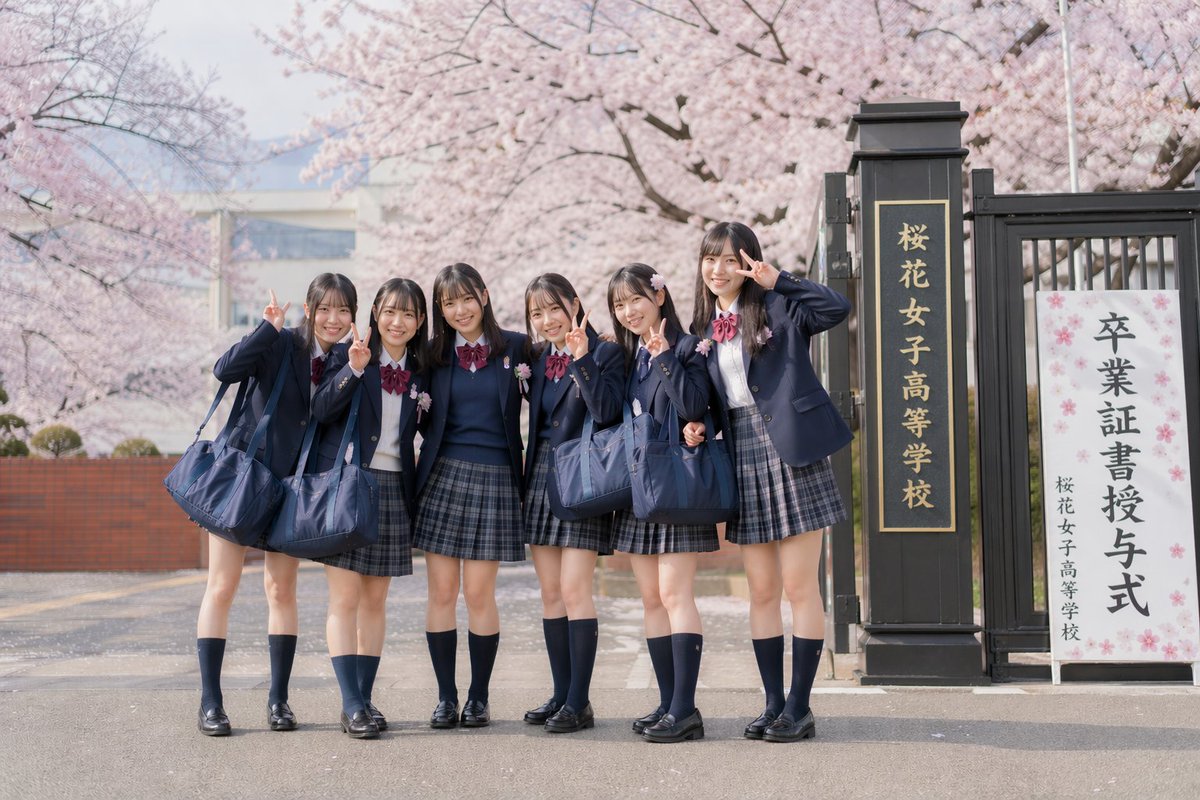
Japanisches Abschlussfoto unter Kirschblüten
Diese Vorgabe erzeugt ein realistisches, nostalgisches Gruppenporträt von 6 japanischen Schülerinnen in Uniform, die mit Friedenszeichen vor einem mit Kirschblüten gesäumten Schuleingang posieren.
Dies ist ein GPT Image 2 -Prompt für Porträt & Charakter . Verwenden Sie den unten stehenden, kopierfertigen Prompt, um ähnliche Grafiken zu erstellen, und überprüfen Sie vor der Wiederverwendung Awesome GPT Image 2 Prompts -Quellenangaben sowie die kommerziellen Nutzungsrechte.
Benötigen Sie den vollständigen Prompt-Satz? Verwenden Sie den Porträt & Charakter Weitere verwandte Beispiele finden Sie im Themen-Hub oder öffnen Sie die GPT Image 2 Prompt-Katalog für das vollständige Beispielverzeichnis, wiederverwendbare Strukturen und Quellenangaben.
Free 1K preview
Generate one preview image instantly, no sign-up required.
1588/4000
Eingabeaufforderung
Kopierfertige Eingabeaufforderung
A soft, realistic Japanese graduation day photo in a retro film photography style, depicting 6 teenage girls standing outdoors with blooming cherry blossoms and the school gate in the background. They are wearing uniform Japanese high school attire: navy blue blazer jackets, white shirts, burgundy ribbons, gray-blue plaid pleated skirts, navy blue knee-high socks, and black loafers, each carrying a large navy blue school bag. The group of students stands closely together on the road in front of the school gate, with relaxed and cheerful body language, presenting a casual class photo feel. At least 5 of the girls are making the peace sign (scissor hand gesture) next to their faces, and the girl furthest to the right is raising her hand in a playful salute. Emphasize natural, slender leg lines, neat dark straight hair with soft bangs, youthful styling, and realistic proportions. The composition is a front-facing full-body shot, with the students slightly to the left and the school gate on the right. The scene includes a tall black gatepost with vertical golden Japanese characters reading “桜花女子高等学校” (Sakura Girls' High School), and next to it stands a white ceremonial sign with the prominent Japanese text “卒業証書授与式” (Graduation Ceremony) and the smaller school name below. The background features blooming pale pink cherry blossom trees, a shallow depth of field, soft pastel tones, a light spring haze, bright daylight on an overcast day, fine film grain, and soft contrast, creating a subdued and nostalgic atmosphere reminiscent of an old-fashioned commemorative photo.
Best for
- - Porträt & Charakter visual exploration
- - Image generation and reference-image edits
- - Reusable briefs that keep source attribution visible
Change these parts
- - Subject, product, character, or scene
- - Aspect ratio, camera, lighting, and background
- - Brand, text, color, and output constraints
Recommended model and settings
- - Model: gpt-image-2
- - Input mode: Text zu Bild
- - Aspect ratio: source
- - Commercial status: review original source
How to use this prompt
- 1. Copy the prompt and preserve its structure for the first test.
- 2. Replace the subject, context, and publishing channel.
- 3. Change one camera, lighting, or style variable per iteration.
- 4. Inspect the output, source, text, and rights before reuse.
Limitations, source, and reuse cautions
- - Generated output is an editable draft, not factual, legal, or rights evidence.
- - Review the linked source, people, brands, logos, text, and third-party media before commercial use.
Importiert von Awesome GPT Image 2 Prompts . Quellenangabe erforderlich. Status der kommerziellen Nutzung: allowed ; Rechte an der Quelle vor kostenpflichtiger Nutzung prüfen.
Weitere Fälle in dieser Kategorie
Priorisiert nach Kategorie, Kompatibilität der Eingabemodi, Qualität und geringerem Risiko.






Hinweise zur Wiederverwendung und Quellenangabe
Verwenden Sie diese Eingabeaufforderung sicher, nachdem Sie den Fall in der Vorschau angezeigt haben.
- 1.Kopieren Sie die Eingabeaufforderung oder öffnen Sie sie direkt in Dovoo mit der Schaltfläche „Generieren“.
- 2.Passen Sie Variablen, Seitenverhältnis und Referenzbilder an Ihren Anwendungsfall an.
- 3.Vor der Veröffentlichung oder kostenpflichtigen Nutzung sollten Sie die Rechte an der Quelle, die Anforderungen an die Namensnennung sowie die Risiken für die Marke oder das Abbild prüfen.