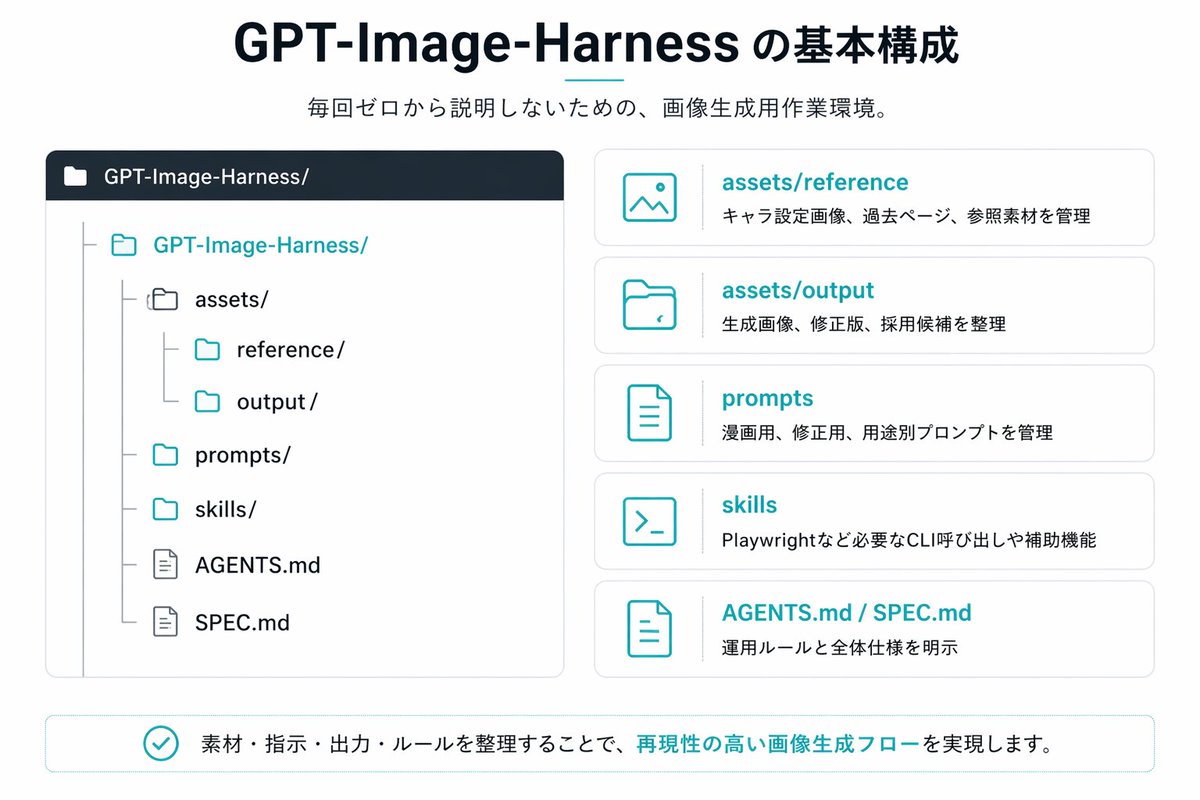
Infografik zum japanischen GPT-Bild-Harness
Eine übersichtliche Infografik im japanischen Präsentationsstil, die eine Repository-Struktur und fünf erläuternde Karten zeigt, ideal zur Dokumentation eines Workflows zur KI-Bildgenerierung oder eines Projektordnersystems.
Dies ist ein GPT Image 2 -Prompt für Grafik & Poster . Verwenden Sie den unten stehenden, kopierfertigen Prompt, um ähnliche Grafiken zu erstellen, und überprüfen Sie vor der Wiederverwendung Awesome GPT Image 2 Prompts -Quellenangaben sowie die kommerziellen Nutzungsrechte.
Free 1K preview
Generate one preview image instantly, no sign-up required.
Eingabeaufforderung
Kopierfertige Eingabeaufforderung
{
  "type": "Japanese infographic slide",
  "style": "clean flat vector presentation graphic, minimal corporate design, white background, dark navy and teal accent colors, subtle light gray borders, crisp typography, balanced spacing",
  "canvas": {
    "aspect_ratio": "16:9"
  },
  "title_block": {
    "headline": "{argument name=\"headline text\" default=\"GPT-Image-Harness の基本構成\"}",
    "subheadline": "{argument name=\"subheadline text\" default=\"毎回ゼロから説明しないための、画像生成用作業環境。\"}",
    "headline_alignment": "center top",
    "headline_style": "bold sans-serif, very large, dark navy",
    "accent": "short horizontal teal line under headline"
  },
  "layout": {
    "sections": [
      {
        "title": "repository tree",
        "position": "left large panel",
        "count": 1,
        "panel_style": "rounded rectangle with light gray outline and dark navy header bar",
        "header_label": "GPT-Image-Harness/",
        "content": {
          "type": "folder tree",
          "root": "GPT-Image-Harness/",
          "items_count": 8,
          "items": [
            "assets/",
            "reference/",
            "output/",
            "prompts/",
            "skills/",
            "AGENTS.md",
            "SPEC.md"
          ],
          "hierarchy": "assets contains reference and output; root also contains prompts, skills, AGENTS.md, and SPEC.md",
          "icon_style": "outline folder and document icons, teal for active folders, gray for nested guides"
        }
      },
      {
        "title": "feature cards",
        "position": "right stacked column",
        "count": 5,
        "panel_style": "five separate rounded white cards with light gray outline, evenly spaced vertically",
        "labels": [
          "assets/reference",
          "assets/output",
          "prompts",
          "skills",
          "AGENTS.md / SPEC.md"
        ],
        "descriptions": [
          "キャラ設定画像、過去ページ、参照素材を管理",
          "生成画像、修正版、採用候補を整理",
          "漫画用、修正版、用途別プロンプトを管理",
          "Playwrightなど必要なCLI呼び出しや補助機能",
          "運用ルールと全体仕様を明示"
        ],
        "icons": [
          "image icon",
          "folder icon",
          "document icon",
          "terminal icon",
          "document icon"
        ],
        "title_color": "teal",
        "body_color": "dark gray"
      },
      {
        "title": "bottom message",
        "position": "bottom full width banner",
        "count": 1,
        "panel_style": "rounded rectangle with light teal outline",
        "content": {
          "icon": "teal circled checkmark",
          "text": "{argument name=\"footer message\" default=\"素材・指示・出力・ルールを整理することで、再現性の高い画像生成フローを実現します。\"}",
          "emphasis": "the phrase 再現性の高い画像生成フロー is teal and bold"
        }
      }
    ],
    "composition": "title and subtitle centered at top, large repository diagram on left, five explanatory cards on right, summary banner across bottom"
  },
  "text_language": "Japanese",
  "visual_details": {
    "left_panel_header_gradient": "dark navy to slightly lighter navy",
    "folder_tree_line_color": "light gray",
    "teal_hex_approx": "#22B8C7",
    "navy_hex_approx": "#0F2236",
    "background": "very light gray-white"
  }
}
Eingabeaufforderungsvariablen
In der Eingabeaufforderung befinden sich bearbeitbare Argumentplatzhalter mit ihren Standardwerten.
Best for
- - Grafik & Poster visual exploration
- - Image generation and reference-image edits
- - Reusable briefs that keep source attribution visible
Change these parts
- - Subject, product, character, or scene
- - Aspect ratio, camera, lighting, and background
- - Brand, text, color, and output constraints
Recommended model and settings
- - Model: gpt-image-2
- - Input mode: Text zu Bild
- - Aspect ratio: source
- - Commercial status: review original source
How to use this prompt
- 1. Copy the prompt and preserve its structure for the first test.
- 2. Replace the subject, context, and publishing channel.
- 3. Change one camera, lighting, or style variable per iteration.
- 4. Inspect the output, source, text, and rights before reuse.
Limitations, source, and reuse cautions
- - Generated output is an editable draft, not factual, legal, or rights evidence.
- - Review the linked source, people, brands, logos, text, and third-party media before commercial use.
Weitere Fälle in dieser Kategorie
Priorisiert nach Kategorie, Kompatibilität der Eingabemodi, Qualität und geringerem Risiko.






Hinweise zur Wiederverwendung und Quellenangabe
Verwenden Sie diese Eingabeaufforderung sicher, nachdem Sie den Fall in der Vorschau angezeigt haben.
- 1.Kopieren Sie die Eingabeaufforderung oder öffnen Sie sie direkt in Dovoo mit der Schaltfläche „Generieren“.
- 2.Passen Sie Variablen, Seitenverhältnis und Referenzbilder an Ihren Anwendungsfall an.
- 3.Vor der Veröffentlichung oder kostenpflichtigen Nutzung sollten Sie die Rechte an der Quelle, die Anforderungen an die Namensnennung sowie die Risiken für die Marke oder das Abbild prüfen.