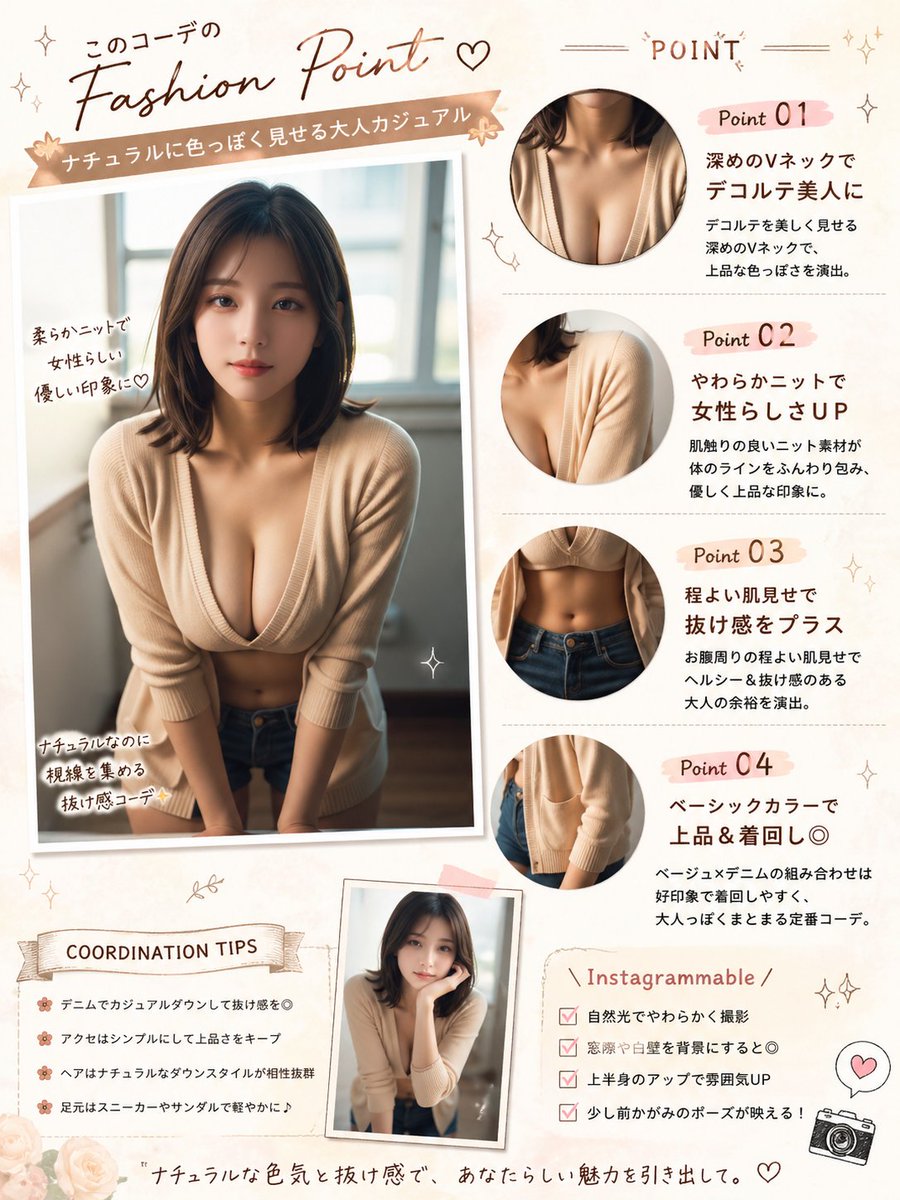
Japanische Fashion Point Poster Edit
Diese Vorgabe verwandelt ein Referenzporträt in ein Modeposter im Stil eines japanischen Magazins, das als Kommentar für Social-Media-Beiträge, Outfit-Analysen und Styling-Präsentationen dient.
Dies ist ein GPT Image 2 -Prompt für Grafik & Poster . Verwenden Sie den unten stehenden, kopierfertigen Prompt, um ähnliche Grafiken zu erstellen, und überprüfen Sie vor der Wiederverwendung Awesome GPT Image 2 Prompts -Quellenangaben sowie die kommerziellen Nutzungsrechte.
Free 1K preview
Generate one preview image instantly, no sign-up required.
Free text preview doesn’t preserve reference-image consistency.
Eingabeaufforderung
Kopierfertige Eingabeaufforderung
Using REFERENCE_0, turn the photo into a soft feminine Japanese fashion-check infographic poster while keeping the same person, outfit, indoor window setting, Show every face clearly with natural, detailed facial features. Create a scrapbook/editorial layout on a warm cream background with blush-pink and beige accents. Place the main full-body photo on the left as a slightly tilted printed snapshot with handwritten callouts. Add 4 circular close-up detail crops on the right showing: 1) neckline/chest area, 2) knit shoulder and sleeve texture, 3) waist and jeans area, 4) cardigan hem and pocket area. Add a small extra inset portrait near the bottom center using the same outfit and person in a casual leaning pose. Include Japanese magazine-style typography and decorative doodles throughout. The visible text should include these sections and labels: top headline 「このコーデの Fashion Point ♡」, ribbon subtitle 「ナチュラルに色っぽく見せる大人カジュアル」, right header 「POINT」, point labels 「Point 01」「Point 02」「Point 03」「Point 04」, left photo notes 「柔らかニットで女性らしい優しい印象に♡」「ナチュラルなのに視線を集める抜け感コーデ✨」, a tips box titled 「COORDINATION TIPS」 with 4 bullet lines, a box titled 「Instagrammable」 with 4 checklist lines, and a bottom tagline 「ナチュラルな色気と抜け感で、あなたらしい魅力を引き出して。」. For the point descriptions, write short Japanese copy praising the deep V-neck, soft knit, subtle midriff reveal, and basic color styling. Add small stars, hearts, sparkles, flowers, stitched lines, and a tiny camera icon. Make it look like a polished social-media fashion advice sheet, portrait orientation.
Best for
- - Grafik & Poster visual exploration
- - Image generation and reference-image edits
- - Reusable briefs that keep source attribution visible
Change these parts
- - Subject, product, character, or scene
- - Aspect ratio, camera, lighting, and background
- - Brand, text, color, and output constraints
Recommended model and settings
- - Model: gpt-image-2
- - Input mode: Bild zu Bild
- - Aspect ratio: source
- - Commercial status: review original source
How to use this prompt
- 1. Copy the prompt and preserve its structure for the first test.
- 2. Replace the subject, context, and publishing channel.
- 3. Change one camera, lighting, or style variable per iteration.
- 4. Inspect the output, source, text, and rights before reuse.
Limitations, source, and reuse cautions
- - Generated output is an editable draft, not factual, legal, or rights evidence.
- - Review the linked source, people, brands, logos, text, and third-party media before commercial use.
Weitere Fälle in dieser Kategorie
Priorisiert nach Kategorie, Kompatibilität der Eingabemodi, Qualität und geringerem Risiko.






Hinweise zur Wiederverwendung und Quellenangabe
Verwenden Sie diese Eingabeaufforderung sicher, nachdem Sie den Fall in der Vorschau angezeigt haben.
- 1.Kopieren Sie die Eingabeaufforderung oder öffnen Sie sie direkt in Dovoo mit der Schaltfläche „Generieren“.
- 2.Passen Sie Variablen, Seitenverhältnis und Referenzbilder an Ihren Anwendungsfall an.
- 3.Vor der Veröffentlichung oder kostenpflichtigen Nutzung sollten Sie die Rechte an der Quelle, die Anforderungen an die Namensnennung sowie die Risiken für die Marke oder das Abbild prüfen.