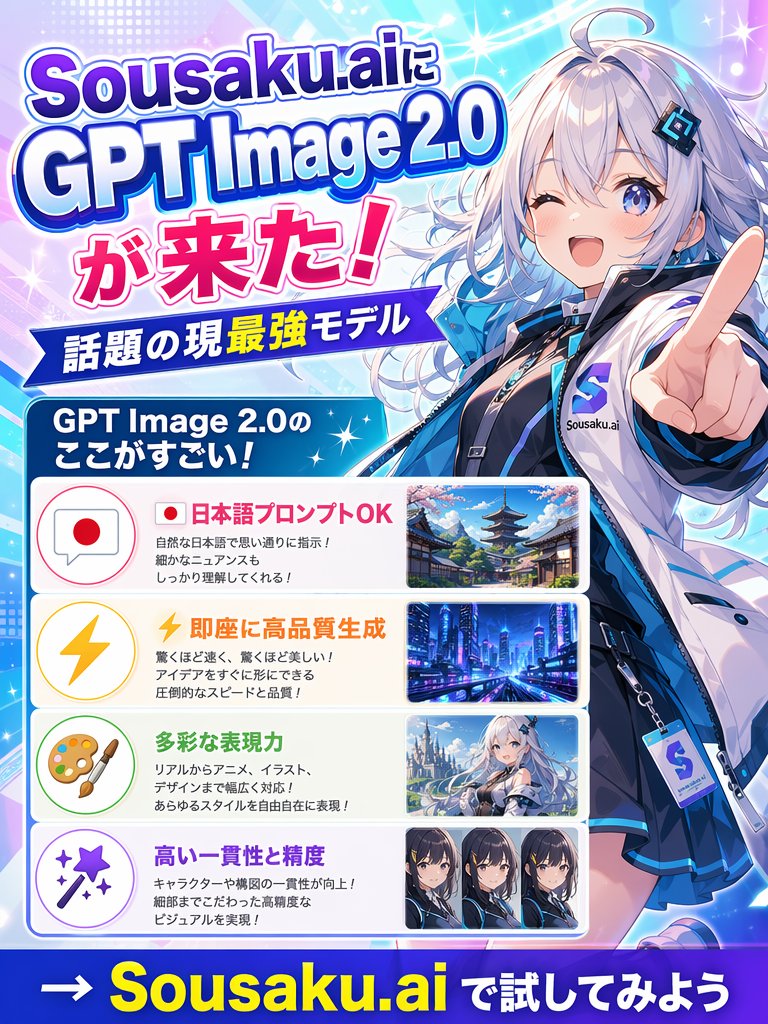
Japanisches Anime-KI-Launchposter
Ein farbenfrohes japanisches Werbeplakat im Anime-Stil für die Markteinführung eines KI-Bildmodells, geeignet für Social-Media-Posts, Anzeigen und Ankündigungsgrafiken.
Dies ist ein GPT Image 2 -Prompt für Grafik & Poster . Verwenden Sie den unten stehenden, kopierfertigen Prompt, um ähnliche Grafiken zu erstellen, und überprüfen Sie vor der Wiederverwendung Awesome GPT Image 2 Prompts -Quellenangaben sowie die kommerziellen Nutzungsrechte.
Free 1K preview
Generate one preview image instantly, no sign-up required.
Eingabeaufforderung
Kopierfertige Eingabeaufforderung
Create a vibrant Japanese promotional poster for {argument name="brand name" default="Sousaku.ai"} announcing {argument name="product name" default="GPT Image 2.0"}. Use a vertical 3:4 layout with a flashy anime-tech advertising style, bright cyan, blue, purple, pink, and white gradients, glowing sparkles, lens flares, halftone dots, and dynamic diagonal light streaks. On the right side, feature a large half-body anime girl mascot in a futuristic streetwear outfit, silver-white long wavy hair with cool blue highlights, pale skin, blue eyes, a confident smile, and one hand thrust toward the viewer with an extended pointing finger in strong foreshortened perspective. She wears a glossy white and blue jacket over a dark inner outfit, a black choker, layered accessories, and a visible badge or tag with an S logo and the text Sousaku.ai. Her face area is covered by a plain square censor block. On the left, place a large stacked headline in bold Japanese display typography with thick outlines and drop shadows reading exactly: "Sousaku.aiに", "GPT Image 2.0", "が来た!". Below it, add a blue ribbon banner with white text reading "話題の現最強モデル". Under that, add a rounded blue header box with white text reading "GPT Image 2.0のここがすごい!". Beneath the header, create 4 rounded rectangular feature panels stacked vertically, each with a pastel icon circle on the left, Japanese text in the center, and a sample image thumbnail on the right. Panel 1: icon is a speech bubble with a Japanese flag, headline text in pink-red "日本語プロンプトOK", smaller black explanatory text in 3 lines, and a thumbnail of a traditional Japanese street with a pagoda and cherry blossoms. Panel 2: icon is a yellow lightning bolt, headline text in orange "即座に高品質生成", smaller black explanatory text in 3 lines, and a thumbnail of a futuristic neon city at night. Panel 3: icon is an artist palette and brush, headline text in green "多彩な表現力", smaller black explanatory text in 3 lines, and a thumbnail of an anime fantasy girl in a snowy or bright scenic setting, with the face lightly obscured. Panel 4: icon is a magic wand with sparkles, headline text in purple "高い一貫性と精度", smaller black explanatory text in 2 lines, and a thumbnail row containing exactly 3 close-up anime character portrait variants side by side, Show every face clearly with natural, detailed facial features. At the very bottom, add a bold call-to-action on a dark blue strip reading exactly "→ {argument name="call to action" default="Sousaku.ai で試してみよう"}" with the brand name in large yellow letters and the remaining text in white. Make the overall composition dense, polished, glossy, and eye-catching like a social media announcement poster for a new AI image model.Eingabeaufforderungsvariablen
In der Eingabeaufforderung befinden sich bearbeitbare Argumentplatzhalter mit ihren Standardwerten.
Best for
- - Grafik & Poster visual exploration
- - Image generation and reference-image edits
- - Reusable briefs that keep source attribution visible
Change these parts
- - Subject, product, character, or scene
- - Aspect ratio, camera, lighting, and background
- - Brand, text, color, and output constraints
Recommended model and settings
- - Model: gpt-image-2
- - Input mode: Text zu Bild
- - Aspect ratio: source
- - Commercial status: review original source
How to use this prompt
- 1. Copy the prompt and preserve its structure for the first test.
- 2. Replace the subject, context, and publishing channel.
- 3. Change one camera, lighting, or style variable per iteration.
- 4. Inspect the output, source, text, and rights before reuse.
Limitations, source, and reuse cautions
- - Generated output is an editable draft, not factual, legal, or rights evidence.
- - Review the linked source, people, brands, logos, text, and third-party media before commercial use.
Weitere Fälle in dieser Kategorie
Priorisiert nach Kategorie, Kompatibilität der Eingabemodi, Qualität und geringerem Risiko.






Hinweise zur Wiederverwendung und Quellenangabe
Verwenden Sie diese Eingabeaufforderung sicher, nachdem Sie den Fall in der Vorschau angezeigt haben.
- 1.Kopieren Sie die Eingabeaufforderung oder öffnen Sie sie direkt in Dovoo mit der Schaltfläche „Generieren“.
- 2.Passen Sie Variablen, Seitenverhältnis und Referenzbilder an Ihren Anwendungsfall an.
- 3.Vor der Veröffentlichung oder kostenpflichtigen Nutzung sollten Sie die Rechte an der Quelle, die Anforderungen an die Namensnennung sowie die Risiken für die Marke oder das Abbild prüfen.