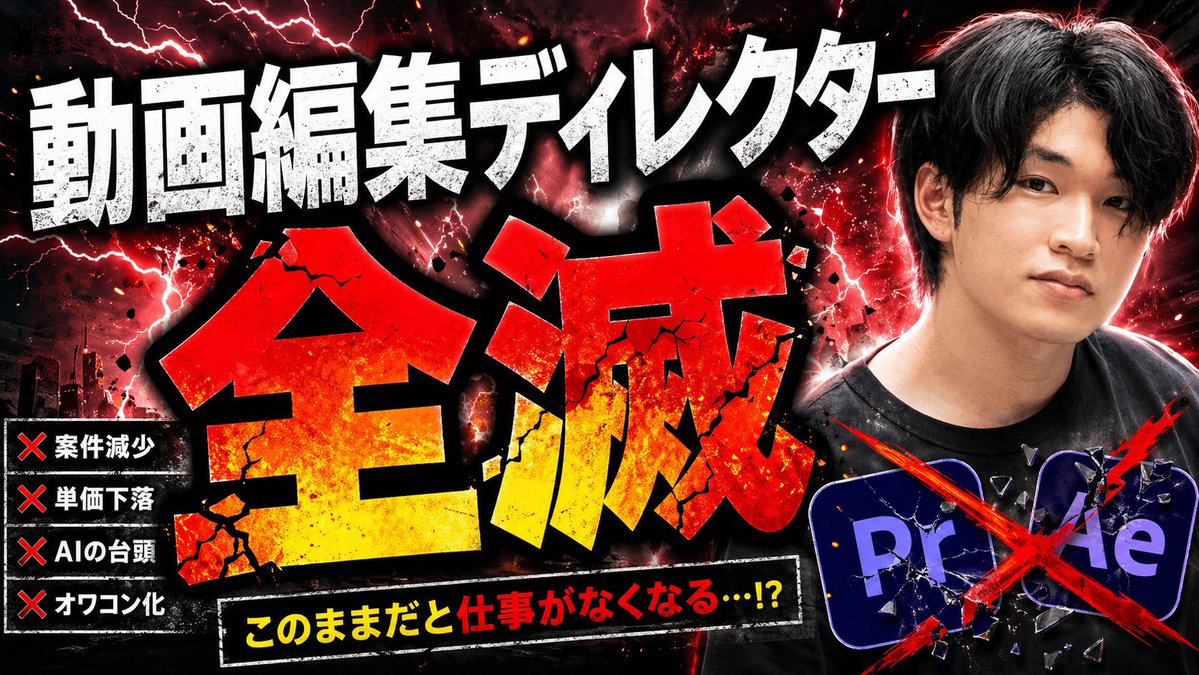
Explosive japanische KI-Bedrohung (Miniaturansicht)
Dadurch entsteht ein wirkungsvolles japanisches YouTube-Thumbnail zum Thema KI, die Videobearbeitungsjobs zerstört – nützlich für kontroverse Inhalte, Kommentare oder Trendanalysen.
Dies ist ein GPT Image 2 -Prompt für Grafik & Poster . Verwenden Sie den unten stehenden, kopierfertigen Prompt, um ähnliche Grafiken zu erstellen, und überprüfen Sie vor der Wiederverwendung Awesome GPT Image 2 Prompts -Quellenangaben sowie die kommerziellen Nutzungsrechte.
Free 1K preview
Generate one preview image instantly, no sign-up required.
Free text preview doesn’t preserve reference-image consistency.
Eingabeaufforderung
Kopierfertige Eingabeaufforderung
Create a dramatic Japanese YouTube thumbnail in a hyper-aggressive clickbait style, 16:9 landscape, with a dark black-and-crimson background filled with red lightning, smoky clouds, glowing sparks, ink splatter, and explosive energy. The composition has 4 main text areas and 2 graphic icon elements. Across the top, place huge distressed white Japanese headline text reading {argument name="top headline text" default="動画編集ディレクター"}, using an extra-bold block font with rough grunge texture, black outline, and heavy shadow. In the center, place the dominant oversized kanji {argument name="main title text" default="Extinction"} in a massive shattered font, red at the top fading to yellow at the bottom, with cracked stone texture, black border, debris fragments, and impact glow, occupying most of the frame. At the lower center, add a black slanted banner with a white border containing bright yellow and red Japanese text reading {argument name="warning text" default="このままだと仕事がなくなる…!?"}, bold and urgent. On the left side, add a vertical black panel listing exactly 4 warning items, each preceded by a red X mark: 「案件減少」, 「単価下落」, 「AIの台頭」, 「オワコン化」. On the right side, show a cropped photo-real Japanese man from chest up, facing slightly left, wearing a black T-shirt, with short dark hair and a strong red rim light around his silhouette; Show every face clearly with natural, detailed facial features. At the lower right, include exactly 2 Adobe-style app icons, 「Pr」 and 「Ae」, dark blue-purple rounded squares, partially overlapping, both cracked like broken glass and crossed out with one large diagonal red paint slash X spanning the icons. Add a subtle dark city skyline silhouette in the lower left background. Overall look: sensational, destructive, high contrast, gritty, overloaded with texture, with intense red/black color grading, thick shadows, dramatic glow, and polished viral-thumbnail composition.Eingabeaufforderungsvariablen
In der Eingabeaufforderung befinden sich bearbeitbare Argumentplatzhalter mit ihren Standardwerten.
Best for
- - Grafik & Poster visual exploration
- - Image generation and reference-image edits
- - Reusable briefs that keep source attribution visible
Change these parts
- - Subject, product, character, or scene
- - Aspect ratio, camera, lighting, and background
- - Brand, text, color, and output constraints
Recommended model and settings
- - Model: gpt-image-2
- - Input mode: Bild zu Bild
- - Aspect ratio: source
- - Commercial status: review original source
How to use this prompt
- 1. Copy the prompt and preserve its structure for the first test.
- 2. Replace the subject, context, and publishing channel.
- 3. Change one camera, lighting, or style variable per iteration.
- 4. Inspect the output, source, text, and rights before reuse.
Limitations, source, and reuse cautions
- - Generated output is an editable draft, not factual, legal, or rights evidence.
- - Review the linked source, people, brands, logos, text, and third-party media before commercial use.
Weitere Fälle in dieser Kategorie
Priorisiert nach Kategorie, Kompatibilität der Eingabemodi, Qualität und geringerem Risiko.






Hinweise zur Wiederverwendung und Quellenangabe
Verwenden Sie diese Eingabeaufforderung sicher, nachdem Sie den Fall in der Vorschau angezeigt haben.
- 1.Kopieren Sie die Eingabeaufforderung oder öffnen Sie sie direkt in Dovoo mit der Schaltfläche „Generieren“.
- 2.Passen Sie Variablen, Seitenverhältnis und Referenzbilder an Ihren Anwendungsfall an.
- 3.Vor der Veröffentlichung oder kostenpflichtigen Nutzung sollten Sie die Rechte an der Quelle, die Anforderungen an die Namensnennung sowie die Risiken für die Marke oder das Abbild prüfen.