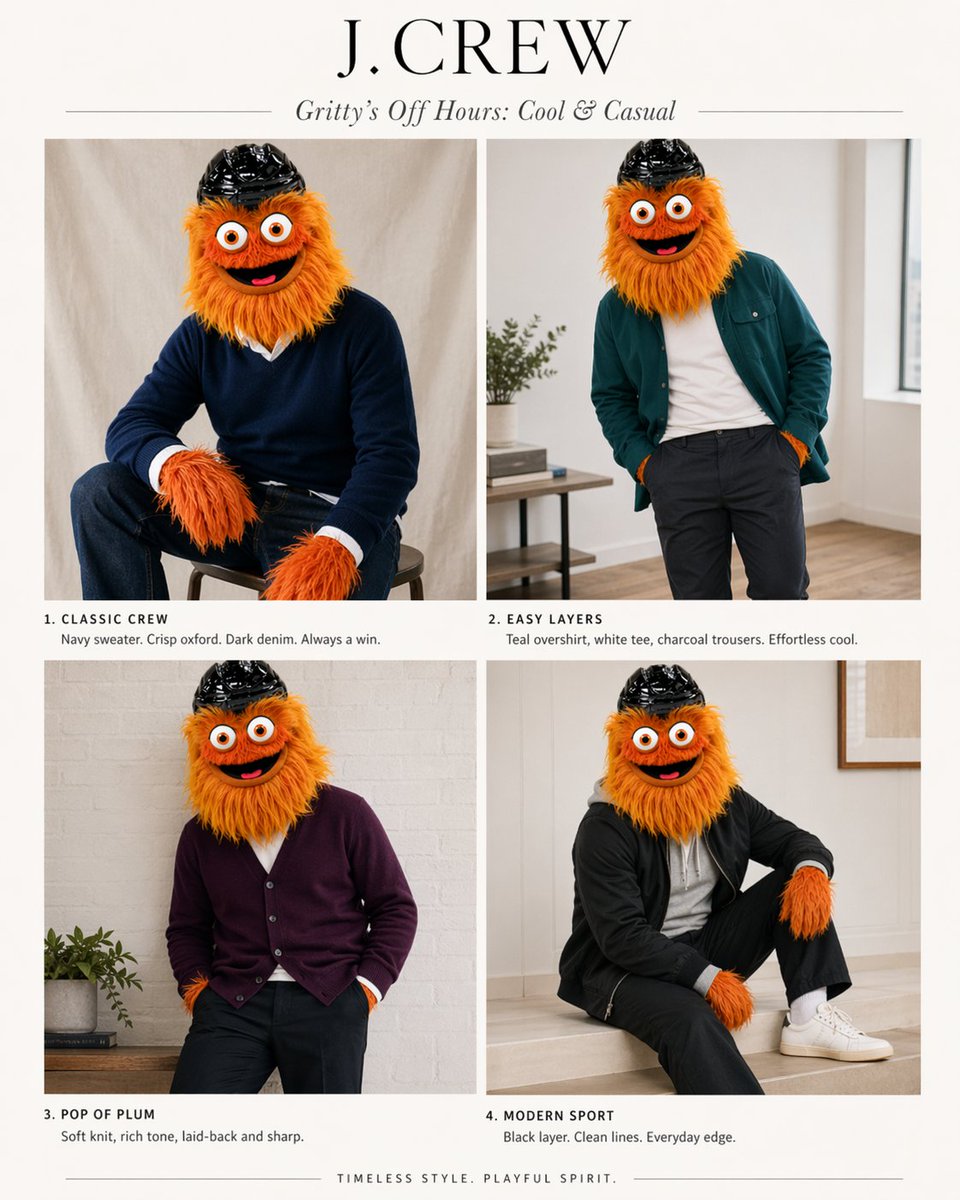
J.Crew Maskottchen-Mode-Editorial
Diese Vorgabe verwandelt eine Infografik mit Maskottchen-Referenzen in eine Modestrecke im J.Crew-Stil mit vier Looks für spielerische Marken-Mockups oder Charakter-Styling-Konzepte.
Dies ist ein GPT Image 2 -Prompt für Mode & Schönheit . Verwenden Sie den unten stehenden, kopierfertigen Prompt, um ähnliche Grafiken zu erstellen, und überprüfen Sie vor der Wiederverwendung Awesome GPT Image 2 Prompts -Quellenangaben sowie die kommerziellen Nutzungsrechte.
Free 1K preview
Generate one preview image instantly, no sign-up required.
Free text preview doesn’t preserve reference-image consistency.
Eingabeaufforderung
Kopierfertige Eingabeaufforderung
Using the provided reference image as the character and color-palette guide, transform it into a polished J.Crew-style editorial fashion lookbook starring the same mascot. Replace the infographic/chart layout with a clean 2x2 magazine spread on an off-white background. Add a large serif brand header reading {argument name="headline text" default="J.CREW"} and an italic subhead reading {argument name="subhead text" default="Gritty’s Off Hours: Cool & Casual"}. Show exactly 4 styled outfit photos of the same character, keeping the fuzzy orange fur, big eyes, and black helmet, but placing the mascot in modern menswear inspired by the “best” colors from the reference: 1) “CLASSIC CREW” — seated on a stool in a navy sweater over a crisp white oxford with dark denim; 2) “EASY LAYERS” — standing casually in a teal overshirt, white tee, and charcoal trousers; 3) “POP OF PLUM” — relaxed pose in a plum cardigan with dark pants; 4) “MODERN SPORT” — seated in a black sporty layer with black pants, white socks, and white sneakers. Give each panel a short catalog-style caption under it matching those 4 titles and concise fashion copy. Use soft natural indoor lighting, minimal home-interior editorial settings, premium catalog photography, and a tasteful upscale preppy aesthetic. Add a small closing line centered at the bottom: {argument name="footer text" default="TIMELESS STYLE. PLAYFUL SPIRIT."}Eingabeaufforderungsvariablen
In der Eingabeaufforderung befinden sich bearbeitbare Argumentplatzhalter mit ihren Standardwerten.
Best for
- - Mode & Schönheit visual exploration
- - Image generation and reference-image edits
- - Reusable briefs that keep source attribution visible
Change these parts
- - Subject, product, character, or scene
- - Aspect ratio, camera, lighting, and background
- - Brand, text, color, and output constraints
Recommended model and settings
- - Model: gpt-image-2
- - Input mode: Bild zu Bild
- - Aspect ratio: source
- - Commercial status: review original source
How to use this prompt
- 1. Copy the prompt and preserve its structure for the first test.
- 2. Replace the subject, context, and publishing channel.
- 3. Change one camera, lighting, or style variable per iteration.
- 4. Inspect the output, source, text, and rights before reuse.
Limitations, source, and reuse cautions
- - Generated output is an editable draft, not factual, legal, or rights evidence.
- - Review the linked source, people, brands, logos, text, and third-party media before commercial use.
Weitere Fälle in dieser Kategorie
Priorisiert nach Kategorie, Kompatibilität der Eingabemodi, Qualität und geringerem Risiko.






Hinweise zur Wiederverwendung und Quellenangabe
Verwenden Sie diese Eingabeaufforderung sicher, nachdem Sie den Fall in der Vorschau angezeigt haben.
- 1.Kopieren Sie die Eingabeaufforderung oder öffnen Sie sie direkt in Dovoo mit der Schaltfläche „Generieren“.
- 2.Passen Sie Variablen, Seitenverhältnis und Referenzbilder an Ihren Anwendungsfall an.
- 3.Vor der Veröffentlichung oder kostenpflichtigen Nutzung sollten Sie die Rechte an der Quelle, die Anforderungen an die Namensnennung sowie die Risiken für die Marke oder das Abbild prüfen.