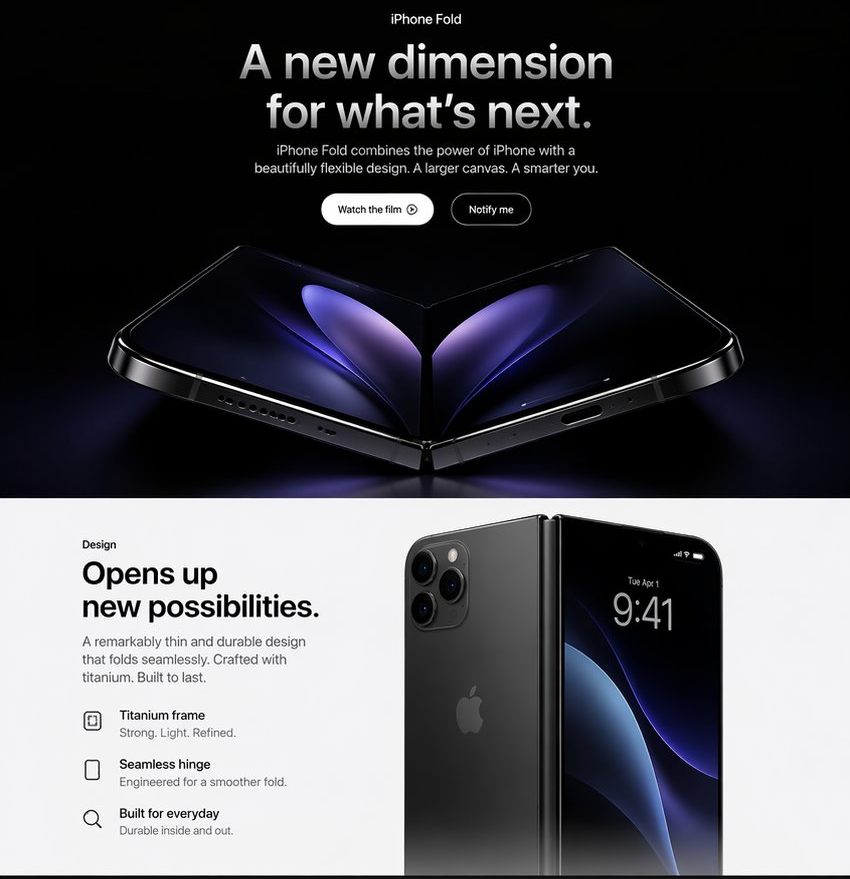
Apple-Style iPhone Fold Landing Page
Creates a premium Apple-inspired web landing page mockup for a fictional foldable iPhone product reveal.
Dies ist ein GPT Image 2 -Prompt für Produkt & Vertrieb . Verwenden Sie den unten stehenden, kopierfertigen Prompt, um ähnliche Grafiken zu erstellen, und überprüfen Sie vor der Wiederverwendung Awesome GPT Image 2 Prompts -Quellenangaben sowie die kommerziellen Nutzungsrechte.
Benötigen Sie den vollständigen Prompt-Satz? Verwenden Sie den Produkt & Vertrieb Weitere verwandte Beispiele finden Sie im Themen-Hub oder öffnen Sie die GPT Image 2 Prompt-Katalog für das vollständige Beispielverzeichnis, wiederverwendbare Strukturen und Quellenangaben.
Free 1K preview
Generate one preview image instantly, no sign-up required.
3321/4000
Eingabeaufforderung
Kopierfertige Eingabeaufforderung
Goal: Create a polished Apple-style product landing page hero for a fictional {argument name="product name" default="iPhone Fold"}, presenting a premium foldable smartphone with dramatic black-and-white contrast and photorealistic device renders.

Canvas: Square 1:1 web mockup, approximately 850 × 850 px. Split into exactly 2 horizontal sections: a dark cinematic hero section on the top taking about 58% of the canvas, and a bright white design section on the bottom taking about 42%.

Top section: Use a pure black background with subtle blue-purple glow near the bottom. Center all typography. At the very top, small label text reads “iPhone Fold”. Below it, a large bold Apple-like headline reads “{argument name="headline text" default="A new dimension for what’s next."}” in white-to-silver gradient lettering. Under the headline, add a short centered paragraph: “{argument name="subheadline text" default="iPhone Fold combines the power of iPhone with a beautifully flexible design. A larger canvas. A smarter you."}” Place exactly 2 pill buttons below the paragraph: first button is white with black text “Watch the film” plus a small play-circle icon; second button is black/dark with a thin white outline and white text “Notify me”.

Top product render: Beneath the buttons, show one large photorealistic foldable iPhone opened like a shallow V on a glossy black surface. The device has black titanium edges, visible speaker holes and charging port along the lower edges, a central hinge at the fold, rounded corners, and a dark inner display with abstract purple-blue petal-like light shapes mirrored across the fold. Use cinematic rim lighting, high contrast, and a faint reflection below the phone.

Bottom section: Clean white Apple product-page layout. On the left, create a text block with the small label “Design”, then a large bold headline: “{argument name="design headline" default="Opens up new possibilities."}” Add the paragraph: “A remarkably thin and durable design that folds seamlessly. Crafted with titanium. Built to last.” Below it, include exactly 3 feature rows with minimalist black outline icons and two lines of text each: 1) “Titanium frame” with subtext “Strong. Light. Refined.” 2) “Seamless hinge” with subtext “Engineered for a smoother fold.” 3) “Built for everyday” with subtext “Durable inside and out.”

Bottom product render: On the right side, show a second photorealistic product composition: a closed or partially folded black iPhone Fold standing upright, with the rear panel and triple camera cluster visible on the left half and the front display visible on the right half. The front display shows the time “9:41”, small date text “Tue Apr 1”, tiny status icons, and a dark blue-purple abstract wallpaper. Use a vertical hinge between the halves, soft shadows, and realistic glass reflections.

Visual style: Minimal luxury Apple keynote aesthetic, San Francisco-like typography, precise alignment, generous whitespace, glossy black titanium materials, subtle gradients, realistic lighting, no clutter.

Constraints: Include exactly 2 sections, exactly 2 call-to-action buttons, exactly 3 feature rows, and exactly 2 main product render compositions. Do not add navigation menus, extra logos beyond a faint Apple logo on the device back, watermarks, or unrelated text.
Eingabeaufforderungsvariablen
In der Eingabeaufforderung befinden sich bearbeitbare Argumentplatzhalter mit ihren Standardwerten.
Variable
product name
Standard
iPhone Fold
Variable
headline text
Standard
A new dimension for what’s next.
Variable
subheadline text
Standard
iPhone Fold combines the power of iPhone with a beautifully flexible design. A larger canvas. A smarter you.
Variable
design headline
Standard
Opens up new possibilities.
Best for
- - Produkt & Vertrieb visual exploration
- - Image generation and reference-image edits
- - Reusable briefs that keep source attribution visible
Change these parts
- - Subject, product, character, or scene
- - Aspect ratio, camera, lighting, and background
- - Brand, text, color, and output constraints
Recommended model and settings
- - Model: gpt-image-2
- - Input mode: Text zu Bild
- - Aspect ratio: source
- - Commercial status: review original source
How to use this prompt
- 1. Copy the prompt and preserve its structure for the first test.
- 2. Replace the subject, context, and publishing channel.
- 3. Change one camera, lighting, or style variable per iteration.
- 4. Inspect the output, source, text, and rights before reuse.
Limitations, source, and reuse cautions
- - Generated output is an editable draft, not factual, legal, or rights evidence.
- - Review the linked source, people, brands, logos, text, and third-party media before commercial use.
Importiert von Awesome GPT Image 2 Prompts . Quellenangabe erforderlich. Status der kommerziellen Nutzung: allowed ; Rechte an der Quelle vor kostenpflichtiger Nutzung prüfen.
Weitere Fälle in dieser Kategorie
Priorisiert nach Kategorie, Kompatibilität der Eingabemodi, Qualität und geringerem Risiko.






Hinweise zur Wiederverwendung und Quellenangabe
Verwenden Sie diese Eingabeaufforderung sicher, nachdem Sie den Fall in der Vorschau angezeigt haben.
- 1.Kopieren Sie die Eingabeaufforderung oder öffnen Sie sie direkt in Dovoo mit der Schaltfläche „Generieren“.
- 2.Passen Sie Variablen, Seitenverhältnis und Referenzbilder an Ihren Anwendungsfall an.
- 3.Vor der Veröffentlichung oder kostenpflichtigen Nutzung sollten Sie die Rechte an der Quelle, die Anforderungen an die Namensnennung sowie die Risiken für die Marke oder das Abbild prüfen.