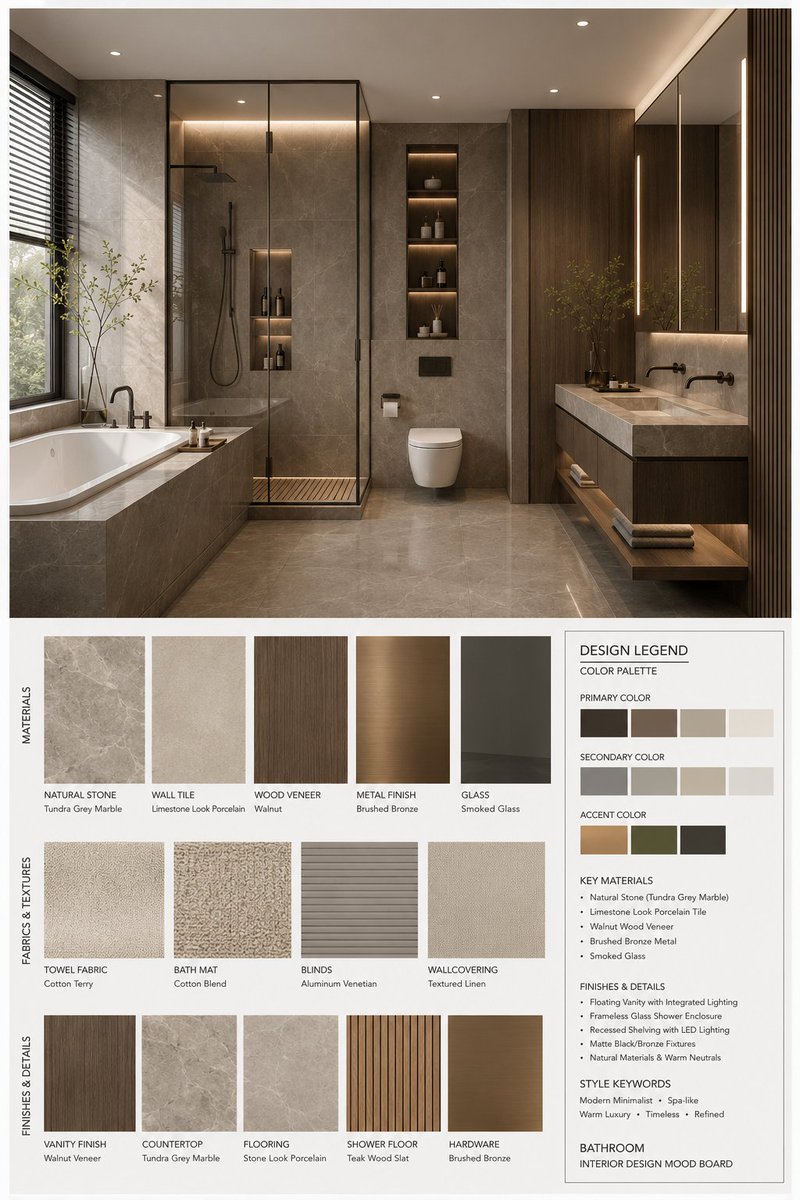
Moodboard-Generator für Inneneinrichtung
Ein umfassendes Tool zur Erstellung professioneller Moodboards für die Innenarchitektur. Es generiert ein strukturiertes Layout mit einer hochauflösenden 3D-Darstellung des Raumes, kombiniert mit passenden Materialmustern, Stofftexturen und einer detaillierten Designlegende inklusive Farbpaletten und Materialspezifikationen.
Dies ist ein GPT Image 2 -Prompt für Innenarchitektur . Verwenden Sie den unten stehenden, kopierfertigen Prompt, um ähnliche Grafiken zu erstellen, und überprüfen Sie vor der Wiederverwendung Awesome GPT Image 2 Prompts -Quellenangaben sowie die kommerziellen Nutzungsrechte.
Free 1K preview
Generate one preview image instantly, no sign-up required.
Free text preview doesn’t preserve reference-image consistency.
Eingabeaufforderung
Kopierfertige Eingabeaufforderung
You are a professional interior design Mood Board creator. Based on the provided {argument name="space type" default="bedroom"} design photo, generate a high-end vertical 3:4 mood board. The overall visual should reference professional design proposals, showing {argument name="style name" default="Modern Mid-century"} aesthetic features, possessing a [Mood Keywords] atmosphere, and conforming to [Branding Tone] design expression.
Space Type: {argument name="space type" default="bedroom"}
Layout Requirements:
Upper section: A high-resolution, photorealistic {argument name="space type" default="bedroom"} interior rendering. It must be consistent with the user's photo in structure, furniture, materials, colors, and lighting, but refined for a professional proposal. Focus on: [Key Furniture Elements], [Material Keywords], [Color Palette], [Lighting Style].
Lower section: Display material and furnishing samples strictly corresponding to the upper design, including: Material samples, fabric samples, color swatches, finish samples, and related wood/stone/metal/glass/leather samples. All must reflect the core material and color logic of the plan.
Bottom right: A Design Legend / Color Palette info box showing: Primary color, secondary color, accent color, core materials, finish descriptions, and style keywords.
Style and Output:
Professional firm-level layout; minimalist, clean, restrained, and orderly; clear visual hierarchy and white space control; material/color labels clear and modern; overall vibe matching {argument name="style name" default="Modern Mid-century"}; Render Quality: 4K Ultra HD, hyper-detailed, photorealistic rendering. Vertical 3:4 composition.
Label Requirements:
Each sample must have a clear label organized by [Label Language] material/color/finish names in a concise, professional, and well-aligned style.
Eingabeaufforderungsvariablen
In der Eingabeaufforderung befinden sich bearbeitbare Argumentplatzhalter mit ihren Standardwerten.
Best for
- - Innenarchitektur visual exploration
- - Image generation and reference-image edits
- - Reusable briefs that keep source attribution visible
Change these parts
- - Subject, product, character, or scene
- - Aspect ratio, camera, lighting, and background
- - Brand, text, color, and output constraints
Recommended model and settings
- - Model: gpt-image-2
- - Input mode: Bild zu Bild
- - Aspect ratio: source
- - Commercial status: review original source
How to use this prompt
- 1. Copy the prompt and preserve its structure for the first test.
- 2. Replace the subject, context, and publishing channel.
- 3. Change one camera, lighting, or style variable per iteration.
- 4. Inspect the output, source, text, and rights before reuse.
Limitations, source, and reuse cautions
- - Generated output is an editable draft, not factual, legal, or rights evidence.
- - Review the linked source, people, brands, logos, text, and third-party media before commercial use.
Weitere Fälle in dieser Kategorie
Priorisiert nach Kategorie, Kompatibilität der Eingabemodi, Qualität und geringerem Risiko.






Hinweise zur Wiederverwendung und Quellenangabe
Verwenden Sie diese Eingabeaufforderung sicher, nachdem Sie den Fall in der Vorschau angezeigt haben.
- 1.Kopieren Sie die Eingabeaufforderung oder öffnen Sie sie direkt in Dovoo mit der Schaltfläche „Generieren“.
- 2.Passen Sie Variablen, Seitenverhältnis und Referenzbilder an Ihren Anwendungsfall an.
- 3.Vor der Veröffentlichung oder kostenpflichtigen Nutzung sollten Sie die Rechte an der Quelle, die Anforderungen an die Namensnennung sowie die Risiken für die Marke oder das Abbild prüfen.