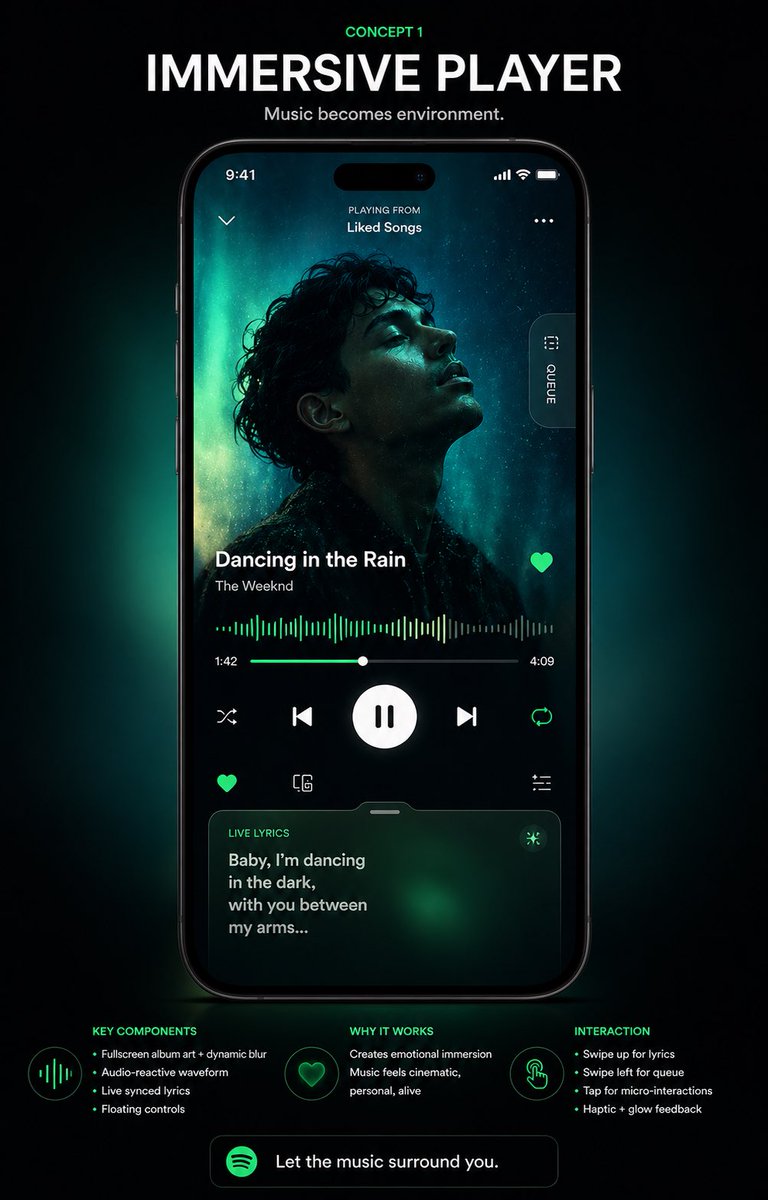
Poster zur Benutzeroberfläche eines immersiven Musikplayers
Ein hochwertiges Konzeptposter, das eine futuristische, immersive Musikplayer-Oberfläche auf einem Smartphone zeigt und sich ideal für App-Redesign-Präsentationen, Portfolio-Aufnahmen und Social-Media-Design-Enthüllungen eignet.
Dies ist ein GPT Image 2 -Prompt für Grafik & Poster . Verwenden Sie den unten stehenden, kopierfertigen Prompt, um ähnliche Grafiken zu erstellen, und überprüfen Sie vor der Wiederverwendung Awesome GPT Image 2 Prompts -Quellenangaben sowie die kommerziellen Nutzungsrechte.
Free 1K preview
Generate one preview image instantly, no sign-up required.
Eingabeaufforderung
Kopierfertige Eingabeaufforderung
{
  "type": "music app UI concept poster",
  "style": "premium futuristic mobile app showcase, dark mode, cinematic product presentation, Spotify-inspired green neon glow, high contrast, sleek glassmorphism, polished tech advertising aesthetic",
  "format": "vertical poster with centered smartphone mockup on a black background",
  "headline": {
    "kicker": "CONCEPT 1",
    "title": "IMMERSIVE PLAYER",
    "subtitle": "Music becomes environment."
  },
  "device": {
    "type": "modern black smartphone",
    "position": "center",
    "screen": {
      "app": "immersive music player",
      "status_bar": {
        "time": "9:41",
        "icons_count": 3
      },
      "top_area": {
        "left_icon_count": 1,
        "center_text_lines": 2,
        "texts": [
          "PLAYING FROM",
          "Liked Songs"
        ],
        "right_icon_count": 1
      },
      "artwork": {
        "shape": "large full-screen background portrait with a centered square album cover overlay",
        "subject": "moody silhouette portrait of a curly-haired singer against teal aurora-like lighting",
        "dominant_colors": [
          "deep black",
          "cyan",
          "emerald green",
          "cyan glow"
        ]
      },
      "side_tab": {
        "count": 1,
        "label": "QUEUE",
        "orientation": "vertical pill button on right edge"
      },
      "track_info": {
        "song_title": "{argument name=\"song title\" default=\"Dancing in the Rain\"}",
        "artist_name": "{argument name=\"artist name\" default=\"The Weeknd\"}",
        "favorite_icon": true
      },
      "playback": {
        "waveform": "audio-reactive neon green waveform spanning the width",
        "time_labels": [
          "1:42",
          "4:09"
        ],
        "progress_slider": true,
        "main_controls": {
          "count": 5,
          "items": [
            "shuffle",
            "previous",
            "large play/pause button",
            "next",
            "repeat"
          ]
        },
        "secondary_controls": {
          "count": 4,
          "items": [
            "favorite",
            "device or connect icon",
            "settings or sliders icon",
            "small utility icon row integrated above lyrics card"
          ]
        }
      },
      "lyrics_card": {
        "title": "LIVE LYRICS",
        "text": "{argument name=\"lyric text\" default=\"Baby, I’m dancing in the dark, with you between my arms...\"}",
        "style": "rounded translucent card with green atmospheric glow",
        "bottom_position": true
      }
    }
  },
  "layout": {
    "sections": [
      {
        "title": "KEY COMPONENTS",
        "position": "bottom left",
        "count": 4,
        "labels": [
          "Fullscreen album art + dynamic blur",
          "Audio-reactive waveform",
          "Live synced lyrics",
          "Floating controls"
        ]
      },
      {
        "title": "WHY IT WORKS",
        "position": "bottom center",
        "count": 2,
        "labels": [
          "Creates emotional immersion",
          "Music feels cinematic, personal, alive"
        ]
      },
      {
        "title": "INTERACTION",
        "position": "bottom right",
        "count": 4,
        "labels": [
          "Swipe up for lyrics",
          "Swipe left for queue",
          "Tap for micro-interactions",
          "Haptic + glow feedback"
        ]
      }
    ],
    "footer_cta": {
      "count": 1,
      "text": "{argument name=\"cta text\" default=\"Let the music surround you.\"}",
      "icon": "green circular music app logo"
    }
  },
  "lighting": "soft emerald backglow radiating behind the phone, subtle vignette, luminous edges, premium showroom feel",
  "color_palette": [
    "black",
    "charcoal",
    "white",
    "Spotify green",
    "emerald green",
    "cyan"
  ],
  "quality": "high-end UI case study render, sharp typography, realistic device reflections, clean spacing, presentation-ready Behance/Dribbble poster"
}
Eingabeaufforderungsvariablen
In der Eingabeaufforderung befinden sich bearbeitbare Argumentplatzhalter mit ihren Standardwerten.
Best for
- - Grafik & Poster visual exploration
- - Image generation and reference-image edits
- - Reusable briefs that keep source attribution visible
Change these parts
- - Subject, product, character, or scene
- - Aspect ratio, camera, lighting, and background
- - Brand, text, color, and output constraints
Recommended model and settings
- - Model: gpt-image-2
- - Input mode: Text zu Bild
- - Aspect ratio: source
- - Commercial status: review original source
How to use this prompt
- 1. Copy the prompt and preserve its structure for the first test.
- 2. Replace the subject, context, and publishing channel.
- 3. Change one camera, lighting, or style variable per iteration.
- 4. Inspect the output, source, text, and rights before reuse.
Limitations, source, and reuse cautions
- - Generated output is an editable draft, not factual, legal, or rights evidence.
- - Review the linked source, people, brands, logos, text, and third-party media before commercial use.
Weitere Fälle in dieser Kategorie
Priorisiert nach Kategorie, Kompatibilität der Eingabemodi, Qualität und geringerem Risiko.






Hinweise zur Wiederverwendung und Quellenangabe
Verwenden Sie diese Eingabeaufforderung sicher, nachdem Sie den Fall in der Vorschau angezeigt haben.
- 1.Kopieren Sie die Eingabeaufforderung oder öffnen Sie sie direkt in Dovoo mit der Schaltfläche „Generieren“.
- 2.Passen Sie Variablen, Seitenverhältnis und Referenzbilder an Ihren Anwendungsfall an.
- 3.Vor der Veröffentlichung oder kostenpflichtigen Nutzung sollten Sie die Rechte an der Quelle, die Anforderungen an die Namensnennung sowie die Risiken für die Marke oder das Abbild prüfen.