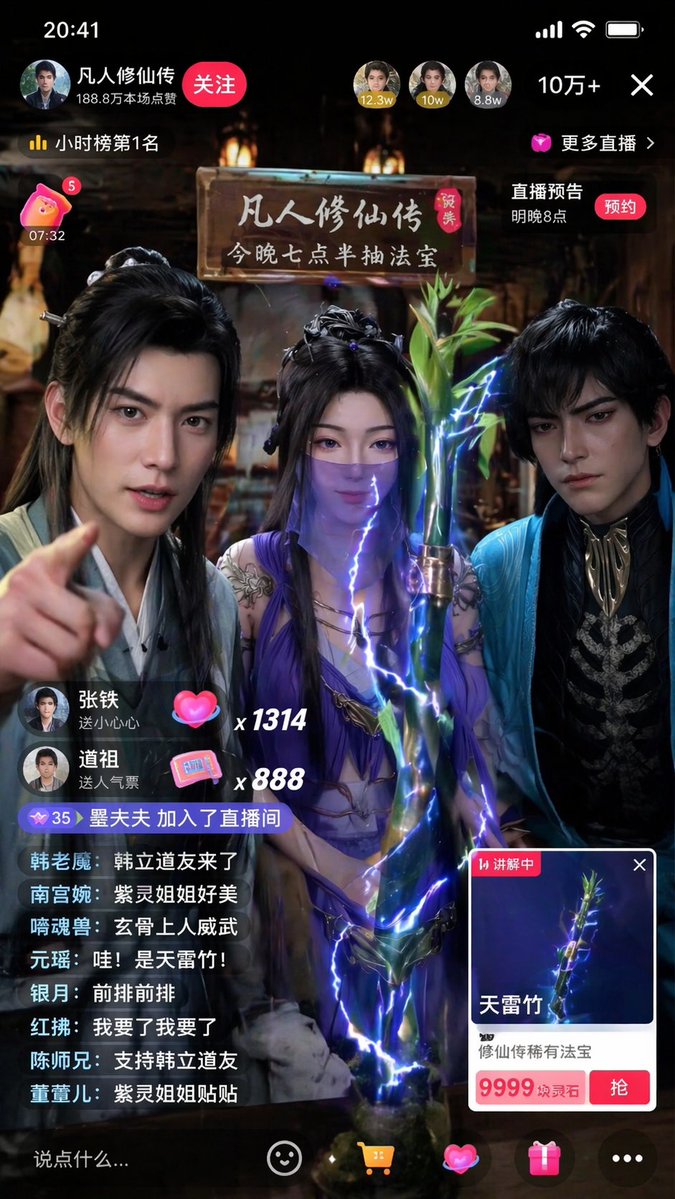
Immersive Kultivierung Roman Livestream Prompt
Eine sehr detaillierte Anweisung zum Erstellen eines vertikalen Smartphone-Screenshots eines Livestreams, in dem Charaktere aus „A Will Eternal“ magische Gegenstände verkaufen.
Dies ist ein GPT Image 2 -Prompt für Porträt & Charakter . Verwenden Sie den unten stehenden, kopierfertigen Prompt, um ähnliche Grafiken zu erstellen, und überprüfen Sie vor der Wiederverwendung Awesome GPT Image 2 Prompts -Quellenangaben sowie die kommerziellen Nutzungsrechte.
Free 1K preview
Generate one preview image instantly, no sign-up required.
Eingabeaufforderung
Kopierfertige Eingabeaufforderung
Generate a 9:16 vertical smartphone screenshot of a realistic Douyin livestream. The theme is {argument name="livestream theme" default="three characters from 'A Record of a Mortal's Journey to Immortality' selling magical treasures"}. Three people are in the frame, with their temperaments from left to right referencing Han Li, Zi Ling, and Xuan Gu. Do not show character names or use anime style; they should look like immortal cultivation streamers with a strong sense of reality. Clothing, makeup, and temperament should retain the Eastern immortal style while fitting realistic camera effects. The current item on display is {argument name="displayed item" default="'Thunderbolt Bamboo'"}, placed prominently in the foreground center. The item card should clearly display 'Thunderbolt Bamboo' and {argument name="item price" default="'9999 Spirit Stones'"}. The bamboo should have a rare treasure texture with clear details and a subtle, realistic lightning aura. The atmosphere should be lively with realistic UI, bullet comments, likes, and viewer counts. Bullet comments should feature relevant character nicknames like real fan interaction. The overall effect must look like a popular Chinese livestream screenshot—real, bustling, and having a mobile feel. No anime illustrations, movie posters, or game art. No English UI or exaggerated magic effects.Eingabeaufforderungsvariablen
In der Eingabeaufforderung befinden sich bearbeitbare Argumentplatzhalter mit ihren Standardwerten.
Best for
- - Porträt & Charakter visual exploration
- - Image generation and reference-image edits
- - Reusable briefs that keep source attribution visible
Change these parts
- - Subject, product, character, or scene
- - Aspect ratio, camera, lighting, and background
- - Brand, text, color, and output constraints
Recommended model and settings
- - Model: gpt-image-2
- - Input mode: Text zu Bild
- - Aspect ratio: source
- - Commercial status: review original source
How to use this prompt
- 1. Copy the prompt and preserve its structure for the first test.
- 2. Replace the subject, context, and publishing channel.
- 3. Change one camera, lighting, or style variable per iteration.
- 4. Inspect the output, source, text, and rights before reuse.
Limitations, source, and reuse cautions
- - Generated output is an editable draft, not factual, legal, or rights evidence.
- - Review the linked source, people, brands, logos, text, and third-party media before commercial use.
Weitere Fälle in dieser Kategorie
Priorisiert nach Kategorie, Kompatibilität der Eingabemodi, Qualität und geringerem Risiko.






Hinweise zur Wiederverwendung und Quellenangabe
Verwenden Sie diese Eingabeaufforderung sicher, nachdem Sie den Fall in der Vorschau angezeigt haben.
- 1.Kopieren Sie die Eingabeaufforderung oder öffnen Sie sie direkt in Dovoo mit der Schaltfläche „Generieren“.
- 2.Passen Sie Variablen, Seitenverhältnis und Referenzbilder an Ihren Anwendungsfall an.
- 3.Vor der Veröffentlichung oder kostenpflichtigen Nutzung sollten Sie die Rechte an der Quelle, die Anforderungen an die Namensnennung sowie die Risiken für die Marke oder das Abbild prüfen.