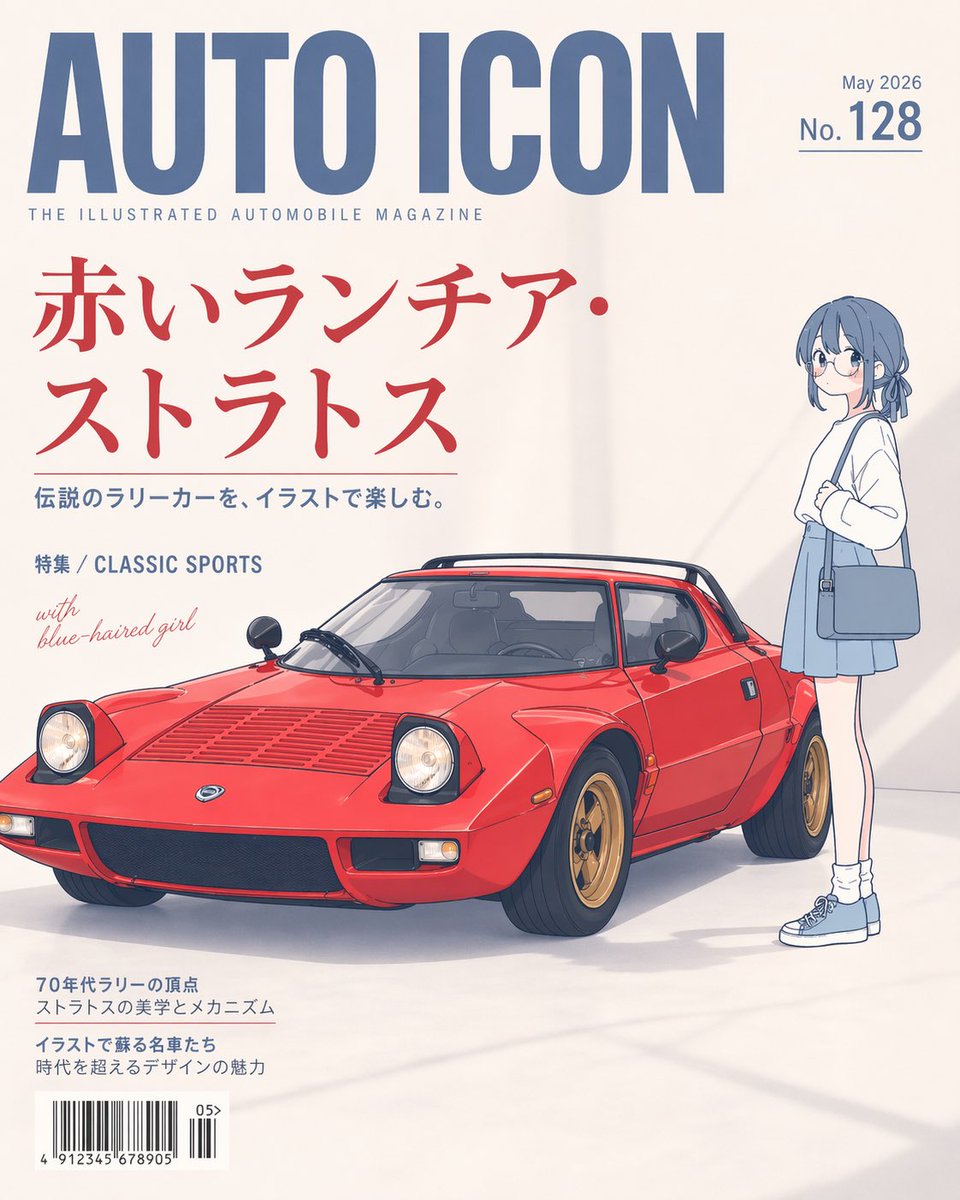
Illustriertes Titelbild des Oldtimer-Magazins
Diese Eingabeaufforderung generiert ein stilvolles, japanisch inspiriertes Magazincover mit einem roten klassischen Sportwagen und einem Anime-Mädchen, ideal für redaktionelle Poster oder fiktive Publikationscover.
Dies ist ein GPT Image 2 -Prompt für Grafik & Poster . Verwenden Sie den unten stehenden, kopierfertigen Prompt, um ähnliche Grafiken zu erstellen, und überprüfen Sie vor der Wiederverwendung Awesome GPT Image 2 Prompts -Quellenangaben sowie die kommerziellen Nutzungsrechte.
Free 1K preview
Generate one preview image instantly, no sign-up required.
Eingabeaufforderung
Kopierfertige Eingabeaufforderung
A clean editorial magazine cover on an off-white studio background, designed like a premium illustrated automobile magazine. The main headline at the top is huge condensed blue sans-serif text reading {argument name="magazine title" default="AUTO ICON"}, with a small subtitle beneath it reading "THE ILLUSTRATED AUTOMOBILE MAGAZINE". In the top right, place small blue issue text reading {argument name="issue date" default="May 2026"} above a larger blue number line reading "No.128" with a thin underline. The central feature is a beautifully illustrated classic {argument name="car model" default="red Lancia Stratos"}, shown in a front three-quarter view facing left, low and wedge-shaped, bright glossy red paint, black roof spoiler, pop-up headlights raised, detailed vents on the hood, black grille, gold wheels, realistic tires, and subtle reflections and shadows on the floor. To the right of the car stands a slim anime-style {argument name="companion character" default="blue-haired girl"}, full body, facing left toward the car, short muted blue bob haircut with a small tied section in back, minimalist facial detail, white long-sleeve top, pale blue skirt, white socks, blue sneakers, and a blue shoulder bag, posed casually with one arm bent near her chest. Use a refined blend of soft cel-shaded anime illustration and realistic automotive rendering, with lots of negative space and elegant print-layout balance. Add large red Japanese cover text on the left in two lines reading {argument name="main cover line" default="赤いランチア・ストラトス"}, with a smaller blue Japanese subheading beneath it reading "伝説のラリーカーを、イラストで楽しむ。" Add another small blue line reading "特集 / CLASSIC SPORTS" and a handwritten-style light red note saying "with blue-haired girl". At the bottom left, include two blocks of small Japanese cover copy and a realistic barcode with tiny issue digits. Keep the overall aesthetic minimal, sophisticated, airy, and poster-like, with soft daylight shadows and a high-end Japanese magazine cover composition.Eingabeaufforderungsvariablen
In der Eingabeaufforderung befinden sich bearbeitbare Argumentplatzhalter mit ihren Standardwerten.
Best for
- - Grafik & Poster visual exploration
- - Image generation and reference-image edits
- - Reusable briefs that keep source attribution visible
Change these parts
- - Subject, product, character, or scene
- - Aspect ratio, camera, lighting, and background
- - Brand, text, color, and output constraints
Recommended model and settings
- - Model: gpt-image-2
- - Input mode: Text zu Bild
- - Aspect ratio: source
- - Commercial status: review original source
How to use this prompt
- 1. Copy the prompt and preserve its structure for the first test.
- 2. Replace the subject, context, and publishing channel.
- 3. Change one camera, lighting, or style variable per iteration.
- 4. Inspect the output, source, text, and rights before reuse.
Limitations, source, and reuse cautions
- - Generated output is an editable draft, not factual, legal, or rights evidence.
- - Review the linked source, people, brands, logos, text, and third-party media before commercial use.
Weitere Fälle in dieser Kategorie
Priorisiert nach Kategorie, Kompatibilität der Eingabemodi, Qualität und geringerem Risiko.






Hinweise zur Wiederverwendung und Quellenangabe
Verwenden Sie diese Eingabeaufforderung sicher, nachdem Sie den Fall in der Vorschau angezeigt haben.
- 1.Kopieren Sie die Eingabeaufforderung oder öffnen Sie sie direkt in Dovoo mit der Schaltfläche „Generieren“.
- 2.Passen Sie Variablen, Seitenverhältnis und Referenzbilder an Ihren Anwendungsfall an.
- 3.Vor der Veröffentlichung oder kostenpflichtigen Nutzung sollten Sie die Rechte an der Quelle, die Anforderungen an die Namensnennung sowie die Risiken für die Marke oder das Abbild prüfen.