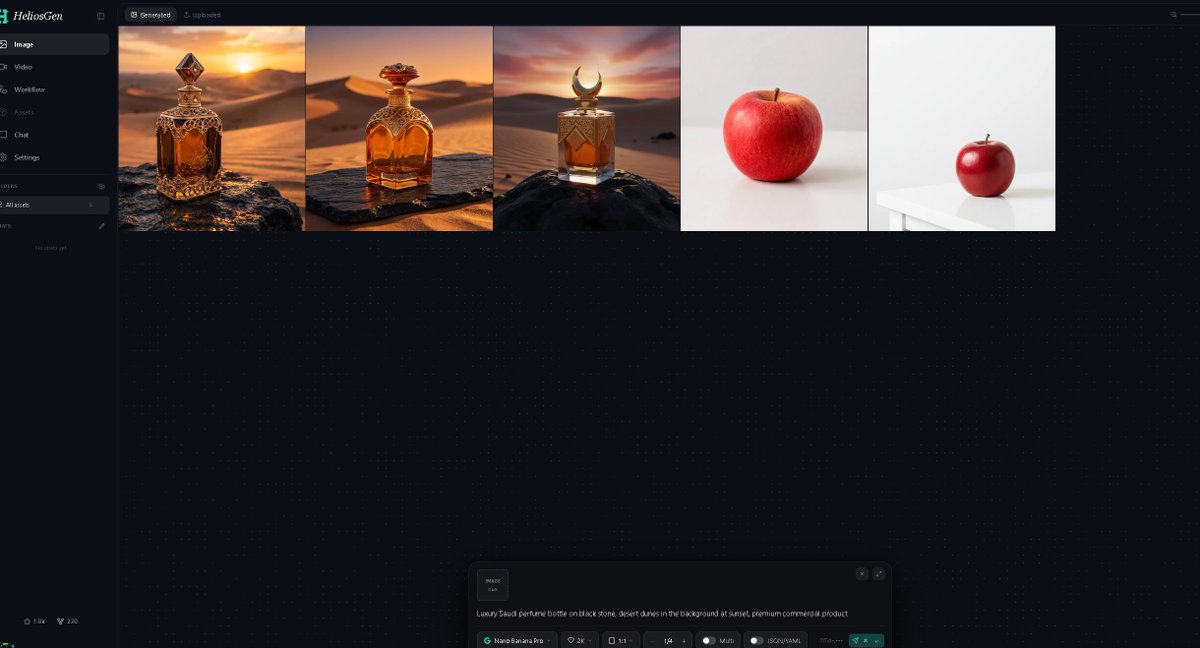
Dark AI Generation Dashboard Screenshot
A wide dark-mode HeliosGen-style dashboard mockup showing generated image thumbnails and an AI prompt control panel for showcasing an image generation workflow.
Dies ist ein GPT Image 2 -Prompt für Grafik & Poster . Verwenden Sie den unten stehenden, kopierfertigen Prompt, um ähnliche Grafiken zu erstellen, und überprüfen Sie vor der Wiederverwendung Awesome GPT Image 2 Prompts -Quellenangaben sowie die kommerziellen Nutzungsrechte.
Free 1K preview
Generate one preview image instantly, no sign-up required.
Eingabeaufforderung
Kopierfertige Eingabeaufforderung
Goal: Create a dark-mode desktop web app screenshot for {argument name="app name" default="HeliosGen"}, an AI image/video generation dashboard, shown in a wide 16:9 browser-like canvas.

Canvas: 1200×675 style screenshot, very dark navy/black interface with subtle dotted grid texture across the main workspace. Use a clean modern SaaS UI aesthetic, thin dividers, small muted gray text, and teal accents.

Layout: A narrow left sidebar occupies about 10% of the width, with the main workspace filling the rest. At the top of the main workspace, show two small tabs: “Generated” selected and “Uploaded” inactive. Beneath the tabs, display exactly 5 generated image thumbnails in one horizontal row, aligned along the top, each separated by thin borders.

Sidebar details: Top-left logo text reads “HeliosGen” with a small teal emblem. Include exactly 6 primary navigation items with icons: 1) Image selected, 2) Video, 3) Workflow, 4) Assets, 5) Chat, 6) Settings. Below that, show a small “Folders” section with exactly 1 folder row labeled “All works,” then an empty-state area reading “No chats yet.” At the bottom-left, add two tiny stats/icons resembling “1.8k” and “220.”

Thumbnail row: Show exactly 5 thumbnails from left to right: 1) an ornate amber luxury perfume bottle on a dark rock in a golden desert at sunset, 2) a rounded amber perfume bottle with ornate gold cap on a stone slab in desert dunes at sunset, 3) a square amber perfume bottle with a crescent-shaped cap on a black rock in desert dunes at sunset, 4) a single red apple centered on an off-white studio background, 5) a smaller red apple sitting on a white table in a minimal white studio scene. The first three thumbnails should feel cinematic and warm; the last two should be minimal product-photo tests.

Bottom prompt panel: Near the bottom center of the workspace, include a floating generation control panel with rounded corners. On the left of the panel, show a small square preview tile labeled “IMAGE 1:1.” In the main text area, include the prompt: “{argument name="generation prompt" default="Luxury Saudi perfume bottle on black stone, desert dunes in the background at sunset, premium commercial product"}”. Along the bottom of the panel, show compact controls reading approximately “Nano Banana Pro,” “2K,” “1:1,” “1/4,” “Multi,” and “JSON (4.14k),” plus a teal send/generate button at the right.

Visual style: Crisp UI screenshot, high contrast, minimal glow, fine dotted background, realistic generated-image thumbnails, no browser chrome, no extra popups, no people, no watermark.
Eingabeaufforderungsvariablen
In der Eingabeaufforderung befinden sich bearbeitbare Argumentplatzhalter mit ihren Standardwerten.
Best for
- - Grafik & Poster visual exploration
- - Image generation and reference-image edits
- - Reusable briefs that keep source attribution visible
Change these parts
- - Subject, product, character, or scene
- - Aspect ratio, camera, lighting, and background
- - Brand, text, color, and output constraints
Recommended model and settings
- - Model: gpt-image-2
- - Input mode: Text zu Bild
- - Aspect ratio: source
- - Commercial status: review original source
How to use this prompt
- 1. Copy the prompt and preserve its structure for the first test.
- 2. Replace the subject, context, and publishing channel.
- 3. Change one camera, lighting, or style variable per iteration.
- 4. Inspect the output, source, text, and rights before reuse.
Limitations, source, and reuse cautions
- - Generated output is an editable draft, not factual, legal, or rights evidence.
- - Review the linked source, people, brands, logos, text, and third-party media before commercial use.
Weitere Fälle in dieser Kategorie
Priorisiert nach Kategorie, Kompatibilität der Eingabemodi, Qualität und geringerem Risiko.






Hinweise zur Wiederverwendung und Quellenangabe
Verwenden Sie diese Eingabeaufforderung sicher, nachdem Sie den Fall in der Vorschau angezeigt haben.
- 1.Kopieren Sie die Eingabeaufforderung oder öffnen Sie sie direkt in Dovoo mit der Schaltfläche „Generieren“.
- 2.Passen Sie Variablen, Seitenverhältnis und Referenzbilder an Ihren Anwendungsfall an.
- 3.Vor der Veröffentlichung oder kostenpflichtigen Nutzung sollten Sie die Rechte an der Quelle, die Anforderungen an die Namensnennung sowie die Risiken für die Marke oder das Abbild prüfen.