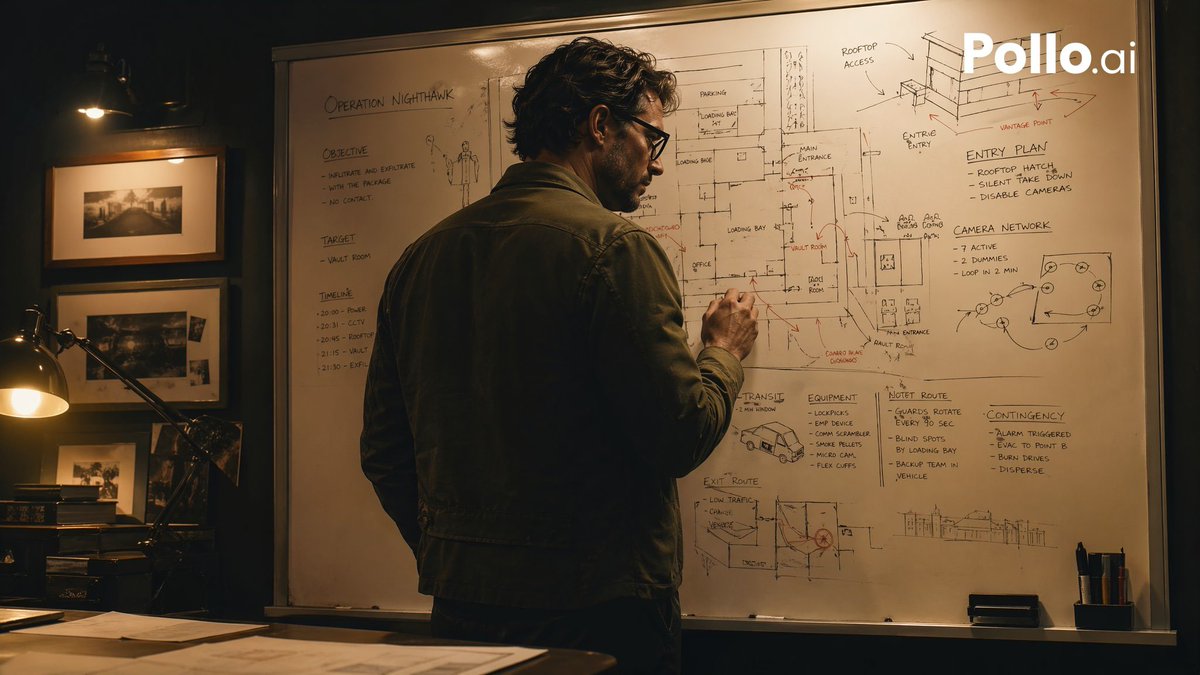
Filmisches Heist-Genie bei Whiteboard
Diese Vorgabe erzeugt eine stimmungsvolle Krimi-Szene, in der ein einsamer Stratege einen Raubplan auf einem Whiteboard entwirft – ideal für Thriller-Poster, Social-Media-Werbung oder filmische Konzeptzeichnungen.
Dies ist ein GPT Image 2 -Prompt für Illustration & Kunst . Verwenden Sie den unten stehenden, kopierfertigen Prompt, um ähnliche Grafiken zu erstellen, und überprüfen Sie vor der Wiederverwendung Awesome GPT Image 2 Prompts -Quellenangaben sowie die kommerziellen Nutzungsrechte.
Benötigen Sie den vollständigen Prompt-Satz? Verwenden Sie den Illustration & Kunst Weitere verwandte Beispiele finden Sie im Themen-Hub oder öffnen Sie die GPT Image 2 Prompt-Katalog für das vollständige Beispielverzeichnis, wiederverwendbare Strukturen und Quellenangaben.
Free 1K preview
Generate one preview image instantly, no sign-up required.
1689/4000
Eingabeaufforderung
Kopierfertige Eingabeaufforderung
A cinematic, moody heist-planning scene in a dimly lit office at night, shot in a realistic thriller style. A single adult man stands with his back mostly to the camera, slightly turned in profile, writing on a huge whiteboard filled edge to edge with tactical notes, building sketches, floor plans, arrows, routes, and hand-drawn diagrams. He has wavy dark hair and wears a dark olive or charcoal casual jacket over dark trousers, giving the impression of a mastermind strategist. The whiteboard is the focal point and contains multiple readable planning areas: the top left title says "OPERATION NIGHTHAWK"; the left column has 3 sections labeled "OBJECTIVE," "TARGET," and "TIMELINE"; the upper right has 2 labeled diagram areas, "ENTRY PLAN" and "CAMERA NETWORK"; the lower middle-right has 4 labeled planning blocks, "TRANSIT," "EQUIPMENT," "HOTEL ROUTE," and "CONTINGENCIES." Include sketched building elevations, a rooftop access drawing, loading bay notes, room labels, arrows in black and red marker, and a small van sketch near the lower center. The room is warm and shadowy with amber practical lighting. On the left side of the frame, show a desk lamp glowing over a dark wooden desk with scattered papers, and a wall with 3 framed black-and-white photographs arranged vertically. Composition is a medium-wide over-the-shoulder shot, the man centered slightly left, the whiteboard dominating the background. High contrast, soft filmic grain, tense atmosphere, realistic textures, prestige TV crime-drama aesthetic similar to a brilliant planner preparing a robbery, but not depicting any specific copyrighted character. Add a white "Pollo.ai" watermark in the top-right corner.
Best for
- - Illustration & Kunst visual exploration
- - Image generation and reference-image edits
- - Reusable briefs that keep source attribution visible
Change these parts
- - Subject, product, character, or scene
- - Aspect ratio, camera, lighting, and background
- - Brand, text, color, and output constraints
Recommended model and settings
- - Model: gpt-image-2
- - Input mode: Text zu Bild
- - Aspect ratio: source
- - Commercial status: review original source
How to use this prompt
- 1. Copy the prompt and preserve its structure for the first test.
- 2. Replace the subject, context, and publishing channel.
- 3. Change one camera, lighting, or style variable per iteration.
- 4. Inspect the output, source, text, and rights before reuse.
Limitations, source, and reuse cautions
- - Generated output is an editable draft, not factual, legal, or rights evidence.
- - Review the linked source, people, brands, logos, text, and third-party media before commercial use.
Importiert von Awesome GPT Image 2 Prompts . Quellenangabe erforderlich. Status der kommerziellen Nutzung: allowed ; Rechte an der Quelle vor kostenpflichtiger Nutzung prüfen.
Weitere Fälle in dieser Kategorie
Priorisiert nach Kategorie, Kompatibilität der Eingabemodi, Qualität und geringerem Risiko.






Hinweise zur Wiederverwendung und Quellenangabe
Verwenden Sie diese Eingabeaufforderung sicher, nachdem Sie den Fall in der Vorschau angezeigt haben.
- 1.Kopieren Sie die Eingabeaufforderung oder öffnen Sie sie direkt in Dovoo mit der Schaltfläche „Generieren“.
- 2.Passen Sie Variablen, Seitenverhältnis und Referenzbilder an Ihren Anwendungsfall an.
- 3.Vor der Veröffentlichung oder kostenpflichtigen Nutzung sollten Sie die Rechte an der Quelle, die Anforderungen an die Namensnennung sowie die Risiken für die Marke oder das Abbild prüfen.