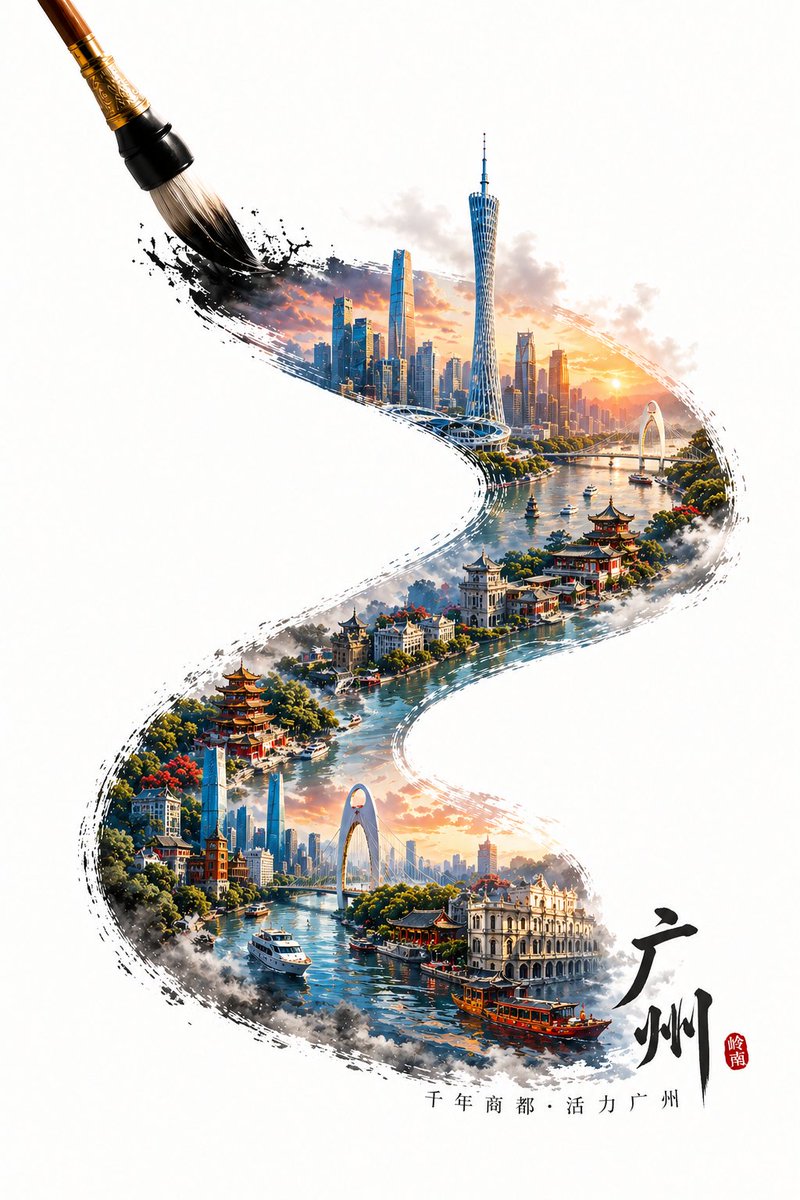
GPT Bild 2 Stadt – Künstlerische Plakatidee
Eine anspruchsvolle Vorlage zur Erstellung dreidimensionaler, farbintensiver Stadtposter, bei denen mit kalligrafischen Pinselstrichen eine Miniaturlandschaft aus urbanen Wahrzeichen und traditioneller Architektur eingerahmt wird.
Dies ist ein GPT Image 2 -Prompt für Grafik & Poster . Verwenden Sie den unten stehenden, kopierfertigen Prompt, um ähnliche Grafiken zu erstellen, und überprüfen Sie vor der Wiederverwendung Awesome GPT Image 2 Prompts -Quellenangaben sowie die kommerziellen Nutzungsrechte.
Free 1K preview
Generate one preview image instantly, no sign-up required.
Eingabeaufforderung
Kopierfertige Eingabeaufforderung
A writing brush in the process of painting, tracing an S-shaped calligraphy stroke from the bottom right to the top left. Within the stroke is a microscopic landscape of landmarks from {argument name="city name" default="Guangzhou"}, styled as a 3D high-saturation poster. The content within the stroke features iconic buildings of {argument name="city name" default="Guangzhou"}, blending local traditional architecture with modern structures to create a visual layer of old and new. If the city has a water system (such as a river or bay), incorporate the corresponding water body into the stroke to create a misty and atmospheric feel, enhancing the sense of spatial depth. The stroke as a whole shows natural ink diffusion and edge fragmentation effects while maintaining clear urban structures and rich details. The tip of the brush is at the end of the stroke in the upper left corner, capturing a dynamic moment of "currently drawing." Outside the stroke is a large area of clean white space, highlighting an Oriental minimalist composition. Add text at the beginning of the stroke: {argument name="city name" default="Guangzhou"} and a {argument name="city slogan" default="short slogan for the city"}, with the text naturally arranged along the direction of the stroke. Overall style: A blend of traditional Chinese style and modern 3D art, high detail, high saturation but clean, vibrant colors, realistic physical lighting, HDR, 8K resolution, commercial-grade visual quality.Eingabeaufforderungsvariablen
In der Eingabeaufforderung befinden sich bearbeitbare Argumentplatzhalter mit ihren Standardwerten.
Best for
- - Grafik & Poster visual exploration
- - Image generation and reference-image edits
- - Reusable briefs that keep source attribution visible
Change these parts
- - Subject, product, character, or scene
- - Aspect ratio, camera, lighting, and background
- - Brand, text, color, and output constraints
Recommended model and settings
- - Model: gpt-image-2
- - Input mode: Text zu Bild
- - Aspect ratio: source
- - Commercial status: review original source
How to use this prompt
- 1. Copy the prompt and preserve its structure for the first test.
- 2. Replace the subject, context, and publishing channel.
- 3. Change one camera, lighting, or style variable per iteration.
- 4. Inspect the output, source, text, and rights before reuse.
Limitations, source, and reuse cautions
- - Generated output is an editable draft, not factual, legal, or rights evidence.
- - Review the linked source, people, brands, logos, text, and third-party media before commercial use.
Weitere Fälle in dieser Kategorie
Priorisiert nach Kategorie, Kompatibilität der Eingabemodi, Qualität und geringerem Risiko.






Hinweise zur Wiederverwendung und Quellenangabe
Verwenden Sie diese Eingabeaufforderung sicher, nachdem Sie den Fall in der Vorschau angezeigt haben.
- 1.Kopieren Sie die Eingabeaufforderung oder öffnen Sie sie direkt in Dovoo mit der Schaltfläche „Generieren“.
- 2.Passen Sie Variablen, Seitenverhältnis und Referenzbilder an Ihren Anwendungsfall an.
- 3.Vor der Veröffentlichung oder kostenpflichtigen Nutzung sollten Sie die Rechte an der Quelle, die Anforderungen an die Namensnennung sowie die Risiken für die Marke oder das Abbild prüfen.