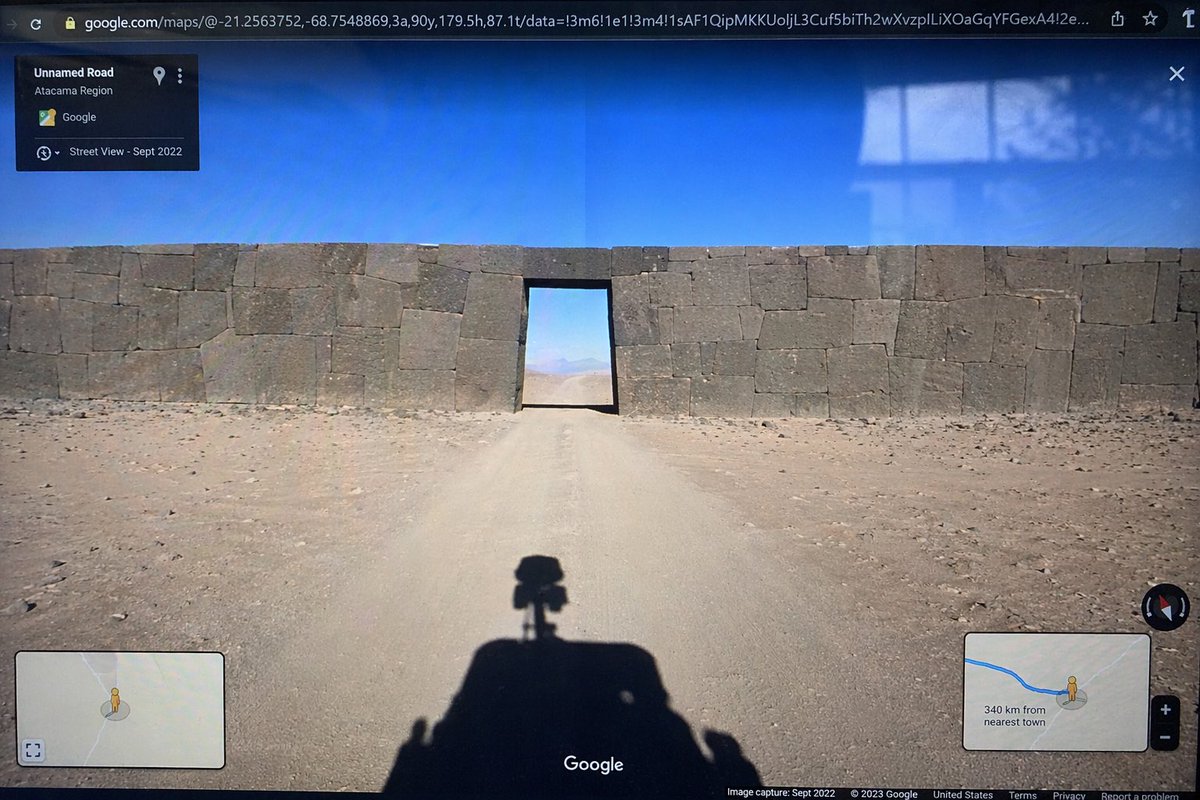
Google Street View-Bildschirmfoto mit Anomalie
Erzeugt ein realistisches Foto eines Computerbildschirms, der eine Google Street View-Oberfläche mit einer surrealen oder deplatzierten architektonischen Anomalie anzeigt.
Dies ist ein GPT Image 2 -Prompt für Andere Inspiration . Verwenden Sie den unten stehenden, kopierfertigen Prompt, um ähnliche Grafiken zu erstellen, und überprüfen Sie vor der Wiederverwendung Awesome GPT Image 2 Prompts -Quellenangaben sowie die kommerziellen Nutzungsrechte.
Free 1K preview
Generate one preview image instantly, no sign-up required.
Eingabeaufforderung
Kopierfertige Eingabeaufforderung
{
  "type": "photograph of a computer monitor displaying a Google Maps Street View interface",
  "scene": {
    "environment": "{argument name=\"environment\" default=\"barren desert landscape under a clear blue sky\"}",
    "subject": "{argument name=\"subject\" default=\"massive ancient stone wall with perfectly fitted cyclopean masonry blocking a dirt road, with a rectangular doorway cut through the center\"}",
    "foreground": "shadow of a Google Street View car with a 360-degree camera mounted on top cast onto the dirt road"
  },
  "ui_elements": {
    "browser_bar": "URL bar at the top showing google.com/maps with latitude and longitude coordinates",
    "top_left_panel": "black semi-transparent info box with text 'Unnamed Road', '{argument name=\"region\" default=\"Atacama Region\"}', and 'Street View - Sept 2022'",
    "bottom_left_panel": "minimap inset with a yellow Pegman icon",
    "bottom_right_panel": "minimap inset showing a blue route line, Pegman, zoom controls, and text '{argument name=\"distance text\" default=\"340 km from nearest town\"}'",
    "bottom_bar": "Google logo in the bottom center, compass icon on the right, and copyright/capture date text along the bottom edge"
  },
  "style_details": "visible screen glare and slight monitor distortion to simulate a photograph taken of a physical screen with a smartphone"
}
Eingabeaufforderungsvariablen
In der Eingabeaufforderung befinden sich bearbeitbare Argumentplatzhalter mit ihren Standardwerten.
Best for
- - Andere Inspiration visual exploration
- - Image generation and reference-image edits
- - Reusable briefs that keep source attribution visible
Change these parts
- - Subject, product, character, or scene
- - Aspect ratio, camera, lighting, and background
- - Brand, text, color, and output constraints
Recommended model and settings
- - Model: gpt-image-2
- - Input mode: Text zu Bild
- - Aspect ratio: source
- - Commercial status: review original source
How to use this prompt
- 1. Copy the prompt and preserve its structure for the first test.
- 2. Replace the subject, context, and publishing channel.
- 3. Change one camera, lighting, or style variable per iteration.
- 4. Inspect the output, source, text, and rights before reuse.
Limitations, source, and reuse cautions
- - Generated output is an editable draft, not factual, legal, or rights evidence.
- - Review the linked source, people, brands, logos, text, and third-party media before commercial use.
Weitere Fälle in dieser Kategorie
Priorisiert nach Kategorie, Kompatibilität der Eingabemodi, Qualität und geringerem Risiko.






Hinweise zur Wiederverwendung und Quellenangabe
Verwenden Sie diese Eingabeaufforderung sicher, nachdem Sie den Fall in der Vorschau angezeigt haben.
- 1.Kopieren Sie die Eingabeaufforderung oder öffnen Sie sie direkt in Dovoo mit der Schaltfläche „Generieren“.
- 2.Passen Sie Variablen, Seitenverhältnis und Referenzbilder an Ihren Anwendungsfall an.
- 3.Vor der Veröffentlichung oder kostenpflichtigen Nutzung sollten Sie die Rechte an der Quelle, die Anforderungen an die Namensnennung sowie die Risiken für die Marke oder das Abbild prüfen.