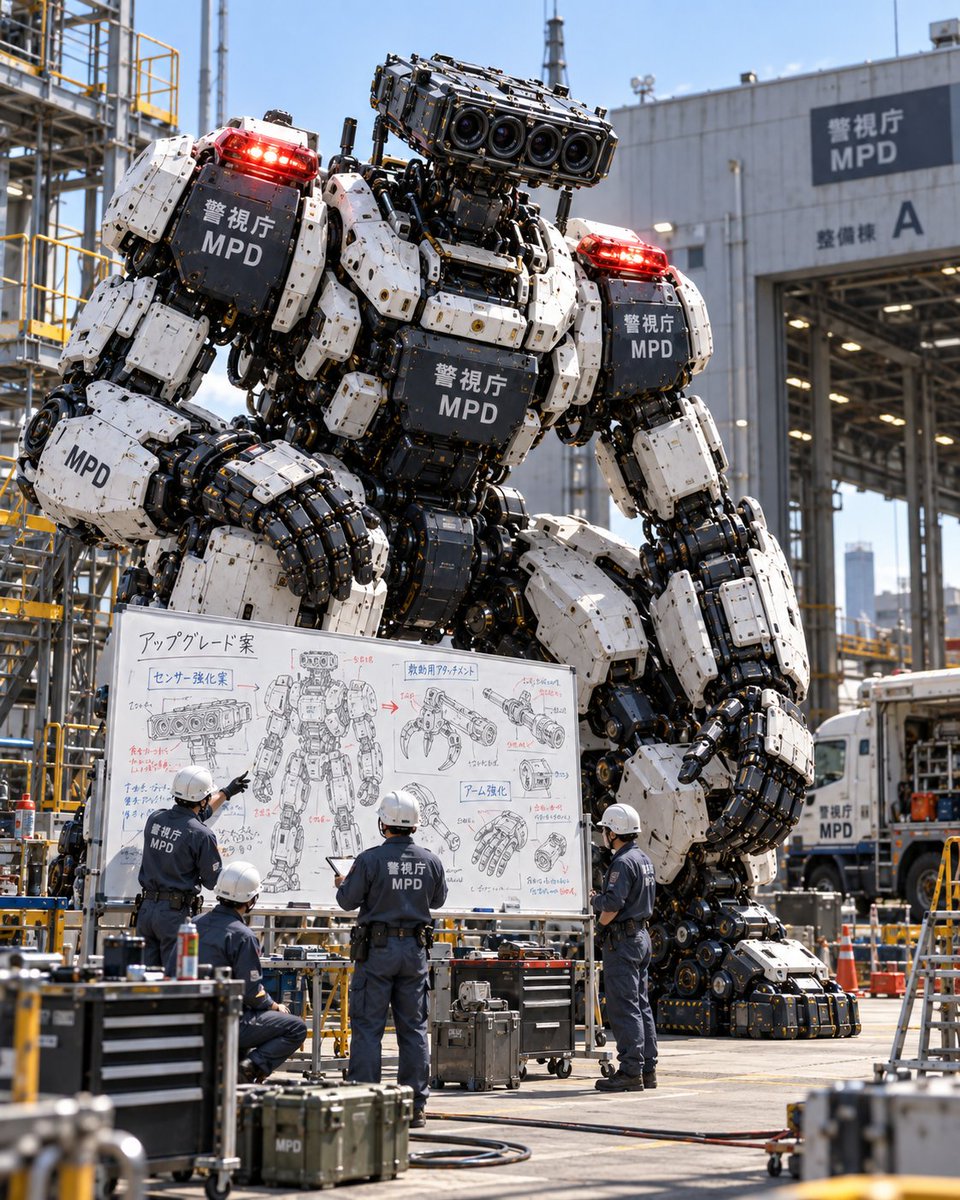
Giant Police Robot Maintenance Review
A photorealistic image of a massive white and black police mecha standing behind a group of mechanics reviewing upgrade plans on a whiteboard.
Dies ist ein GPT Image 2 -Prompt für Porträt & Charakter . Verwenden Sie den unten stehenden, kopierfertigen Prompt, um ähnliche Grafiken zu erstellen, und überprüfen Sie vor der Wiederverwendung Awesome GPT Image 2 Prompts -Quellenangaben sowie die kommerziellen Nutzungsrechte.
Benötigen Sie den vollständigen Prompt-Satz? Verwenden Sie den Porträt & Charakter Weitere verwandte Beispiele finden Sie im Themen-Hub oder öffnen Sie die GPT Image 2 Prompt-Katalog für das vollständige Beispielverzeichnis, wiederverwendbare Strukturen und Quellenangaben.
Free 1K preview
Generate one preview image instantly, no sign-up required.
1685/4000
Eingabeaufforderung
Kopierfertige Eingabeaufforderung
Goal: Create a photorealistic scene of a giant police robot being reviewed by maintenance staff at an industrial depot.

Canvas: Vertical 4:5 aspect ratio, realistic photography style with bright daylight and sharp focus.

Subject details: A massive humanoid robot stands in the center background. It has white armored plating on its shoulders, chest, and thighs, contrasted with exposed black mechanical joints, pistons, and hydraulic cables. The head is a rectangular sensor block featuring four large camera lenses arranged horizontally. Red emergency lights are mounted on both shoulders. The text "警視庁 MPD" (Metropolitan Police Department) appears in white on the black chest plate, shoulder plates, and arm guards.

Layout & Action: In the foreground, four mechanics stand with their backs to the viewer, wearing dark blue uniforms with "MPD" printed on the back and white hard hats. They are gathered around a large mobile whiteboard, actively discussing the robot's design. One mechanic points at the board; another holds a tablet.

Text content: The whiteboard contains hand-drawn technical sketches and Japanese notes. Key visible headers include "アップグレード案" (Upgrade Proposal), "センサー強化案" (Sensor Enhancement Plan), and "アーム強化" (Arm Strengthening). Diagrams show close-ups of the sensor head, a claw attachment, and a reinforced hand.

Environment: An industrial maintenance yard with yellow scaffolding and steel structures on the left. On the right, a large warehouse building features a sign reading "警視庁 MPD" and "整備棟 A" (Maintenance Building A). A white truck marked "MPD" is partially visible in the background. Toolboxes and equipment cases clutter the concrete ground.
Best for
- - Porträt & Charakter visual exploration
- - Image generation and reference-image edits
- - Reusable briefs that keep source attribution visible
Change these parts
- - Subject, product, character, or scene
- - Aspect ratio, camera, lighting, and background
- - Brand, text, color, and output constraints
Recommended model and settings
- - Model: gpt-image-2
- - Input mode: Text zu Bild
- - Aspect ratio: source
- - Commercial status: review original source
How to use this prompt
- 1. Copy the prompt and preserve its structure for the first test.
- 2. Replace the subject, context, and publishing channel.
- 3. Change one camera, lighting, or style variable per iteration.
- 4. Inspect the output, source, text, and rights before reuse.
Limitations, source, and reuse cautions
- - Generated output is an editable draft, not factual, legal, or rights evidence.
- - Review the linked source, people, brands, logos, text, and third-party media before commercial use.
Importiert von Awesome GPT Image 2 Prompts . Quellenangabe erforderlich. Status der kommerziellen Nutzung: allowed ; Rechte an der Quelle vor kostenpflichtiger Nutzung prüfen.
Weitere Fälle in dieser Kategorie
Priorisiert nach Kategorie, Kompatibilität der Eingabemodi, Qualität und geringerem Risiko.


Hinweise zur Wiederverwendung und Quellenangabe
Verwenden Sie diese Eingabeaufforderung sicher, nachdem Sie den Fall in der Vorschau angezeigt haben.
- 1.Kopieren Sie die Eingabeaufforderung oder öffnen Sie sie direkt in Dovoo mit der Schaltfläche „Generieren“.
- 2.Passen Sie Variablen, Seitenverhältnis und Referenzbilder an Ihren Anwendungsfall an.
- 3.Vor der Veröffentlichung oder kostenpflichtigen Nutzung sollten Sie die Rechte an der Quelle, die Anforderungen an die Namensnennung sowie die Risiken für die Marke oder das Abbild prüfen.