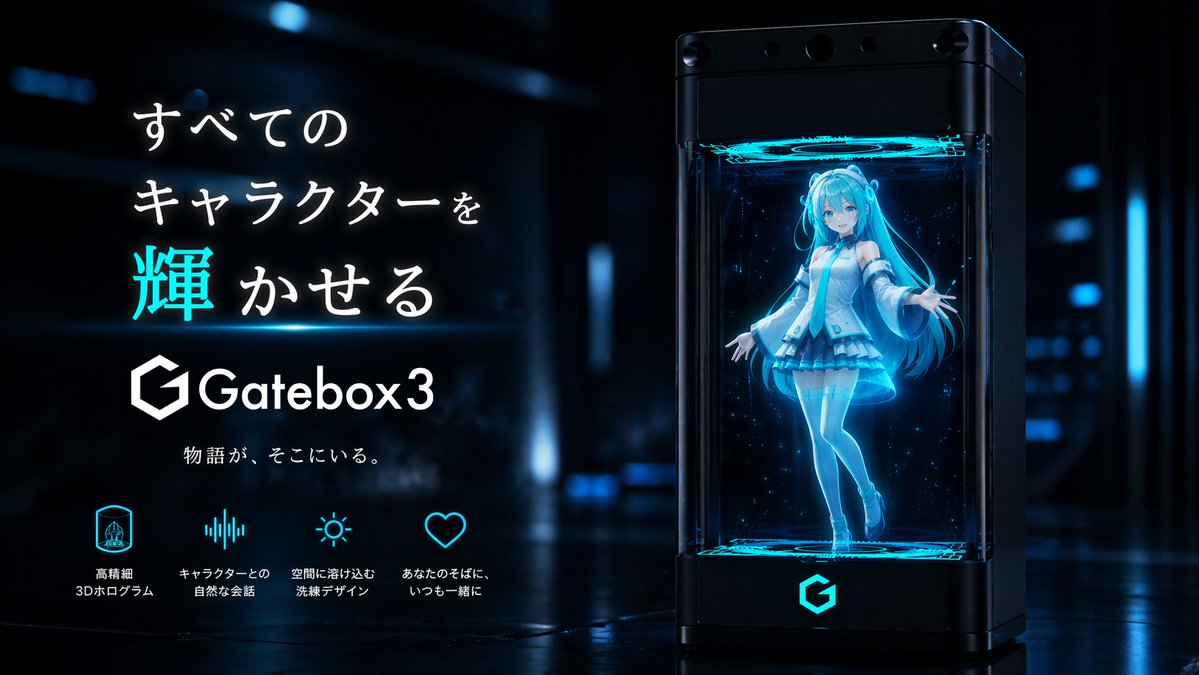
Gatebox3 Hologramm-Gerät Anzeige
Diese Vorgabe generiert eine elegante, futuristische japanische Produktanzeige für ein Hologramm-Begleitgerät, die sich für Marketingvisualisierungen im Technologiebereich und Konzeptkampagnen eignet.
Dies ist ein GPT Image 2 -Prompt für Produkt & Vertrieb . Verwenden Sie den unten stehenden, kopierfertigen Prompt, um ähnliche Grafiken zu erstellen, und überprüfen Sie vor der Wiederverwendung Awesome GPT Image 2 Prompts -Quellenangaben sowie die kommerziellen Nutzungsrechte.
Benötigen Sie den vollständigen Prompt-Satz? Verwenden Sie den Produkt & Vertrieb Weitere verwandte Beispiele finden Sie im Themen-Hub oder öffnen Sie die GPT Image 2 Prompt-Katalog für das vollständige Beispielverzeichnis, wiederverwendbare Strukturen und Quellenangaben.
Free 1K preview
Generate one preview image instantly, no sign-up required.
1832/4000
Eingabeaufforderung
Kopierfertige Eingabeaufforderung
A sleek futuristic Japanese tech advertisement in a dark sci-fi showroom with glossy reflective floors and soft blue neon bokeh lights in the background. On the right side, show a tall black rectangular hologram device with transparent glass front and sides, rounded edges, and subtle camera-like sensors across the top. The device is labeled Gatebox3 and glows with cyan-blue light, including a bright cyan logo on the base. Inside the chamber, display a full-body anime virtual girl hologram floating slightly above the bottom platform, rendered as a luminous translucent blue projection with particle sparkles. She has very long twin-tail hair, a youthful idol-like design, and a futuristic white and cyan outfit with detached sleeves, short skirt, thigh-high stockings, and heeled shoes. Her face is intentionally simplified or softly obscured, and she poses with one leg bent and both arms open in a welcoming gesture. Add glowing circular projection rings at the top and bottom inside the chamber. On the left side, place a clean Japanese promotional text layout with large headline text reading 「すべてのキャラクターを輝かせる」, with the single kanji 「輝」 emphasized in bright cyan and the rest in white. Beneath it, place the Gatebox3 logo and product name in white, followed by smaller tagline text 「物語が、そこにいる。」. Along the bottom left, include exactly 4 feature icons with Japanese labels in white and cyan: 1 hologram icon with 「高精細 3Dホログラム」, 1 audio waveform icon with 「キャラクターとの 自然な会話」, 1 sun-like ambient light icon with 「空間に溶け込む 洗練デザイン」, and 1 heart icon with 「あなたのそばに いつも一緒に」. High-end commercial product visualization, premium cyber-blue color palette, cinematic rim lighting, polished reflections, ultra-clean composition, realistic device rendering combined with anime hologram character, sharp focus on the product and typography.
Best for
- - Produkt & Vertrieb visual exploration
- - Image generation and reference-image edits
- - Reusable briefs that keep source attribution visible
Change these parts
- - Subject, product, character, or scene
- - Aspect ratio, camera, lighting, and background
- - Brand, text, color, and output constraints
Recommended model and settings
- - Model: gpt-image-2
- - Input mode: Text zu Bild
- - Aspect ratio: source
- - Commercial status: review original source
How to use this prompt
- 1. Copy the prompt and preserve its structure for the first test.
- 2. Replace the subject, context, and publishing channel.
- 3. Change one camera, lighting, or style variable per iteration.
- 4. Inspect the output, source, text, and rights before reuse.
Limitations, source, and reuse cautions
- - Generated output is an editable draft, not factual, legal, or rights evidence.
- - Review the linked source, people, brands, logos, text, and third-party media before commercial use.
Importiert von Awesome GPT Image 2 Prompts . Quellenangabe erforderlich. Status der kommerziellen Nutzung: allowed ; Rechte an der Quelle vor kostenpflichtiger Nutzung prüfen.
Weitere Fälle in dieser Kategorie
Priorisiert nach Kategorie, Kompatibilität der Eingabemodi, Qualität und geringerem Risiko.






Hinweise zur Wiederverwendung und Quellenangabe
Verwenden Sie diese Eingabeaufforderung sicher, nachdem Sie den Fall in der Vorschau angezeigt haben.
- 1.Kopieren Sie die Eingabeaufforderung oder öffnen Sie sie direkt in Dovoo mit der Schaltfläche „Generieren“.
- 2.Passen Sie Variablen, Seitenverhältnis und Referenzbilder an Ihren Anwendungsfall an.
- 3.Vor der Veröffentlichung oder kostenpflichtigen Nutzung sollten Sie die Rechte an der Quelle, die Anforderungen an die Namensnennung sowie die Risiken für die Marke oder das Abbild prüfen.