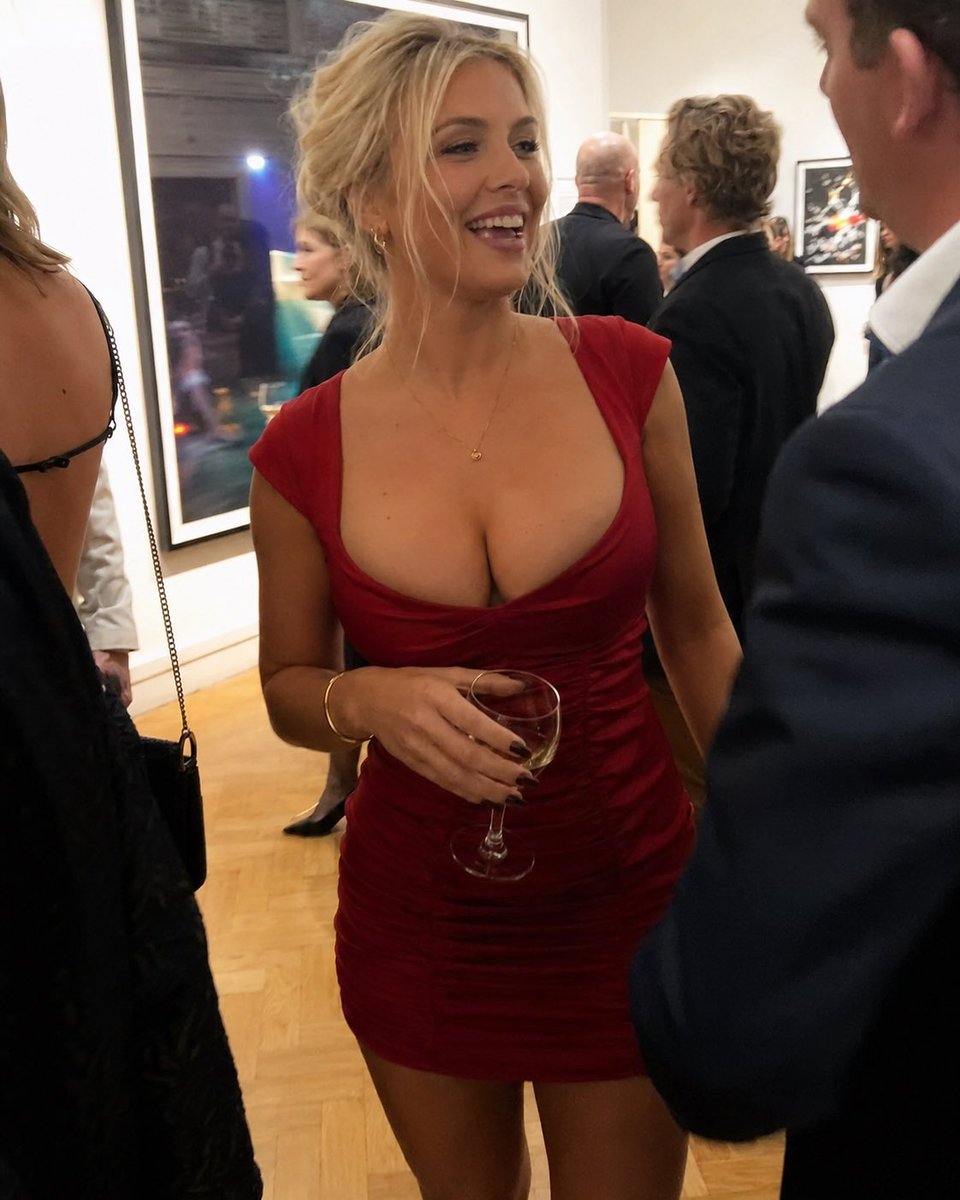
Candid Gallery Reception Portrait
Generates a photorealistic vertical candid photo of a woman socializing at an upscale art gallery reception.
Dies ist ein GPT Image 2 -Prompt für Porträt & Charakter . Verwenden Sie den unten stehenden, kopierfertigen Prompt, um ähnliche Grafiken zu erstellen, und überprüfen Sie vor der Wiederverwendung Awesome GPT Image 2 Prompts -Quellenangaben sowie die kommerziellen Nutzungsrechte.
Benötigen Sie den vollständigen Prompt-Satz? Verwenden Sie den Porträt & Charakter Weitere verwandte Beispiele finden Sie im Themen-Hub oder öffnen Sie die GPT Image 2 Prompt-Katalog für das vollständige Beispielverzeichnis, wiederverwendbare Strukturen und Quellenangaben.
Free 1K preview
Generate one preview image instantly, no sign-up required.
1795/4000
Eingabeaufforderung
Kopierfertige Eingabeaufforderung
Create a highly realistic candid event photograph in a contemporary art gallery during an evening reception. The central subject is an adult blonde woman, {argument name="main subject" default="a smiling blonde woman in her late 20s"}, standing three-quarter view and laughing while looking toward a man just off to the right. She wears a fitted deep red ruched mini dress with a low scoop neckline, small gold hoop earrings, a delicate gold necklace, a thin bracelet, and dark nail polish, holding a stemmed glass of white wine in one hand. Her blonde hair is styled in a loose messy updo with face-framing strands, and her expression is warm, social, and candid. The scene contains exactly 6 visible people: the central woman in red, a cropped woman in a black dress at the far left with a small chain-strap purse, a cropped man in a navy suit in the right foreground facing her, a blonde woman in a teal top blurred in the background, a bald man in a dark jacket, and a curly-haired man in a dark suit near the wall. Set the location in a bright gallery with cream walls, framed modern photographs, warm parquet wood flooring, and soft indoor exhibition lighting. Use a handheld flash-photo aesthetic with shallow depth of field, slight motion blur in the background, realistic skin texture, natural shadows, casual party atmosphere, and the composition of a vertical smartphone snapshot. Emphasize photorealism, natural imperfections, candid framing, and authentic social-event lighting. Use {argument name="dress color" default="deep red"} as the dominant accent color, {argument name="setting" default="modern art gallery reception"}, {argument name="held drink" default="white wine in a stemmed glass"}, and {argument name="camera style" default="candid vertical smartphone flash photo"}.Eingabeaufforderungsvariablen
In der Eingabeaufforderung befinden sich bearbeitbare Argumentplatzhalter mit ihren Standardwerten.
Variable
main subject
Standard
a smiling blonde woman in her late 20s
Variable
dress color
Standard
deep red
Variable
setting
Standard
modern art gallery reception
Variable
held drink
Standard
white wine in a stemmed glass
Variable
camera style
Standard
candid vertical smartphone flash photo
Best for
- - Porträt & Charakter visual exploration
- - Image generation and reference-image edits
- - Reusable briefs that keep source attribution visible
Change these parts
- - Subject, product, character, or scene
- - Aspect ratio, camera, lighting, and background
- - Brand, text, color, and output constraints
Recommended model and settings
- - Model: gpt-image-2
- - Input mode: Text zu Bild
- - Aspect ratio: source
- - Commercial status: review original source
How to use this prompt
- 1. Copy the prompt and preserve its structure for the first test.
- 2. Replace the subject, context, and publishing channel.
- 3. Change one camera, lighting, or style variable per iteration.
- 4. Inspect the output, source, text, and rights before reuse.
Limitations, source, and reuse cautions
- - Generated output is an editable draft, not factual, legal, or rights evidence.
- - Review the linked source, people, brands, logos, text, and third-party media before commercial use.
Importiert von Awesome GPT Image 2 Prompts . Quellenangabe erforderlich. Status der kommerziellen Nutzung: allowed ; Rechte an der Quelle vor kostenpflichtiger Nutzung prüfen.
Weitere Fälle in dieser Kategorie
Priorisiert nach Kategorie, Kompatibilität der Eingabemodi, Qualität und geringerem Risiko.






Hinweise zur Wiederverwendung und Quellenangabe
Verwenden Sie diese Eingabeaufforderung sicher, nachdem Sie den Fall in der Vorschau angezeigt haben.
- 1.Kopieren Sie die Eingabeaufforderung oder öffnen Sie sie direkt in Dovoo mit der Schaltfläche „Generieren“.
- 2.Passen Sie Variablen, Seitenverhältnis und Referenzbilder an Ihren Anwendungsfall an.
- 3.Vor der Veröffentlichung oder kostenpflichtigen Nutzung sollten Sie die Rechte an der Quelle, die Anforderungen an die Namensnennung sowie die Risiken für die Marke oder das Abbild prüfen.