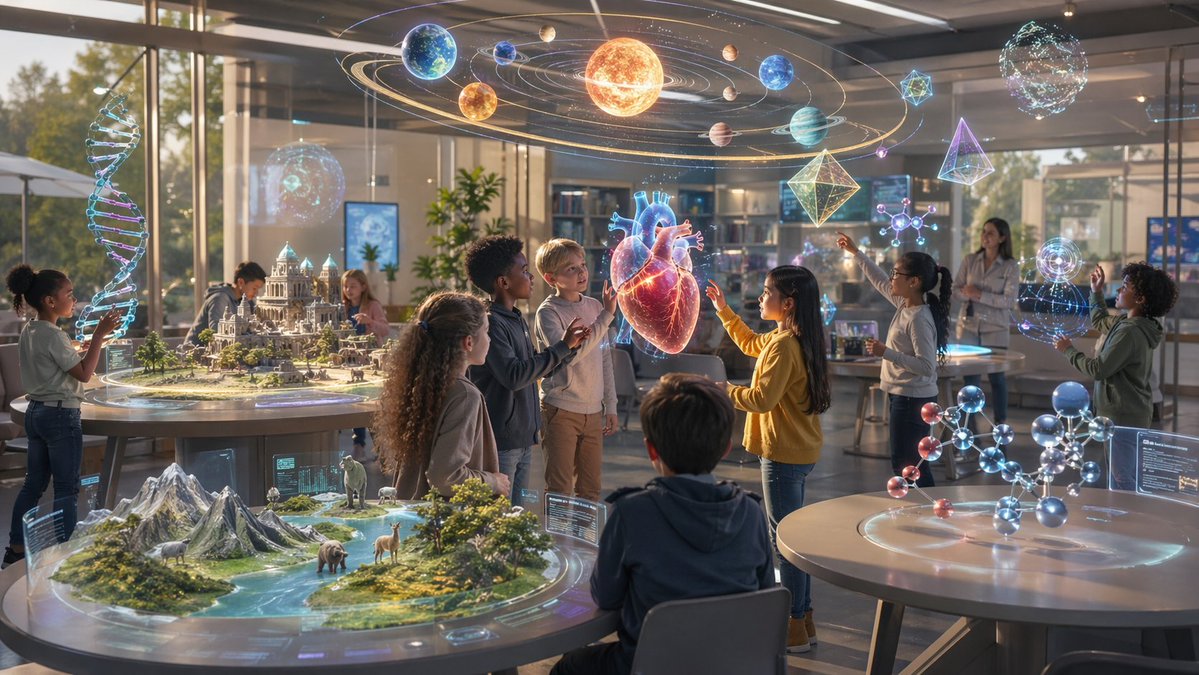
Futuristisches MINT-Klassenzimmer mit Hologrammen
Diese Funktion erzeugt eine filmische, fotorealistische Klassenzimmerszene, in der Kinder immersive holographische Wissenschaftsexponate erkunden – ideal für MINT-Bildungskampagnen, Konzeptkunst oder Innovationsmarketing.
Dies ist ein GPT Image 2 -Prompt für Illustration & Kunst . Verwenden Sie den unten stehenden, kopierfertigen Prompt, um ähnliche Grafiken zu erstellen, und überprüfen Sie vor der Wiederverwendung Awesome GPT Image 2 Prompts -Quellenangaben sowie die kommerziellen Nutzungsrechte.
Benötigen Sie den vollständigen Prompt-Satz? Verwenden Sie den Illustration & Kunst Weitere verwandte Beispiele finden Sie im Themen-Hub oder öffnen Sie die GPT Image 2 Prompt-Katalog für das vollständige Beispielverzeichnis, wiederverwendbare Strukturen und Quellenangaben.
Free 1K preview
Generate one preview image instantly, no sign-up required.
1989/4000
Eingabeaufforderung
Kopierfertige Eingabeaufforderung
A bright futuristic classroom or science museum learning lab filled with school-age children interacting with large mixed-reality holograms, cinematic ultra-detailed photorealism. The scene is a wide-angle interior during warm late-afternoon sunlight, with floor-to-ceiling glass windows, modern tables, bookshelves, digital displays, and a clean high-tech educational atmosphere. About 9 children and 1 adult teacher are spread across the room, actively exploring science exhibits with gestures and touch interactions. In the center, a glowing semi-transparent holographic human heart floats at chest height while 3 children gather around it, reaching toward it in curiosity. Suspended overhead is a large holographic solar system mobile with exactly 9 planets orbiting a bright sun, with luminous orbit trails and a magical scientific visualization style. On the left side, one child interacts with a tall vertical holographic DNA double helix. On the front-left table, there is a circular tabletop hologram of a miniature mountain-and-river ecosystem containing exactly 4 visible animals: an elephant, a deer, a llama or alpaca, and a bear. On the back-left table, there is a circular holographic architectural city model featuring a grand classical domed building and surrounding structures. On the right-front table, there is a large ball-and-stick molecular model made of glowing spheres and rods. In the mid-right and upper-right space, include additional floating science holograms: exactly 2 geometric polyhedra, exactly 2 molecule diagrams, exactly 2 spherical energy or data globes, and 1 hourglass-like abstract hologram. The children should be ethnically diverse, dressed casually, engaged, amazed, collaborative, and looking at different holographic subjects. Use soft volumetric sunlight, realistic reflections on glass and tabletops, subtle blue and gold glow from the holograms, shallow atmospheric haze, and a premium inspirational STEM-education advertisement aesthetic.
Best for
- - Illustration & Kunst visual exploration
- - Image generation and reference-image edits
- - Reusable briefs that keep source attribution visible
Change these parts
- - Subject, product, character, or scene
- - Aspect ratio, camera, lighting, and background
- - Brand, text, color, and output constraints
Recommended model and settings
- - Model: gpt-image-2
- - Input mode: Text zu Bild
- - Aspect ratio: source
- - Commercial status: review original source
How to use this prompt
- 1. Copy the prompt and preserve its structure for the first test.
- 2. Replace the subject, context, and publishing channel.
- 3. Change one camera, lighting, or style variable per iteration.
- 4. Inspect the output, source, text, and rights before reuse.
Limitations, source, and reuse cautions
- - Generated output is an editable draft, not factual, legal, or rights evidence.
- - Review the linked source, people, brands, logos, text, and third-party media before commercial use.
Importiert von Awesome GPT Image 2 Prompts . Quellenangabe erforderlich. Status der kommerziellen Nutzung: allowed ; Rechte an der Quelle vor kostenpflichtiger Nutzung prüfen.
Weitere Fälle in dieser Kategorie
Priorisiert nach Kategorie, Kompatibilität der Eingabemodi, Qualität und geringerem Risiko.






Hinweise zur Wiederverwendung und Quellenangabe
Verwenden Sie diese Eingabeaufforderung sicher, nachdem Sie den Fall in der Vorschau angezeigt haben.
- 1.Kopieren Sie die Eingabeaufforderung oder öffnen Sie sie direkt in Dovoo mit der Schaltfläche „Generieren“.
- 2.Passen Sie Variablen, Seitenverhältnis und Referenzbilder an Ihren Anwendungsfall an.
- 3.Vor der Veröffentlichung oder kostenpflichtigen Nutzung sollten Sie die Rechte an der Quelle, die Anforderungen an die Namensnennung sowie die Risiken für die Marke oder das Abbild prüfen.