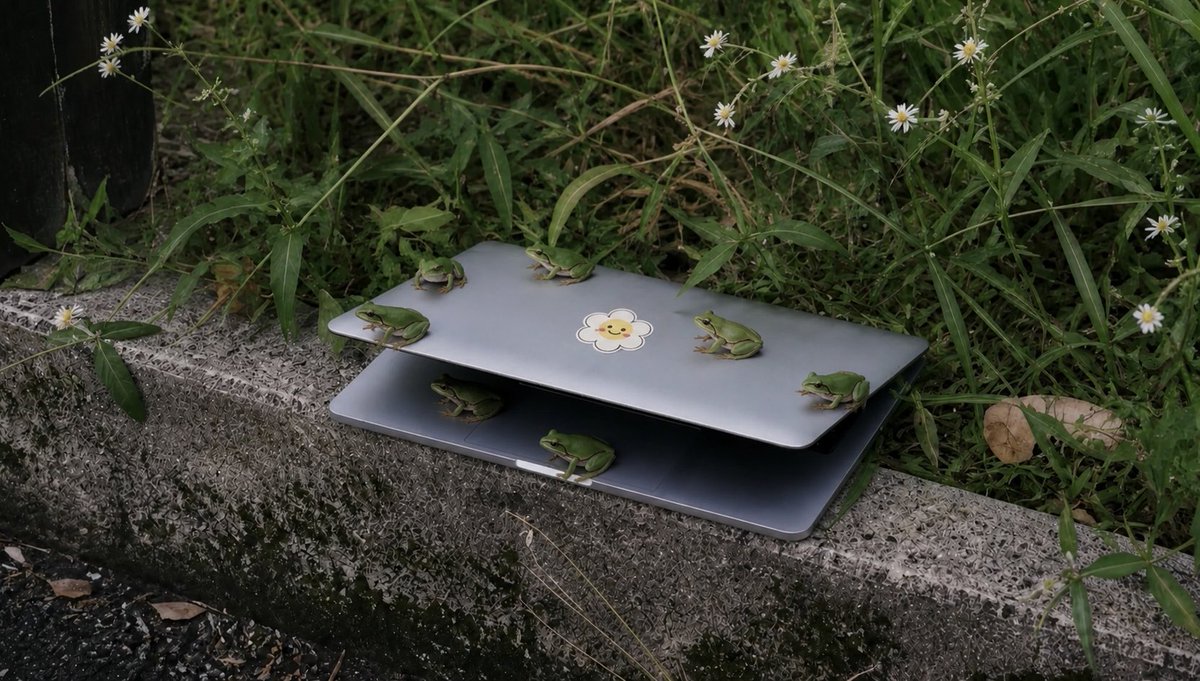
Frösche auf einem Laptop im hohen Gras
Eine realistische Fotovorlage für die Natur, die sechs kleine grüne Frösche zeigt, die sich auf einem teilweise geöffneten Laptop neben hohem Gras und Wildblumen versammelt haben.
Dies ist ein GPT Image 2 -Prompt für Landschaft & Natur . Verwenden Sie den unten stehenden, kopierfertigen Prompt, um ähnliche Grafiken zu erstellen, und überprüfen Sie vor der Wiederverwendung Awesome GPT Image 2 Prompts -Quellenangaben sowie die kommerziellen Nutzungsrechte.
Free 1K preview
Generate one preview image instantly, no sign-up required.
Eingabeaufforderung
Kopierfertige Eingabeaufforderung
Create a realistic documentary-style outdoor photograph of a partially open {argument name="device" default="silver laptop"} resting on a rough concrete curb beside dense wild grass. The laptop is open only a few inches like a shelter, with a dark shadowed gap between the lid and base, and a small cute {argument name="sticker design" default="smiling flower sticker"} centered on the top lid. Show exactly 6 small green tree frogs: 4 frogs perched on the upper lid, including one near the left edge facing left, one near the back center facing left, one near the right-center facing left, and one on the far right edge facing left; 2 frogs on or under the lower half, including one crouched in the dark gap near the left side and one sitting on the front lower edge near the center facing right. Surround the scene with tall tangled green weeds, thin stems, and small white daisy-like wildflowers, with a dry brown leaf on the right and a dark vertical object barely visible at the far left edge. Use muted natural colors, overcast soft light, shallow depth of field, realistic textures on the mossy stained curb, and a slightly eerie “many tiny animals gathered around an abandoned object” mood. Horizontal 16:9 composition, low eye-level angle, no people, no added text, no watermark.Eingabeaufforderungsvariablen
In der Eingabeaufforderung befinden sich bearbeitbare Argumentplatzhalter mit ihren Standardwerten.
Best for
- - Landschaft & Natur visual exploration
- - Image generation and reference-image edits
- - Reusable briefs that keep source attribution visible
Change these parts
- - Subject, product, character, or scene
- - Aspect ratio, camera, lighting, and background
- - Brand, text, color, and output constraints
Recommended model and settings
- - Model: gpt-image-2
- - Input mode: Text zu Bild
- - Aspect ratio: source
- - Commercial status: review original source
How to use this prompt
- 1. Copy the prompt and preserve its structure for the first test.
- 2. Replace the subject, context, and publishing channel.
- 3. Change one camera, lighting, or style variable per iteration.
- 4. Inspect the output, source, text, and rights before reuse.
Limitations, source, and reuse cautions
- - Generated output is an editable draft, not factual, legal, or rights evidence.
- - Review the linked source, people, brands, logos, text, and third-party media before commercial use.
Weitere Fälle in dieser Kategorie
Priorisiert nach Kategorie, Kompatibilität der Eingabemodi, Qualität und geringerem Risiko.






Hinweise zur Wiederverwendung und Quellenangabe
Verwenden Sie diese Eingabeaufforderung sicher, nachdem Sie den Fall in der Vorschau angezeigt haben.
- 1.Kopieren Sie die Eingabeaufforderung oder öffnen Sie sie direkt in Dovoo mit der Schaltfläche „Generieren“.
- 2.Passen Sie Variablen, Seitenverhältnis und Referenzbilder an Ihren Anwendungsfall an.
- 3.Vor der Veröffentlichung oder kostenpflichtigen Nutzung sollten Sie die Rechte an der Quelle, die Anforderungen an die Namensnennung sowie die Risiken für die Marke oder das Abbild prüfen.