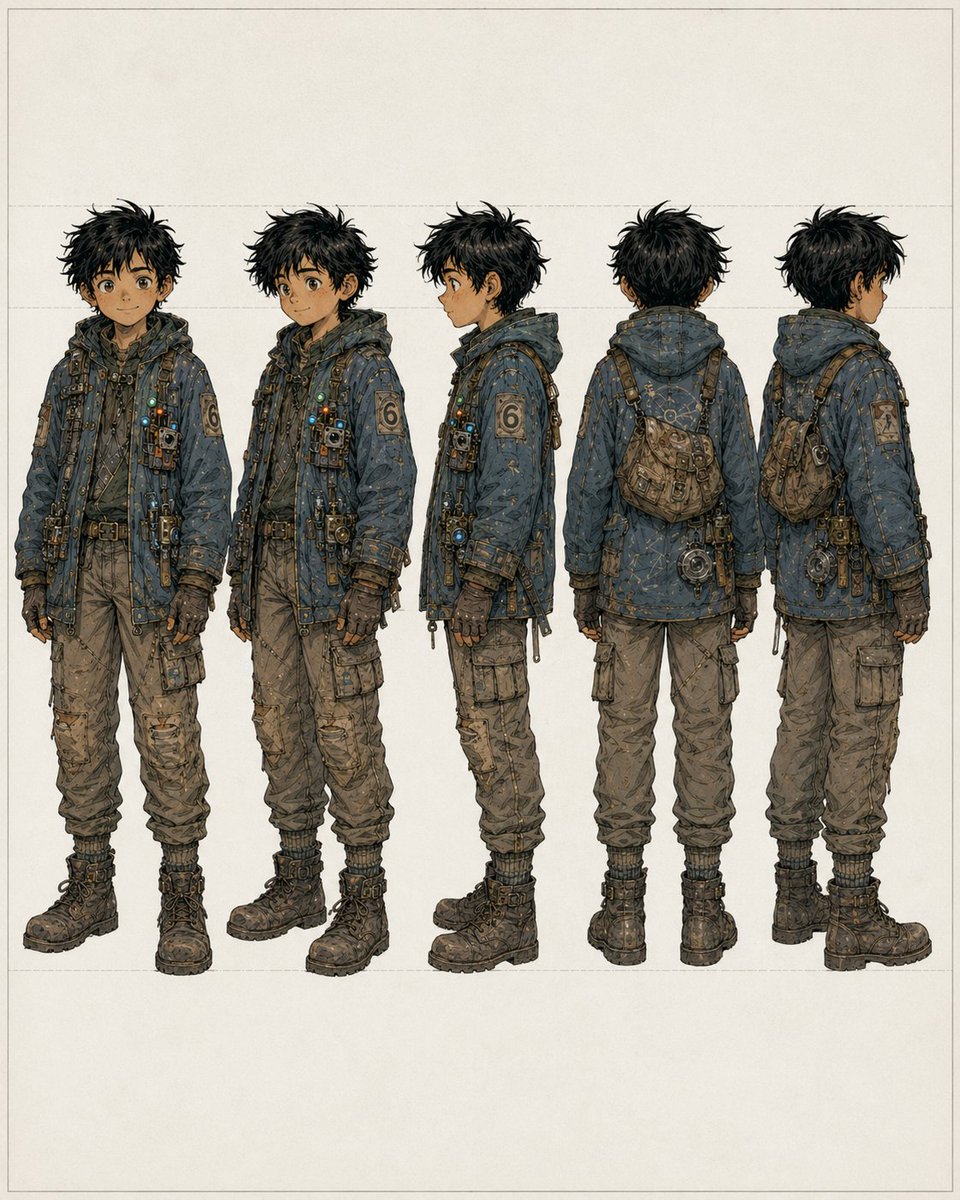
Fünf-Ansichten-Junge-Plünderer-Drehung
Ein detailliertes Charakter-Turnaround-Sheet, das einen robusten jungen Plünderer aus fünf Blickwinkeln zeigt und sich für Konzeptzeichnungen, Modellbögen und die visuelle Charakterentwicklung eignet.
Dies ist ein GPT Image 2 -Prompt für Porträt & Charakter . Verwenden Sie den unten stehenden, kopierfertigen Prompt, um ähnliche Grafiken zu erstellen, und überprüfen Sie vor der Wiederverwendung Awesome GPT Image 2 Prompts -Quellenangaben sowie die kommerziellen Nutzungsrechte.
Diese Eingabeaufforderung ist für mehrere Referenzbilder vorgesehen. Wir öffnen Dovoo mit der Eingabeaufforderung und dem verfügbaren Vorschaubild; fügen Sie die restlichen Referenzen in Dovoo hinzu, bevor Sie den Generierungsvorgang starten.
Free 1K preview
Generate one preview image instantly, no sign-up required.
Free text preview doesn’t preserve reference-image consistency.
Eingabeaufforderung
Kopierfertige Eingabeaufforderung
{
  "background": {
    "color": "warm off-white paper",
    "details": "minimal blank backdrop with faint rectangular guide lines and generous margins"
  },
  "character": {
    "accessories": [
      "cross-body harness straps",
      "small chest-mounted pouches and devices",
      "belt with attached tools and hanging hardware",
      "compact worn satchel worn across the back/side",
      "round mechanical device hanging near the hip in rear views"
    ],
    "age_appearance": "teenage boy",
    "build": "slim, slightly short, practical proportions",
    "face": {
      "visibility": "Show every face clearly with natural, detailed facial features, no clear facial detail"
    },
    "hair": {
      "color": "{argument name=\"hair color\" default=\"messy black\"}",
      "style": "thick tousled short hair with spiky, unkempt silhouette"
    },
    "outfit": {
      "boots": "heavy dark lace-up combat boots with thick soles",
      "gloves": "dark fingerless or fitted utility gloves",
      "left_sleeve_patch": "large numeral 6 patch",
      "outerwear": "oversized hooded utility jacket in desaturated blue-gray, heavily stitched and patched, covered with small straps, fasteners, dangling cords, metal clips, tiny lights, and technical trinkets",
      "pants": "baggy tan cargo pants with multiple pockets, wrinkles, wear, and gathered cuffs"
    },
    "palette": "dusty blue, charcoal, brown, tan, brass, and muted metallic accents"
  },
  "layout": {
    "composition": "five evenly spaced full-body figures aligned horizontally",
    "count": 5,
    "presentation": "consistent scale, turnaround/reference-sheet format, centered on page",
    "views": [
      "front view",
      "three-quarter front view",
      "left side profile",
      "back view",
      "three-quarter back view"
    ]
  },
  "style": "high-detail anime-inspired concept design with fine ink linework, muted earthy colors, lightly weathered texture, clean studio presentation",
  "subject": "full-body concept art of a young male scavenger/adventurer",
  "type": "character turnaround sheet"
}
Eingabeaufforderungsvariablen
In der Eingabeaufforderung befinden sich bearbeitbare Argumentplatzhalter mit ihren Standardwerten.
Best for
- - Porträt & Charakter visual exploration
- - Image generation and reference-image edits
- - Reusable briefs that keep source attribution visible
Change these parts
- - Subject, product, character, or scene
- - Aspect ratio, camera, lighting, and background
- - Brand, text, color, and output constraints
Recommended model and settings
- - Model: gpt-image-2
- - Input mode: Mehrere Bilder zu Bildern
- - Aspect ratio: source
- - Commercial status: review original source
How to use this prompt
- 1. Copy the prompt and preserve its structure for the first test.
- 2. Replace the subject, context, and publishing channel.
- 3. Change one camera, lighting, or style variable per iteration.
- 4. Inspect the output, source, text, and rights before reuse.
Limitations, source, and reuse cautions
- - Generated output is an editable draft, not factual, legal, or rights evidence.
- - Review the linked source, people, brands, logos, text, and third-party media before commercial use.
Weitere Fälle in dieser Kategorie
Priorisiert nach Kategorie, Kompatibilität der Eingabemodi, Qualität und geringerem Risiko.






Hinweise zur Wiederverwendung und Quellenangabe
Verwenden Sie diese Eingabeaufforderung sicher, nachdem Sie den Fall in der Vorschau angezeigt haben.
- 1.Kopieren Sie die Eingabeaufforderung oder öffnen Sie sie direkt in Dovoo mit der Schaltfläche „Generieren“.
- 2.Passen Sie Variablen, Seitenverhältnis und Referenzbilder an Ihren Anwendungsfall an.
- 3.Vor der Veröffentlichung oder kostenpflichtigen Nutzung sollten Sie die Rechte an der Quelle, die Anforderungen an die Namensnennung sowie die Risiken für die Marke oder das Abbild prüfen.