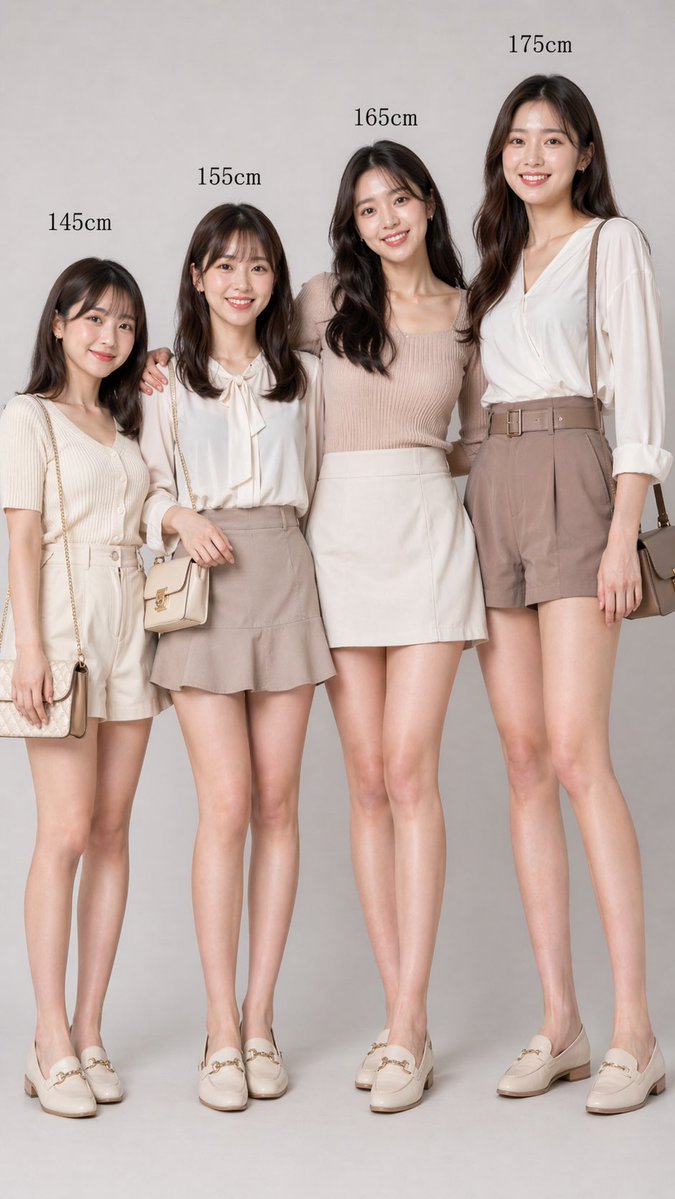
Größenvergleich von vier Frauen
Diese Funktion erzeugt ein realistisches Studio-Modebild, das vier Frauen mit unterschiedlicher Körpergröße zeigt und sich für Vergleichsposts in sozialen Medien oder visuelle Anleitungen im redaktionellen Stil eignet.
Dies ist ein GPT Image 2 -Prompt für Mode und Schönheit . Verwenden Sie den unten stehenden, kopierfertigen Prompt, um ähnliche Grafiken zu erstellen, und überprüfen Sie vor der Wiederverwendung Awesome GPT Image 2 Prompts -Quellenangaben sowie die kommerziellen Nutzungsrechte.
Benötigen Sie den vollständigen Prompt-Satz? Verwenden Sie den Mode und Schönheit Weitere verwandte Beispiele finden Sie im Themen-Hub oder öffnen Sie die GPT Image 2 Prompt-Katalog für das vollständige Beispielverzeichnis, wiederverwendbare Strukturen und Quellenangaben.
Free 1K preview
Generate one preview image instantly, no sign-up required.
1799/4000
Eingabeaufforderung
Kopierfertige Eingabeaufforderung
A minimalist, high-fashion studio photograph showcases four adult East Asian women standing side-by-side against a seamless, light gray background. Full-body shots, from head to toe, are taken from the front, with soft, even lighting creating a sophisticated commercial feel. Above each woman's head, her height is clearly indicated in black serif font: 145cm, 155cm, 165cm, and 175cm. This emphasizes the realistic differences in height proportions while maintaining the women's slender, elegant, and unified style. They have long, soft, wavy hair ranging from dark brown to black and possess neutral expressions. Show every face clearly with natural, detailed facial features, rectangular blurs. The four women stand close together in a friendly posture, with subtle physical contact; one woman lightly links arms with another. Their clothing features harmonious shades of beige, cream, taupe, and soft pink, paired with sophisticated, feminine casual wear and matching ivory loafers. Woman 1 (145cm): Wears a short-sleeved cream-colored ribbed knit top tucked into high-waisted light beige shorts, with a fabric belt, and carries a small chain-stitched shoulder bag. Woman 2 (155cm): Wears a white long-sleeved shirt with a bow at the collar, paired with a taupe mini skirt with a slight flare, and carries a small light beige crossbody bag. Woman 3 (165cm): Wears a sleeveless pinkish-beige ribbed knit top with a simple ivory mini skirt. Woman 4 (175cm): Wears a flowing white V-neck shirt with rolled-up sleeves, paired with high-waisted taupe belted shorts, and carries a medium-sized taupe shoulder bag. All four women wear cream or ivory horsebit loafers. The composition is vertical, centered, minimalist, fashionable, and realistic, like a fashion catalog image comparing women's heights.
Best for
- - Mode und Schönheit visual exploration
- - Image generation and reference-image edits
- - Reusable briefs that keep source attribution visible
Change these parts
- - Subject, product, character, or scene
- - Aspect ratio, camera, lighting, and background
- - Brand, text, color, and output constraints
Recommended model and settings
- - Model: gpt-image-2
- - Input mode: Text zu Bild
- - Aspect ratio: source
- - Commercial status: review original source
How to use this prompt
- 1. Copy the prompt and preserve its structure for the first test.
- 2. Replace the subject, context, and publishing channel.
- 3. Change one camera, lighting, or style variable per iteration.
- 4. Inspect the output, source, text, and rights before reuse.
Limitations, source, and reuse cautions
- - Generated output is an editable draft, not factual, legal, or rights evidence.
- - Review the linked source, people, brands, logos, text, and third-party media before commercial use.
Importiert von Awesome GPT Image 2 Prompts . Quellenangabe erforderlich. Status der kommerziellen Nutzung: allowed ; Rechte an der Quelle vor kostenpflichtiger Nutzung prüfen.
Weitere Fälle in dieser Kategorie
Priorisiert nach Kategorie, Kompatibilität der Eingabemodi, Qualität und geringerem Risiko.






Hinweise zur Wiederverwendung und Quellenangabe
Verwenden Sie diese Eingabeaufforderung sicher, nachdem Sie den Fall in der Vorschau angezeigt haben.
- 1.Kopieren Sie die Eingabeaufforderung oder öffnen Sie sie direkt in Dovoo mit der Schaltfläche „Generieren“.
- 2.Passen Sie Variablen, Seitenverhältnis und Referenzbilder an Ihren Anwendungsfall an.
- 3.Vor der Veröffentlichung oder kostenpflichtigen Nutzung sollten Sie die Rechte an der Quelle, die Anforderungen an die Namensnennung sowie die Risiken für die Marke oder das Abbild prüfen.