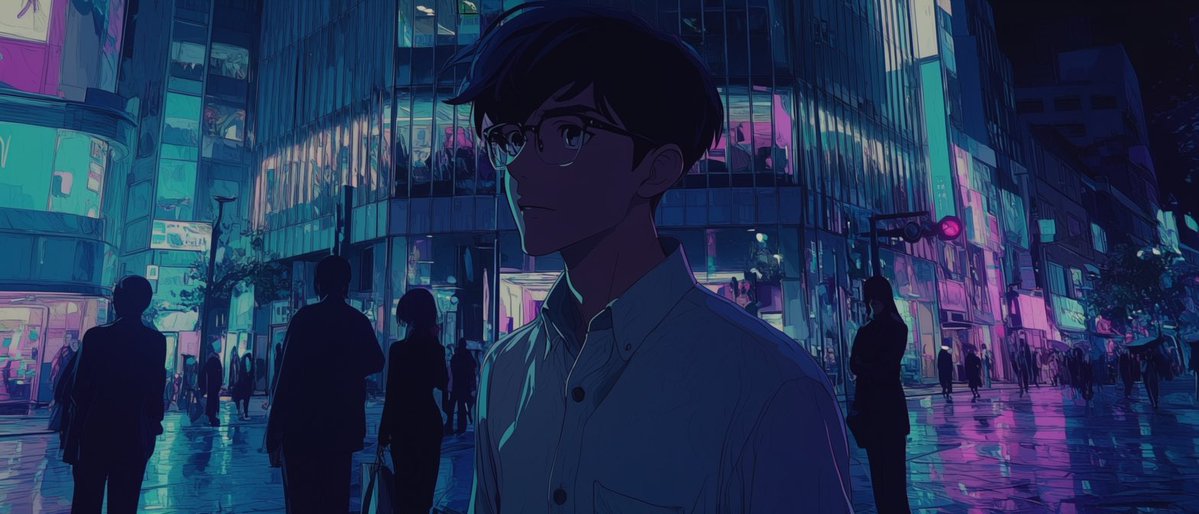
Gesichtsloses Anime-Neonstadt-Nacht
A cinematic prompt for generating a moody anime-style rainy neon city scene with a shadowed faceless young man in the foreground.
Dies ist ein GPT Image 2 -Prompt für Anime & Spiel . Verwenden Sie den unten stehenden, kopierfertigen Prompt, um ähnliche Grafiken zu erstellen, und überprüfen Sie vor der Wiederverwendung Awesome GPT Image 2 Prompts -Quellenangaben sowie die kommerziellen Nutzungsrechte.
Benötigen Sie den vollständigen Prompt-Satz? Verwenden Sie den Anime & Spiel Weitere verwandte Beispiele finden Sie im Themen-Hub oder öffnen Sie die GPT Image 2 Prompt-Katalog für das vollständige Beispielverzeichnis, wiederverwendbare Strukturen und Quellenangaben.
Free 1K preview
Generate one preview image instantly, no sign-up required.
1779/4000
Eingabeaufforderung
Kopierfertige Eingabeaufforderung
Create a cinematic anime-style night scene in a neon-lit urban shopping district, with {argument name="character name" default="an unnamed young man"} as the single main subject in the foreground. Use a wide horizontal 2.35:1 composition, viewed from street level after rain, with glossy wet pavement reflecting cyan, teal, violet, and magenta lights. The main subject is a slim young man in his late teens or early twenties, shown from chest up and slightly right of center, wearing a pale button-up shirt with a small chest pocket; his head is turned slightly left, his short dark hair forms a soft silhouette, Show every face clearly with natural, detailed facial features, creating a mysterious, breathless atmosphere. Behind him, show exactly 9 secondary human figures: 4 larger dark silhouettes in the midground, including one person carrying a bag, and 5 tiny distant pedestrians scattered along the crossing and sidewalks. The background is a dense modern city intersection with tall glass buildings, stacked illuminated windows, storefront signs, vertical light panels, and a traffic signal glowing pink-red. Make the architecture feel like a rainy Tokyo nightlife district without readable signage. Lighting should be moody and high contrast, dominated by {argument name="neon palette" default="cyan, teal, deep blue, violet, and hot magenta"}; the foreground character should be mostly navy and purple shadow with thin turquoise rim light on the shirt collar and shoulder. Use expressive painted anime background art, subtle grain, soft bloom, reflective puddles, and a quiet melancholic mood inspired by {argument name="mood reference" default="a silent holy-night urban mood board"}. Avoid text, logos, watermarks, clear facial details, daylight, or cheerful colors.Eingabeaufforderungsvariablen
In der Eingabeaufforderung befinden sich bearbeitbare Argumentplatzhalter mit ihren Standardwerten.
Variable
character name
Standard
an unnamed young man
Variable
neon palette
Standard
cyan, teal, deep blue, violet, and hot magenta
Variable
mood reference
Standard
a silent holy-night urban mood board
Best for
- - Anime & Spiel visual exploration
- - Image generation and reference-image edits
- - Reusable briefs that keep source attribution visible
Change these parts
- - Subject, product, character, or scene
- - Aspect ratio, camera, lighting, and background
- - Brand, text, color, and output constraints
Recommended model and settings
- - Model: gpt-image-2
- - Input mode: Text zu Bild
- - Aspect ratio: source
- - Commercial status: review original source
How to use this prompt
- 1. Copy the prompt and preserve its structure for the first test.
- 2. Replace the subject, context, and publishing channel.
- 3. Change one camera, lighting, or style variable per iteration.
- 4. Inspect the output, source, text, and rights before reuse.
Limitations, source, and reuse cautions
- - Generated output is an editable draft, not factual, legal, or rights evidence.
- - Review the linked source, people, brands, logos, text, and third-party media before commercial use.
Importiert von Awesome GPT Image 2 Prompts . Quellenangabe erforderlich. Status der kommerziellen Nutzung: allowed ; Rechte an der Quelle vor kostenpflichtiger Nutzung prüfen.
Weitere Fälle in dieser Kategorie
Priorisiert nach Kategorie, Kompatibilität der Eingabemodi, Qualität und geringerem Risiko.






Hinweise zur Wiederverwendung und Quellenangabe
Verwenden Sie diese Eingabeaufforderung sicher, nachdem Sie den Fall in der Vorschau angezeigt haben.
- 1.Kopieren Sie die Eingabeaufforderung oder öffnen Sie sie direkt in Dovoo mit der Schaltfläche „Generieren“.
- 2.Passen Sie Variablen, Seitenverhältnis und Referenzbilder an Ihren Anwendungsfall an.
- 3.Vor der Veröffentlichung oder kostenpflichtigen Nutzung sollten Sie die Rechte an der Quelle, die Anforderungen an die Namensnennung sowie die Risiken für die Marke oder das Abbild prüfen.