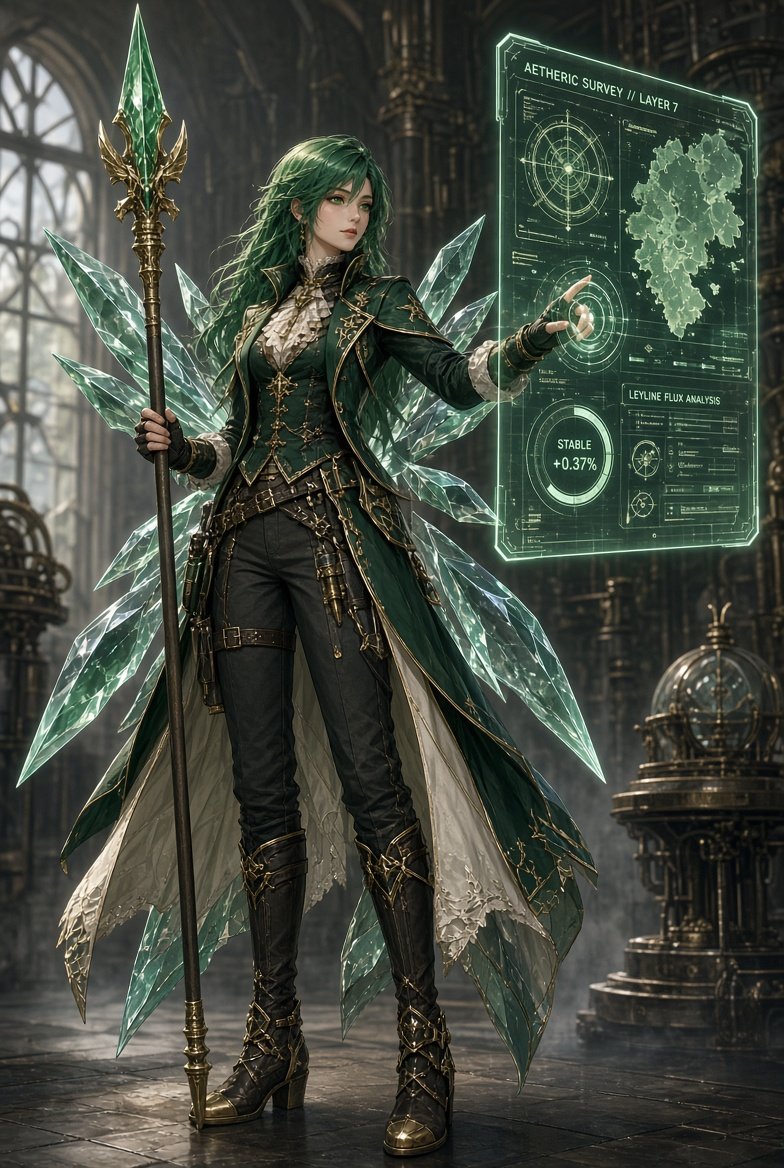
Emerald Aetheric Surveyor
A detailed fantasy concept art prompt for creating an emerald-haired steampunk elven mage with crystal wings and a glowing holographic survey interface.
Dies ist ein GPT Image 2 -Prompt für Anime & Spiel . Verwenden Sie den unten stehenden, kopierfertigen Prompt, um ähnliche Grafiken zu erstellen, und überprüfen Sie vor der Wiederverwendung Awesome GPT Image 2 Prompts -Quellenangaben sowie die kommerziellen Nutzungsrechte.
Benötigen Sie den vollständigen Prompt-Satz? Verwenden Sie den Anime & Spiel Weitere verwandte Beispiele finden Sie im Themen-Hub oder öffnen Sie die GPT Image 2 Prompt-Katalog für das vollständige Beispielverzeichnis, wiederverwendbare Strukturen und Quellenangaben.
Free 1K preview
Generate one preview image instantly, no sign-up required.
2079/4000
Eingabeaufforderung
Kopierfertige Eingabeaufforderung
Create a vertical 2:3 cinematic fantasy character illustration of {argument name="character name" default="an elven aetheric surveyor"} standing full-body in a grand gothic steampunk observatory. She is a refined young woman with long windswept {argument name="hair color" default="emerald green hair"}, pale skin, pointed ears, elegant serious expression, and detailed anime-realism facial features. Outfit: dark emerald Victorian military coat with gold embroidery and trim, high ruffled cream blouse, fitted black trousers, belts, pouches, brass instruments, black gloves, tall black leather heeled boots with ornate gold buckles, and a long layered cape lined in cream fabric. Behind her are exactly eight large translucent crystalline wing-like shards radiating from her back, faceted and glowing pale mint green like cut glass. In her left hand she holds a tall ornate staff topped with a large green crystal spearhead framed by gold filigree; with her right hand she touches a floating holographic interface panel. The hologram is a luminous green transparent rectangular sci-fi magic screen containing exactly five main information areas: 1) top title text reading {argument name="hologram title" default="AETHERIC SURVEY // LAYER 7"}, 2) an upper-left circular compass/radar diagram, 3) an upper-right irregular map silhouette, 4) a lower-left circular status gauge reading {argument name="status readout" default="STABLE +0.37%"}, and 5) a lower-right analysis card labeled {argument name="analysis label" default="LEYLINE FLUX ANALYSIS"} with small charts and data lines. Background: towering arched windows, dark cathedral columns, brass pipes, gears, mechanical astrolabe machinery, misty volumetric light, polished stone floor with reflections. Color palette of deep green, black, antique gold, pale crystal mint, and smoky gray. Style: highly detailed fantasy concept art, sharp linework blended with painterly realism, luxurious costume design, glowing magical technology, dramatic rim light, depth of field, intricate textures, no watermark, no extra characters.Eingabeaufforderungsvariablen
In der Eingabeaufforderung befinden sich bearbeitbare Argumentplatzhalter mit ihren Standardwerten.
Variable
character name
Standard
an elven aetheric surveyor
Variable
hair color
Standard
emerald green hair
Variable
hologram title
Standard
AETHERIC SURVEY // LAYER 7
Variable
status readout
Standard
STABLE +0.37%
Variable
analysis label
Standard
LEYLINE FLUX ANALYSIS
Best for
- - Anime & Spiel visual exploration
- - Image generation and reference-image edits
- - Reusable briefs that keep source attribution visible
Change these parts
- - Subject, product, character, or scene
- - Aspect ratio, camera, lighting, and background
- - Brand, text, color, and output constraints
Recommended model and settings
- - Model: gpt-image-2
- - Input mode: Text zu Bild
- - Aspect ratio: source
- - Commercial status: review original source
How to use this prompt
- 1. Copy the prompt and preserve its structure for the first test.
- 2. Replace the subject, context, and publishing channel.
- 3. Change one camera, lighting, or style variable per iteration.
- 4. Inspect the output, source, text, and rights before reuse.
Limitations, source, and reuse cautions
- - Generated output is an editable draft, not factual, legal, or rights evidence.
- - Review the linked source, people, brands, logos, text, and third-party media before commercial use.
Importiert von Awesome GPT Image 2 Prompts . Quellenangabe erforderlich. Status der kommerziellen Nutzung: allowed ; Rechte an der Quelle vor kostenpflichtiger Nutzung prüfen.
Weitere Fälle in dieser Kategorie
Priorisiert nach Kategorie, Kompatibilität der Eingabemodi, Qualität und geringerem Risiko.


Hinweise zur Wiederverwendung und Quellenangabe
Verwenden Sie diese Eingabeaufforderung sicher, nachdem Sie den Fall in der Vorschau angezeigt haben.
- 1.Kopieren Sie die Eingabeaufforderung oder öffnen Sie sie direkt in Dovoo mit der Schaltfläche „Generieren“.
- 2.Passen Sie Variablen, Seitenverhältnis und Referenzbilder an Ihren Anwendungsfall an.
- 3.Vor der Veröffentlichung oder kostenpflichtigen Nutzung sollten Sie die Rechte an der Quelle, die Anforderungen an die Namensnennung sowie die Risiken für die Marke oder das Abbild prüfen.