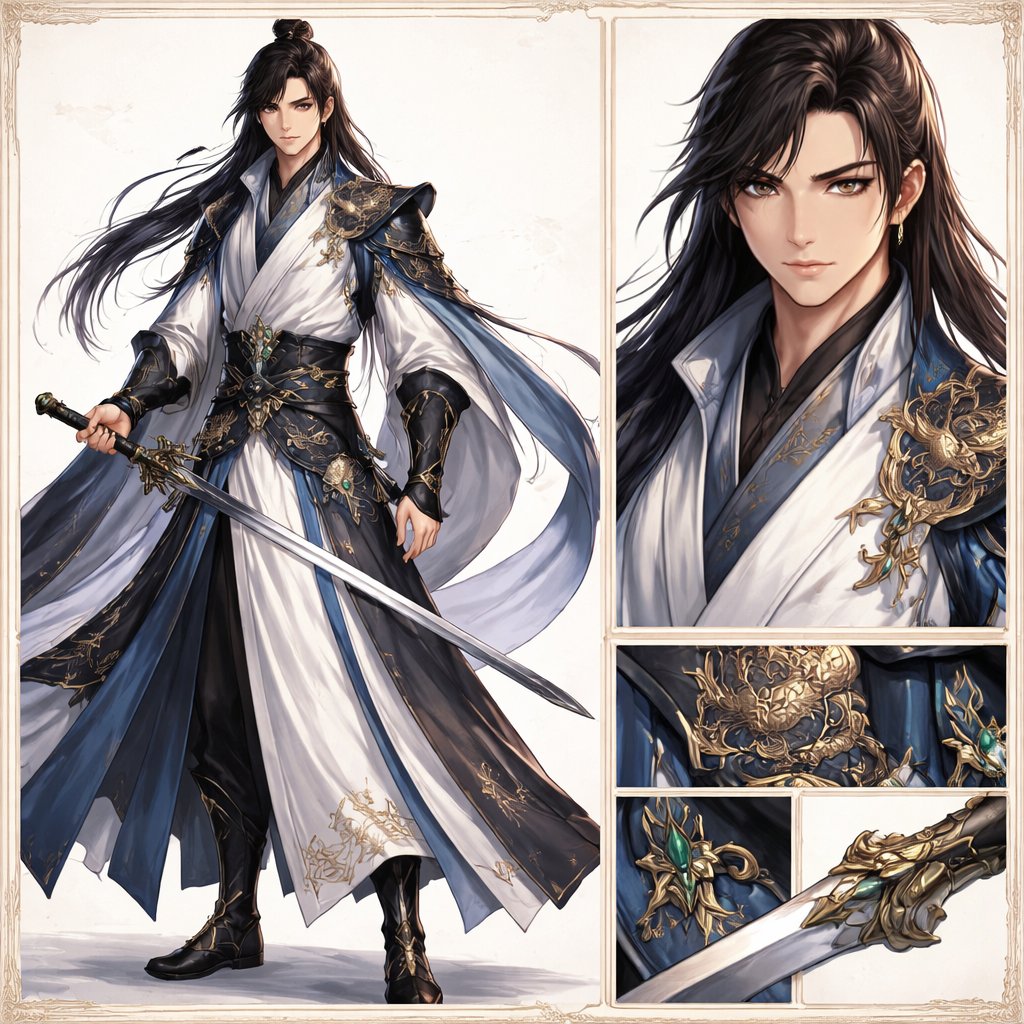
Elegantes Wuxia-Schwertkämpfer-Designblatt
Erzeugt eine detailreiche Fantasy-Charakterreferenz-Illustration eines edlen männlichen Schwertkämpfers mit Ganzkörperansicht und vergrößerten Kostüm- und Waffendetails, ideal für die Präsentation von Konzeptzeichnungen.
Dies ist ein GPT Image 2 -Prompt für Porträt & Charakter . Verwenden Sie den unten stehenden, kopierfertigen Prompt, um ähnliche Grafiken zu erstellen, und überprüfen Sie vor der Wiederverwendung Awesome GPT Image 2 Prompts -Quellenangaben sowie die kommerziellen Nutzungsrechte.
Free 1K preview
Generate one preview image instantly, no sign-up required.
Eingabeaufforderung
Kopierfertige Eingabeaufforderung
Create an elegant high-fantasy character design sheet in a refined wuxia/xianxia style on a clean ivory background with a thin ornate vintage border. The layout is a split showcase with 5 visible panels: 1 large full-body panel on the left, 1 tall upper-right portrait close-up, and 3 stacked/lower detail panels on the right showing armor and weapon craftsmanship. The main subject is a handsome adult male swordsman, {argument name="character name" default="original character"}, with long flowing {argument name="hair color" default="black"} hair tied in a half-up topknot, the rest loose and wind-swept, wearing a small gold earring. His expression is calm, noble, and slightly aloof. He wears luxurious layered robes in {argument name="robe colors" default="white, deep navy blue, and black"}, with wide sleeves, flowing sashes, and highly detailed gold embroidery. Over the shoulders and torso are ornate dark blue and black armor elements with elaborate gold filigree and dragon-like decorative metalwork, plus a jade-green gemstone set into the waist ornament and weapon fittings. In the full-body panel he stands in a poised three-quarter stance holding a long straight jian sword diagonally downward, with the robe hems and ribbons flowing gracefully to suggest motion. The costume should include exactly 6 standout outfit elements: white inner robe, dark blue outer robe panels, black underlayer trousers, wide black-and-gold waist belt, sculpted gold shoulder armor, and black bracers with gold detailing. The right-side close-up portrait emphasizes the layered collar, glossy hair texture, shoulder ornament, and elegant fabric rendering. The 3 detail panels show exactly these focus areas: a gold dragon-like waist armor emblem, a jade-set sword guard or accessory ornament, and a close-up of the ornate gold sword hilt and guard with part of the blade. Overall aesthetic: ultra-detailed concept art, stylish and polished, crisp linework blended with painterly rendering, premium character-sheet presentation, soft neutral studio lighting, subtle shadows, luxurious textures, and a restrained palette of ivory, midnight blue, black, gold, and jade green.Eingabeaufforderungsvariablen
In der Eingabeaufforderung befinden sich bearbeitbare Argumentplatzhalter mit ihren Standardwerten.
Best for
- - Porträt & Charakter visual exploration
- - Image generation and reference-image edits
- - Reusable briefs that keep source attribution visible
Change these parts
- - Subject, product, character, or scene
- - Aspect ratio, camera, lighting, and background
- - Brand, text, color, and output constraints
Recommended model and settings
- - Model: gpt-image-2
- - Input mode: Text zu Bild
- - Aspect ratio: source
- - Commercial status: review original source
How to use this prompt
- 1. Copy the prompt and preserve its structure for the first test.
- 2. Replace the subject, context, and publishing channel.
- 3. Change one camera, lighting, or style variable per iteration.
- 4. Inspect the output, source, text, and rights before reuse.
Limitations, source, and reuse cautions
- - Generated output is an editable draft, not factual, legal, or rights evidence.
- - Review the linked source, people, brands, logos, text, and third-party media before commercial use.
Weitere Fälle in dieser Kategorie
Priorisiert nach Kategorie, Kompatibilität der Eingabemodi, Qualität und geringerem Risiko.






Hinweise zur Wiederverwendung und Quellenangabe
Verwenden Sie diese Eingabeaufforderung sicher, nachdem Sie den Fall in der Vorschau angezeigt haben.
- 1.Kopieren Sie die Eingabeaufforderung oder öffnen Sie sie direkt in Dovoo mit der Schaltfläche „Generieren“.
- 2.Passen Sie Variablen, Seitenverhältnis und Referenzbilder an Ihren Anwendungsfall an.
- 3.Vor der Veröffentlichung oder kostenpflichtigen Nutzung sollten Sie die Rechte an der Quelle, die Anforderungen an die Namensnennung sowie die Risiken für die Marke oder das Abbild prüfen.