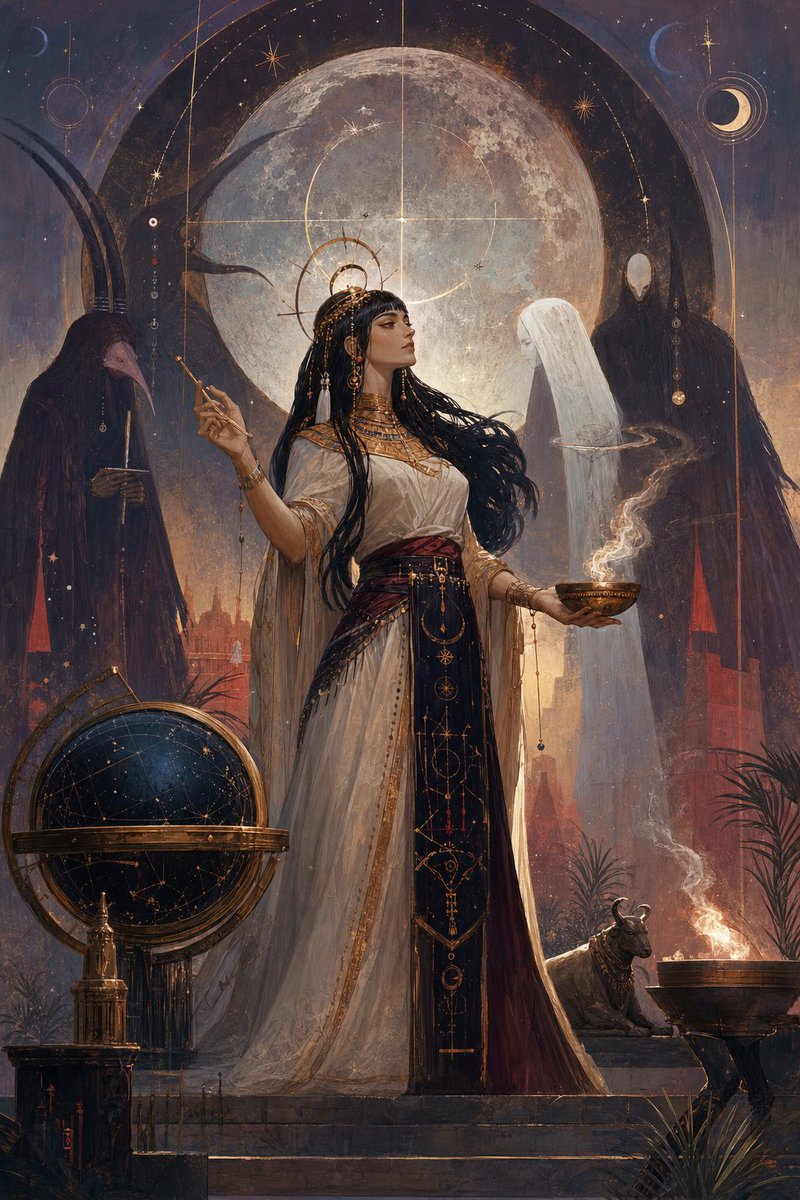
Egyptian Moon Priestess Ritual
A richly detailed dark fantasy illustration prompt for generating an ancient Egyptian moon priestess performing an occult celestial ritual under a giant full moon.
Dies ist ein GPT Image 2 -Prompt für Illustration & Kunst . Verwenden Sie den unten stehenden, kopierfertigen Prompt, um ähnliche Grafiken zu erstellen, und überprüfen Sie vor der Wiederverwendung Awesome GPT Image 2 Prompts -Quellenangaben sowie die kommerziellen Nutzungsrechte.
Free 1K preview
Generate one preview image instantly, no sign-up required.
Eingabeaufforderung
Kopierfertige Eingabeaufforderung
Create a vertical dark fantasy oil painting of an ancient Egyptian high priestess standing on a stone temple terrace at night beneath an enormous full moon. The central subject is {argument name="character name" default="an Egyptian moon priestess"}, shown full body in a regal three-quarter pose, wearing a flowing ivory linen gown with translucent drapery, a deep black and burgundy front panel embroidered with gold celestial symbols, ornate gold collar, bracelets, belt ornaments, dangling beads, and a radiant circular halo-like headdress. She has {argument name="hair color" default="long black braided hair"} streaming in the wind, sharp eyeliner, calm authoritative expression, and she looks toward the right. In her left hand she holds a shallow bronze incense bowl emitting curling white smoke; in her right hand she raises a slender ritual wand or stylus. Surround her with exactly four visible supernatural or ritual figures/creatures: one dark ibis-headed robed figure on the left holding a scale or ritual object, one translucent white veiled spirit facing her on the right, one tall faceless black-robed specter behind the spirit, and one small sacred bull statue or living bull near the lower right. Add exactly three major foreground ritual objects: a large antique celestial globe/orrery with brass rings at lower left, a square dark pedestal with a small gold vessel beside it, and a bronze fire brazier at lower right with flame and smoke. Background: monumental Egyptian architecture, red temple pylons, desert plants, steps, faint city silhouettes, smoky torchlight, and a star-filled indigo sky. The huge moon dominates the upper center and is overlaid with fine golden astrological diagrams, rings, arcs, constellation lines, crosshair geometry, tiny stars, crescent moon motifs, and hanging bead-like ornaments. Visual style: highly detailed painterly illustration, romantic symbolist fantasy, Art Nouveau and occult astronomy influence, muted indigo, charcoal, warm gold, ivory, and ember red palette, dramatic moon backlighting, soft atmospheric haze, intricate gold linework, textured canvas brushstrokes, cinematic composition, no text, no watermark.Eingabeaufforderungsvariablen
In der Eingabeaufforderung befinden sich bearbeitbare Argumentplatzhalter mit ihren Standardwerten.
Best for
- - Illustration & Kunst visual exploration
- - Image generation and reference-image edits
- - Reusable briefs that keep source attribution visible
Change these parts
- - Subject, product, character, or scene
- - Aspect ratio, camera, lighting, and background
- - Brand, text, color, and output constraints
Recommended model and settings
- - Model: gpt-image-2
- - Input mode: Text zu Bild
- - Aspect ratio: source
- - Commercial status: review original source
How to use this prompt
- 1. Copy the prompt and preserve its structure for the first test.
- 2. Replace the subject, context, and publishing channel.
- 3. Change one camera, lighting, or style variable per iteration.
- 4. Inspect the output, source, text, and rights before reuse.
Limitations, source, and reuse cautions
- - Generated output is an editable draft, not factual, legal, or rights evidence.
- - Review the linked source, people, brands, logos, text, and third-party media before commercial use.
Weitere Fälle in dieser Kategorie
Priorisiert nach Kategorie, Kompatibilität der Eingabemodi, Qualität und geringerem Risiko.






Hinweise zur Wiederverwendung und Quellenangabe
Verwenden Sie diese Eingabeaufforderung sicher, nachdem Sie den Fall in der Vorschau angezeigt haben.
- 1.Kopieren Sie die Eingabeaufforderung oder öffnen Sie sie direkt in Dovoo mit der Schaltfläche „Generieren“.
- 2.Passen Sie Variablen, Seitenverhältnis und Referenzbilder an Ihren Anwendungsfall an.
- 3.Vor der Veröffentlichung oder kostenpflichtigen Nutzung sollten Sie die Rechte an der Quelle, die Anforderungen an die Namensnennung sowie die Risiken für die Marke oder das Abbild prüfen.