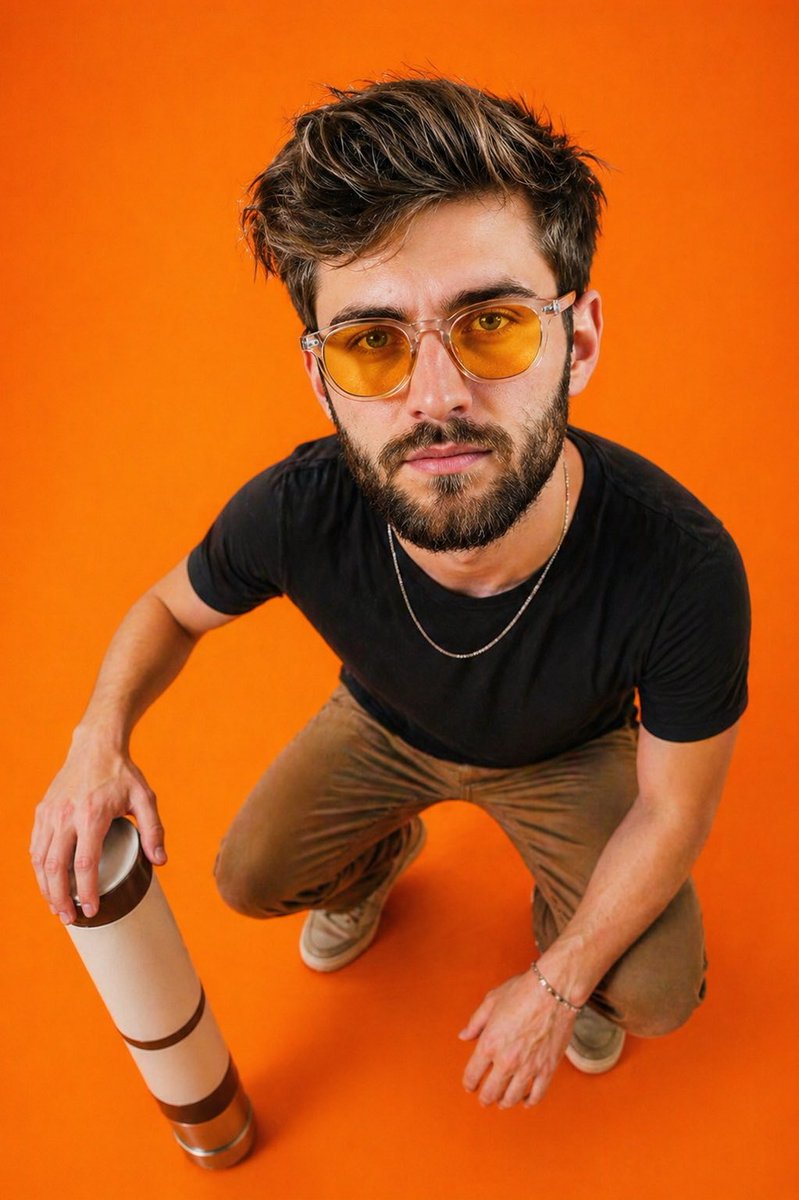
Editorial Top-Down Fisheye Portrait
Eine redaktionelle Vorgabe für ein Mode-Fotoshooting: ein Porträt von oben, Weitwinkelaufnahme mit Fischaugenverzerrung vor einem leuchtenden, einfarbigen, orangefarbenen Hintergrund.
Dies ist ein GPT Image 2 -Prompt für Mode & Schönheit . Verwenden Sie den unten stehenden, kopierfertigen Prompt, um ähnliche Grafiken zu erstellen, und überprüfen Sie vor der Wiederverwendung Awesome GPT Image 2 Prompts -Quellenangaben sowie die kommerziellen Nutzungsrechte.
Free 1K preview
Generate one preview image instantly, no sign-up required.
Eingabeaufforderung
Kopierfertige Eingabeaufforderung
Ultra-realistic portrait of a young man captured from a {argument name="perspective" default="top-down wide-angle perspective (slight fisheye distortion)"}, creating an exaggerated head-to-body ratio. Subject is crouching on a seamless solid {argument name="background color" default="vibrant orange"} background (studio floor and backdrop blended).

Pose: relaxed squat, one arm resting on knee, the other holding a minimal cylindrical object (like a thermos or bottle) placed near the ground. Body slightly angled, head tilted upward looking directly into the camera.

Outfit: {argument name="outfit" default="fitted black t-shirt, neutral-toned pants, casual sneakers"}, minimal accessories (thin chain, bracelet optional).

Styling: yellow-tinted translucent sunglasses with a modern frame.

Lighting: soft but high-contrast studio lighting, evenly illuminating the subject with subtle shadows under arms and legs, vibrant color pop.

Camera: top-down shot, 24–28mm lens feel, slight distortion for editorial effect, sharp focus, high detail.

Mood: confident, minimal, editorial, slightly playful due to perspective distortion.

Background: clean, monochrome orange, no distractions, studio aesthetic.

Style: fashion editorial, high saturation, crisp textures, ultra-detailed, 8k, HDR.
Eingabeaufforderungsvariablen
In der Eingabeaufforderung befinden sich bearbeitbare Argumentplatzhalter mit ihren Standardwerten.
Best for
- - Mode & Schönheit visual exploration
- - Image generation and reference-image edits
- - Reusable briefs that keep source attribution visible
Change these parts
- - Subject, product, character, or scene
- - Aspect ratio, camera, lighting, and background
- - Brand, text, color, and output constraints
Recommended model and settings
- - Model: gpt-image-2
- - Input mode: Text zu Bild
- - Aspect ratio: source
- - Commercial status: review original source
How to use this prompt
- 1. Copy the prompt and preserve its structure for the first test.
- 2. Replace the subject, context, and publishing channel.
- 3. Change one camera, lighting, or style variable per iteration.
- 4. Inspect the output, source, text, and rights before reuse.
Limitations, source, and reuse cautions
- - Generated output is an editable draft, not factual, legal, or rights evidence.
- - Review the linked source, people, brands, logos, text, and third-party media before commercial use.
Weitere Fälle in dieser Kategorie
Priorisiert nach Kategorie, Kompatibilität der Eingabemodi, Qualität und geringerem Risiko.






Hinweise zur Wiederverwendung und Quellenangabe
Verwenden Sie diese Eingabeaufforderung sicher, nachdem Sie den Fall in der Vorschau angezeigt haben.
- 1.Kopieren Sie die Eingabeaufforderung oder öffnen Sie sie direkt in Dovoo mit der Schaltfläche „Generieren“.
- 2.Passen Sie Variablen, Seitenverhältnis und Referenzbilder an Ihren Anwendungsfall an.
- 3.Vor der Veröffentlichung oder kostenpflichtigen Nutzung sollten Sie die Rechte an der Quelle, die Anforderungen an die Namensnennung sowie die Risiken für die Marke oder das Abbild prüfen.