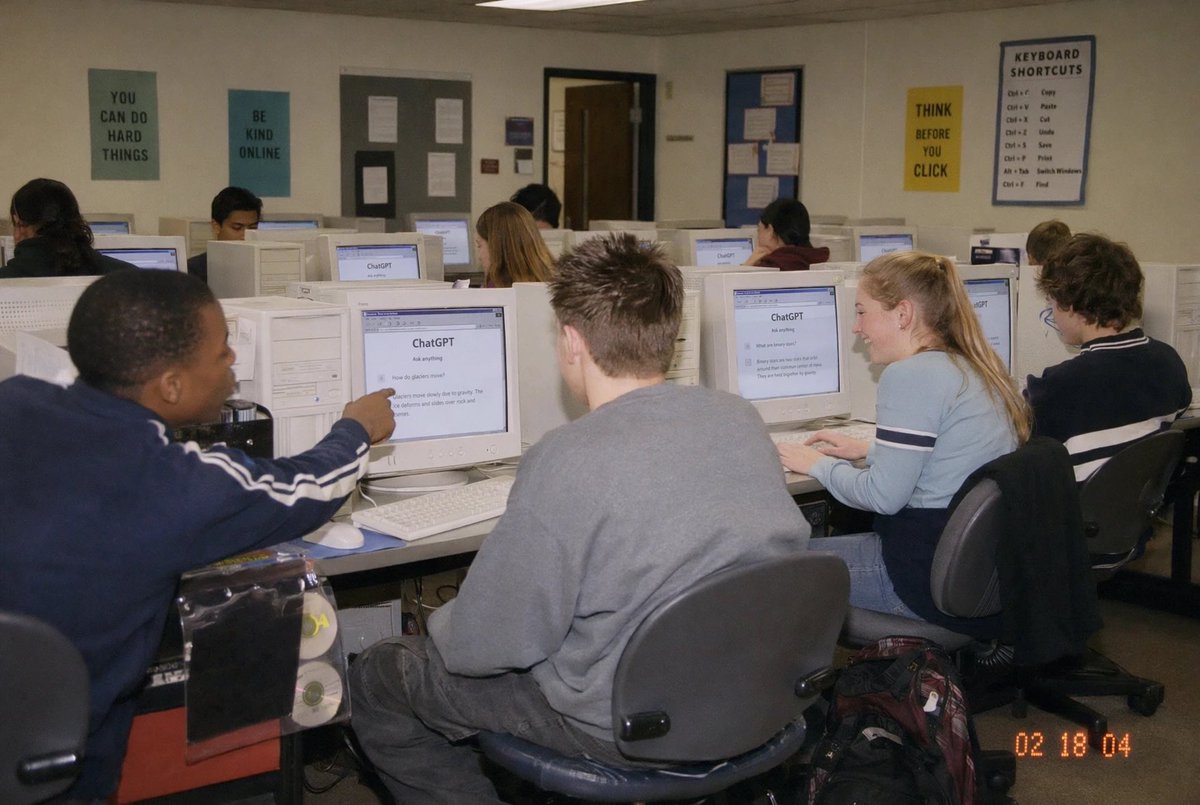
Computerlabor aus den frühen 2000er Jahren mit ChatGPT
Diese Aufforderung erzeugt ein nostalgisches, authentisches Klassenzimmerfoto von Schülern, die ChatGPT auf Röhrencomputern verwenden – ideal für redaktionelle Beiträge oder Social-Media-Grafiken zum Thema KI im Bildungsalltag.
Dies ist ein GPT Image 2 -Prompt für Innenarchitektur . Verwenden Sie den unten stehenden, kopierfertigen Prompt, um ähnliche Grafiken zu erstellen, und überprüfen Sie vor der Wiederverwendung Awesome GPT Image 2 Prompts -Quellenangaben sowie die kommerziellen Nutzungsrechte.
Free 1K preview
Generate one preview image instantly, no sign-up required.
Eingabeaufforderung
Kopierfertige Eingabeaufforderung
A candid documentary-style photo of a {argument name="setting" default="high school computer lab classroom"} filled with exactly 10 students seated at rows of bulky off-white CRT desktop computers, viewed from the back-left corner of the room at a slight wide angle. The scene should feel like an early-2000s snapshot taken on a consumer digital camera with direct flash, soft grain, slightly warm indoor fluorescent lighting, and a timestamp in the bottom-right corner reading {argument name="timestamp" default="02 18 04"}. In the foreground left, a student in a navy track jacket with white sleeve stripes points at a CRT monitor; in the center foreground, another student with short spiky hair wears an oversized gray sweatshirt and sits facing away from the camera; on the right foreground, a blonde student with a ponytail wears a light blue long-sleeve top with dark horizontal arm stripes and types at a keyboard; far right, another student with curly dark hair sits at a workstation. Several other students occupy the middle and back rows, all facing their screens. The monitors prominently display the ChatGPT interface, with the visible heading reading {argument name="screen title" default="ChatGPT"} and simple prompt text beneath it. The room has beige walls, drop ceiling tiles, and multiple motivational classroom posters: exactly 4 readable posters on the back wall saying {argument name="poster one" default="YOU CAN DO HARD THINGS"}, "BE KIND ONLINE", "THINK BEFORE YOU CLICK", and a larger poster titled "KEYBOARD SHORTCUTS" with a list beneath it. Include bulletin boards, a classroom door at the back, rolling office chairs, white keyboards and mice, and a backpack on the floor near the right foreground desk. Show every face clearly with natural, detailed facial features, preserving the look of a real classroom photo while keeping the focus on the students using ChatGPT in an old computer lab.Eingabeaufforderungsvariablen
In der Eingabeaufforderung befinden sich bearbeitbare Argumentplatzhalter mit ihren Standardwerten.
Best for
- - Innenarchitektur visual exploration
- - Image generation and reference-image edits
- - Reusable briefs that keep source attribution visible
Change these parts
- - Subject, product, character, or scene
- - Aspect ratio, camera, lighting, and background
- - Brand, text, color, and output constraints
Recommended model and settings
- - Model: gpt-image-2
- - Input mode: Text zu Bild
- - Aspect ratio: source
- - Commercial status: review original source
How to use this prompt
- 1. Copy the prompt and preserve its structure for the first test.
- 2. Replace the subject, context, and publishing channel.
- 3. Change one camera, lighting, or style variable per iteration.
- 4. Inspect the output, source, text, and rights before reuse.
Limitations, source, and reuse cautions
- - Generated output is an editable draft, not factual, legal, or rights evidence.
- - Review the linked source, people, brands, logos, text, and third-party media before commercial use.
Weitere Fälle in dieser Kategorie
Priorisiert nach Kategorie, Kompatibilität der Eingabemodi, Qualität und geringerem Risiko.






Hinweise zur Wiederverwendung und Quellenangabe
Verwenden Sie diese Eingabeaufforderung sicher, nachdem Sie den Fall in der Vorschau angezeigt haben.
- 1.Kopieren Sie die Eingabeaufforderung oder öffnen Sie sie direkt in Dovoo mit der Schaltfläche „Generieren“.
- 2.Passen Sie Variablen, Seitenverhältnis und Referenzbilder an Ihren Anwendungsfall an.
- 3.Vor der Veröffentlichung oder kostenpflichtigen Nutzung sollten Sie die Rechte an der Quelle, die Anforderungen an die Namensnennung sowie die Risiken für die Marke oder das Abbild prüfen.