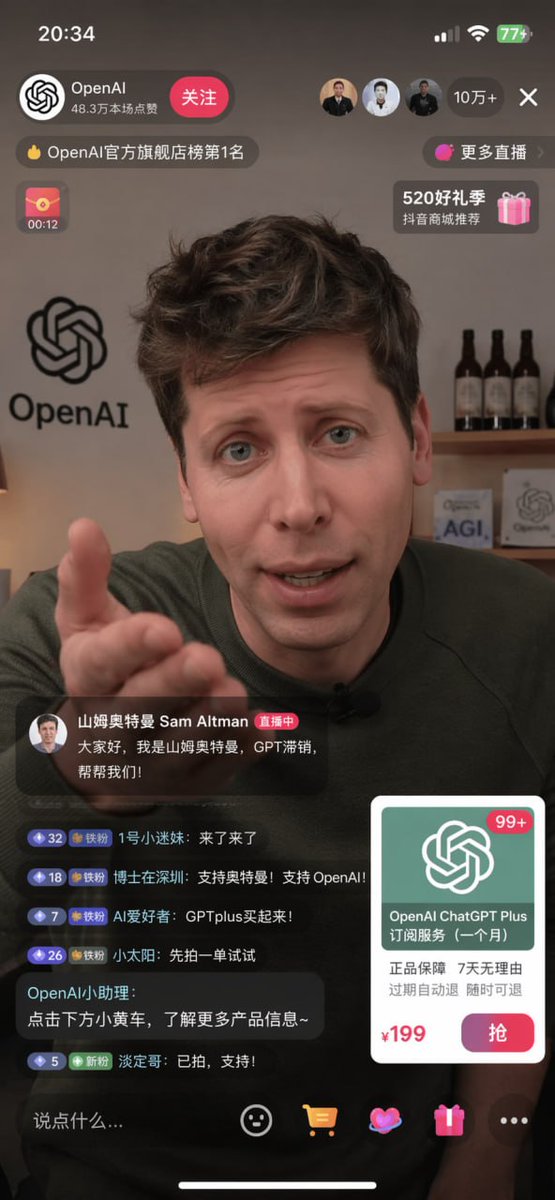
E-Commerce-Livestream-UI-Mockup
Erzeugt einen realistischen Screenshot eines mobilen Livestreams mit Moderator, Chat-Oberfläche und Produktkaufkarte.
Dies ist ein GPT Image 2 -Prompt für Produkt & Vertrieb . Verwenden Sie den unten stehenden, kopierfertigen Prompt, um ähnliche Grafiken zu erstellen, und überprüfen Sie vor der Wiederverwendung Awesome GPT Image 2 Prompts -Quellenangaben sowie die kommerziellen Nutzungsrechte.
Benötigen Sie den vollständigen Prompt-Satz? Verwenden Sie den Produkt & Vertrieb Weitere verwandte Beispiele finden Sie im Themen-Hub oder öffnen Sie die GPT Image 2 Prompt-Katalog für das vollständige Beispielverzeichnis, wiederverwendbare Strukturen und Quellenangaben.
Free 1K preview
Generate one preview image instantly, no sign-up required.
2033/4000
Eingabeaufforderung
Kopierfertige Eingabeaufforderung
{
  "type": "mobile livestream screenshot",
  "subject": {
    "person": "Sam Altman",
    "action": "looking directly at the camera, gesturing with right hand extended forward",
    "clothing": "dark green sweater"
  },
  "background": "room with a shelf containing 3 wine bottles, a sign saying 'AGI', and an OpenAI logo on the wall",
  "layout": {
    "top_bar": {
      "time": "20:34",
      "battery": "77+"
    },
    "streamer_info": {
      "name": "{argument name=\"streamer name\" default=\"OpenAI\"}",
      "likes": "483,000 likes on this live stream",
      "button": "Follow"
    },
    "viewer_stats": {
      "viewers": "100,000+",
      "avatars_count": 3
    },
    "banners": {
      "count": 4,
      "labels": [
        "Ranked No. 1 in the OpenAI Official Flagship Store",
        "More Live Streams",
        "00:12",
        "520 Gift Season"
      ]
    },
    "host_label": {
      "name": "{argument name=\"host name\" default=\"Sam Altman\"}",
      "status": "Live now",
      "subtitle": "{argument name=\"host quote\" default=\"Hello everyone, I'm Sam Altman, GPT is not selling well, help us!\"}"
    },
    "chat_box": {
      "message_count": 6,
      "messages": [
        "1st little fan: Here I come!",
        "Doctor in Shenzhen: Support Ultraman! Support OpenAI!",
        "AI enthusiast: Buy GPT Plus!",
        "Little Sun: Let's try placing an order first",
        "OpenAI Assistant: Click the little yellow cart below to learn more about the product~",
        "Calm Brother: Already clicked, support!"
      ]
    },
    "product_card": {
      "title": "{argument name=\"product name\" default=\"OpenAI ChatGPT Plus subscription service (one month)\"}",
      "features": "Genuine product guarantee 7 days no reason to return Automatic refund if expired Refund available at any time",
      "price": "{argument name=\"product price\" default=\"¥199\"}",
      "button": "Grab"
    },
    "bottom_bar": {
      "input_placeholder": "Say something...",
      "icons_count": 4
    }
  }
}
Eingabeaufforderungsvariablen
In der Eingabeaufforderung befinden sich bearbeitbare Argumentplatzhalter mit ihren Standardwerten.
Variable
streamer name
Standard
OpenAI
Variable
host name
Standard
Sam Altman
Variable
host quote
Standard
Hello everyone, I'm Sam Altman, GPT is not selling well, help us!
Variable
product name
Standard
OpenAI ChatGPT Plus subscription service (one month)
Variable
product price
Standard
¥199
Best for
- - Produkt & Vertrieb visual exploration
- - Image generation and reference-image edits
- - Reusable briefs that keep source attribution visible
Change these parts
- - Subject, product, character, or scene
- - Aspect ratio, camera, lighting, and background
- - Brand, text, color, and output constraints
Recommended model and settings
- - Model: gpt-image-2
- - Input mode: Text zu Bild
- - Aspect ratio: source
- - Commercial status: review original source
How to use this prompt
- 1. Copy the prompt and preserve its structure for the first test.
- 2. Replace the subject, context, and publishing channel.
- 3. Change one camera, lighting, or style variable per iteration.
- 4. Inspect the output, source, text, and rights before reuse.
Limitations, source, and reuse cautions
- - Generated output is an editable draft, not factual, legal, or rights evidence.
- - Review the linked source, people, brands, logos, text, and third-party media before commercial use.
Importiert von Awesome GPT Image 2 Prompts . Quellenangabe erforderlich. Status der kommerziellen Nutzung: allowed ; Rechte an der Quelle vor kostenpflichtiger Nutzung prüfen.
Weitere Fälle in dieser Kategorie
Priorisiert nach Kategorie, Kompatibilität der Eingabemodi, Qualität und geringerem Risiko.






Hinweise zur Wiederverwendung und Quellenangabe
Verwenden Sie diese Eingabeaufforderung sicher, nachdem Sie den Fall in der Vorschau angezeigt haben.
- 1.Kopieren Sie die Eingabeaufforderung oder öffnen Sie sie direkt in Dovoo mit der Schaltfläche „Generieren“.
- 2.Passen Sie Variablen, Seitenverhältnis und Referenzbilder an Ihren Anwendungsfall an.
- 3.Vor der Veröffentlichung oder kostenpflichtigen Nutzung sollten Sie die Rechte an der Quelle, die Anforderungen an die Namensnennung sowie die Risiken für die Marke oder das Abbild prüfen.