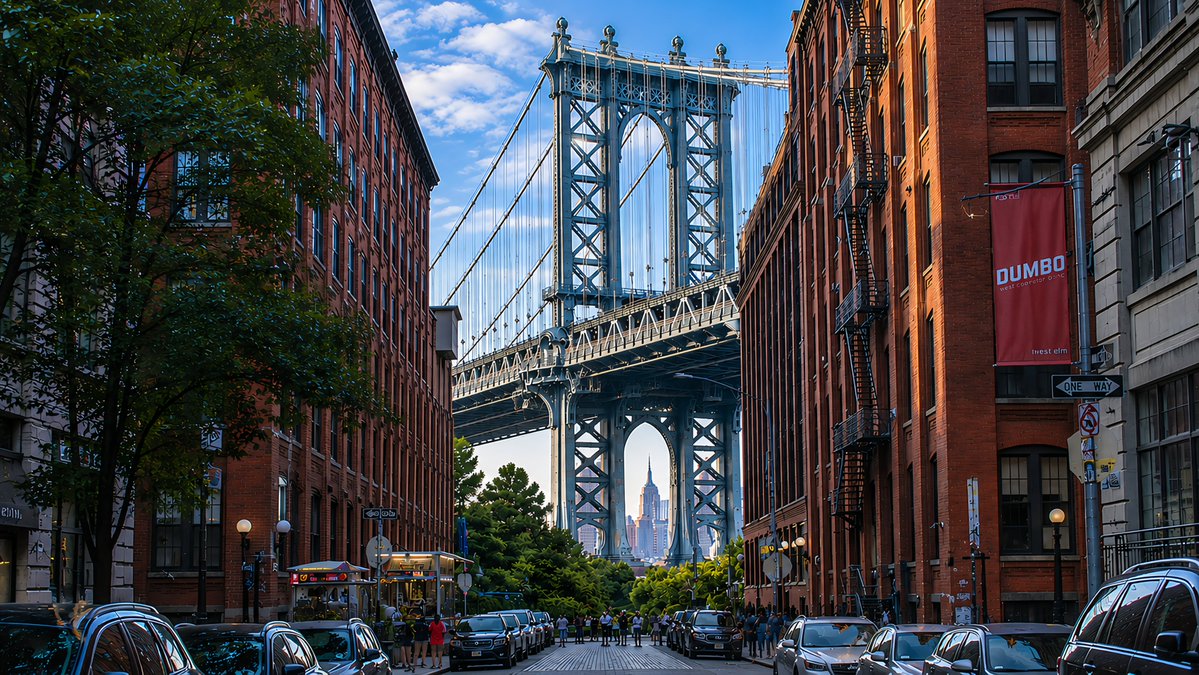
DUMBO Bridge Desktop Wallpaper
Creates a photorealistic 16:9 urban wallpaper of the Manhattan Bridge view in DUMBO using the reference image’s lighting and polished scenic style.
Dies ist ein GPT Image 2 -Prompt für Landschaft & Natur . Verwenden Sie den unten stehenden, kopierfertigen Prompt, um ähnliche Grafiken zu erstellen, und überprüfen Sie vor der Wiederverwendung Awesome GPT Image 2 Prompts -Quellenangaben sowie die kommerziellen Nutzungsrechte.
Free 1K preview
Generate one preview image instantly, no sign-up required.
Free text preview doesn’t preserve reference-image consistency.
Eingabeaufforderung
Kopierfertige Eingabeaufforderung
Using the provided reference image as a visual-quality and lighting reference, transform the scene into a photorealistic 16:9 desktop wallpaper of {argument name="location" default="DUMBO, Brooklyn"}. Replace the lighthouse coastline with an urban street-canyon composition: exactly 2 rows of tall red-brick warehouse buildings on the left and right, 1 large leafy tree in the left foreground, and 1 centered steel suspension bridge tower filling the background. Frame {argument name="distant landmark" default="the Empire State Building"} precisely through the lower arch of the bridge. Add 2 rows of parked cars along both curbs, a small cluster of pedestrians near the bridge approach, and wet-looking reflective street details for depth. Include exactly 2 readable street elements: a vertical red banner reading {argument name="banner text" default="DUMBO"} on the right building and a black-and-white {argument name="street sign text" default="ONE WAY"} sign below it. Preserve the reference image’s crisp high-resolution realism, blue sky with scattered clouds, rich contrast, golden side lighting, and dreamy wallpaper polish. No lighthouse, ocean, rocks, waves, or coastal buildings.Eingabeaufforderungsvariablen
In der Eingabeaufforderung befinden sich bearbeitbare Argumentplatzhalter mit ihren Standardwerten.
Best for
- - Landschaft & Natur visual exploration
- - Image generation and reference-image edits
- - Reusable briefs that keep source attribution visible
Change these parts
- - Subject, product, character, or scene
- - Aspect ratio, camera, lighting, and background
- - Brand, text, color, and output constraints
Recommended model and settings
- - Model: gpt-image-2
- - Input mode: Bild zu Bild
- - Aspect ratio: source
- - Commercial status: review original source
How to use this prompt
- 1. Copy the prompt and preserve its structure for the first test.
- 2. Replace the subject, context, and publishing channel.
- 3. Change one camera, lighting, or style variable per iteration.
- 4. Inspect the output, source, text, and rights before reuse.
Limitations, source, and reuse cautions
- - Generated output is an editable draft, not factual, legal, or rights evidence.
- - Review the linked source, people, brands, logos, text, and third-party media before commercial use.
Weitere Fälle in dieser Kategorie
Priorisiert nach Kategorie, Kompatibilität der Eingabemodi, Qualität und geringerem Risiko.






Hinweise zur Wiederverwendung und Quellenangabe
Verwenden Sie diese Eingabeaufforderung sicher, nachdem Sie den Fall in der Vorschau angezeigt haben.
- 1.Kopieren Sie die Eingabeaufforderung oder öffnen Sie sie direkt in Dovoo mit der Schaltfläche „Generieren“.
- 2.Passen Sie Variablen, Seitenverhältnis und Referenzbilder an Ihren Anwendungsfall an.
- 3.Vor der Veröffentlichung oder kostenpflichtigen Nutzung sollten Sie die Rechte an der Quelle, die Anforderungen an die Namensnennung sowie die Risiken für die Marke oder das Abbild prüfen.