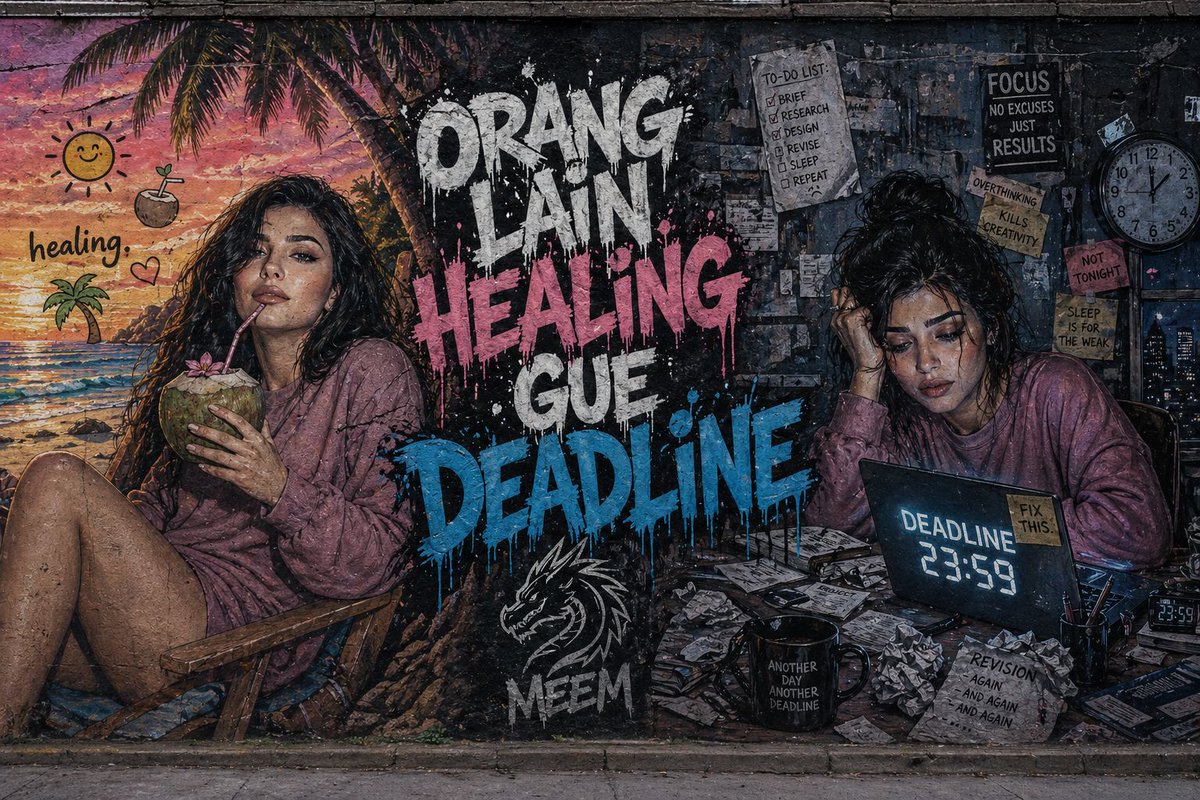
Wandgemälde mit zwei Konzepten: Street Art
Eine komplexe, in zwei Teile aufgeteilte Kompositionsaufgabe für ein Stadtwandgemälde, das ein entspannendes, tropisches Heilmotiv mit einem stressigen Arbeitstermin kontrastiert.
Dies ist ein GPT Image 2 -Prompt für Illustration & Kunst . Verwenden Sie den unten stehenden, kopierfertigen Prompt, um ähnliche Grafiken zu erstellen, und überprüfen Sie vor der Wiederverwendung Awesome GPT Image 2 Prompts -Quellenangaben sowie die kommerziellen Nutzungsrechte.
Free 1K preview
Generate one preview image instantly, no sign-up required.
Eingabeaufforderung
Kopierfertige Eingabeaufforderung
Ultra-detailed wide street art mural painted on a rough concrete city wall with a split composition. On the {argument name="left side" default="left side, a vibrant tropical beach scene in warm pastel tones shows a young woman (same face as reference) relaxing on a chair, sipping a coconut under a sunset sky"}, with playful tropical emojis and the caption “healing.” On the {argument name="right side" default="right side, a dark and messy workspace in cold bluish-gray tones shows the same woman stressed at a desk surrounded by scattered papers, a coffee mug, and a glowing laptop displaying “DEADLINE 23:59”"}. In the center, {argument name="main text" default="bold graffiti text reads “ORANG LAIN HEALING” and “GUE DEADLINE”"} in a dripping paint style with high contrast colors. Include a “MEEM” tag with a stylized dragon logo beneath. Cinematic lighting, gritty textures, hyper-realistic style, strong emotional contrast, 8K detail.Eingabeaufforderungsvariablen
In der Eingabeaufforderung befinden sich bearbeitbare Argumentplatzhalter mit ihren Standardwerten.
Best for
- - Illustration & Kunst visual exploration
- - Image generation and reference-image edits
- - Reusable briefs that keep source attribution visible
Change these parts
- - Subject, product, character, or scene
- - Aspect ratio, camera, lighting, and background
- - Brand, text, color, and output constraints
Recommended model and settings
- - Model: gpt-image-2
- - Input mode: Text zu Bild
- - Aspect ratio: source
- - Commercial status: review original source
How to use this prompt
- 1. Copy the prompt and preserve its structure for the first test.
- 2. Replace the subject, context, and publishing channel.
- 3. Change one camera, lighting, or style variable per iteration.
- 4. Inspect the output, source, text, and rights before reuse.
Limitations, source, and reuse cautions
- - Generated output is an editable draft, not factual, legal, or rights evidence.
- - Review the linked source, people, brands, logos, text, and third-party media before commercial use.
Weitere Fälle in dieser Kategorie
Priorisiert nach Kategorie, Kompatibilität der Eingabemodi, Qualität und geringerem Risiko.






Hinweise zur Wiederverwendung und Quellenangabe
Verwenden Sie diese Eingabeaufforderung sicher, nachdem Sie den Fall in der Vorschau angezeigt haben.
- 1.Kopieren Sie die Eingabeaufforderung oder öffnen Sie sie direkt in Dovoo mit der Schaltfläche „Generieren“.
- 2.Passen Sie Variablen, Seitenverhältnis und Referenzbilder an Ihren Anwendungsfall an.
- 3.Vor der Veröffentlichung oder kostenpflichtigen Nutzung sollten Sie die Rechte an der Quelle, die Anforderungen an die Namensnennung sowie die Risiken für die Marke oder das Abbild prüfen.