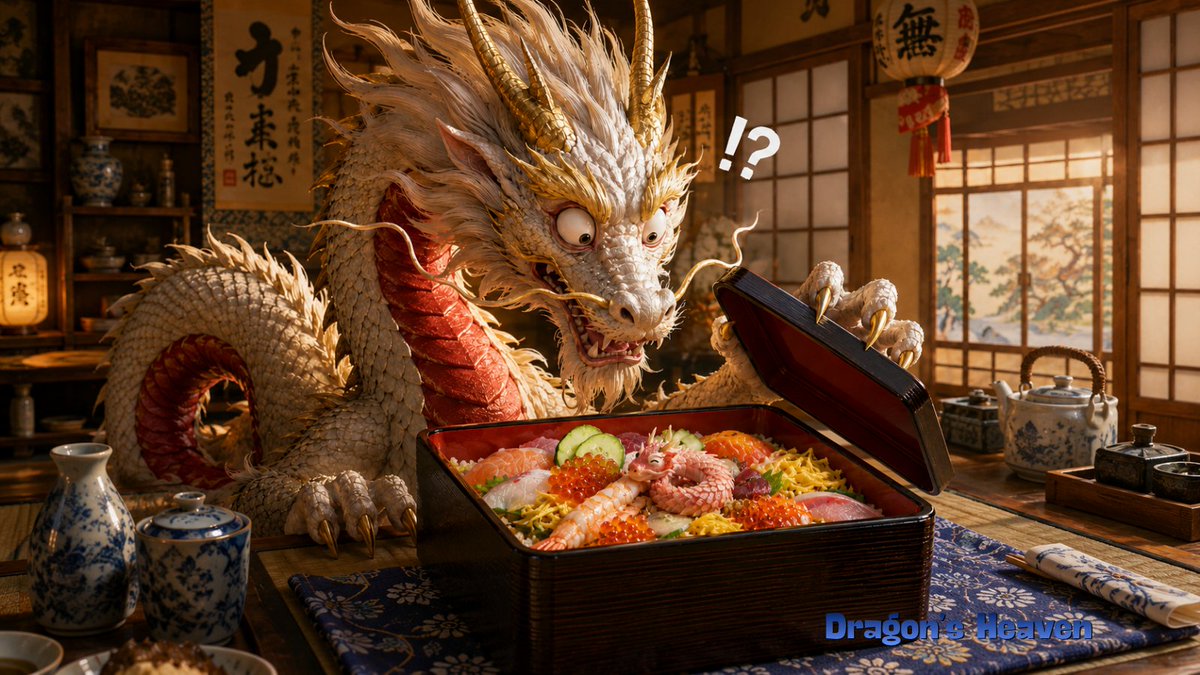
Shocked Dragon Opens Chirashi Sushi
A cinematic fantasy scene of an elderly Japanese dragon discovering a tiny creature inside a premium chirashi sushi box.
Dies ist ein GPT Image 2 -Prompt für Porträt & Charakter . Verwenden Sie den unten stehenden, kopierfertigen Prompt, um ähnliche Grafiken zu erstellen, und überprüfen Sie vor der Wiederverwendung Awesome GPT Image 2 Prompts -Quellenangaben sowie die kommerziellen Nutzungsrechte.
Benötigen Sie den vollständigen Prompt-Satz? Verwenden Sie den Porträt & Charakter Weitere verwandte Beispiele finden Sie im Themen-Hub oder öffnen Sie die GPT Image 2 Prompt-Katalog für das vollständige Beispielverzeichnis, wiederverwendbare Strukturen und Quellenangaben.
Free 1K preview
Generate one preview image instantly, no sign-up required.
1828/4000
Eingabeaufforderung
Kopierfertige Eingabeaufforderung
Create a cinematic, highly detailed fantasy-realistic image of {argument name="character name" default="an elderly Ryugu dragon manager"} in a warm traditional Japanese restaurant or Dragon Palace lunch room, shocked while opening a premium chirashi sushi lacquer box. The main subject is a large ivory-white Eastern dragon with a long serpentine body, shaggy white mane, gold horns, gold whiskers, red underside scales, sharp claws, bulging startled eyes, and an open anxious mouth, leaning over a low wooden table. The dragon holds up the black-and-red lacquer bento lid with one claw, frozen in disbelief. Inside the square lacquer box is abundant chirashi-zushi: exactly 9 prominent toppings or food elements visible, including sliced salmon, white fish, shrimp, red tuna, cucumber slices, orange salmon roe, shredded yellow egg, rice, and a tiny curled pink baby dragon/octopus-like creature sitting in the center as the unexpected mystery item. Add one large white comic punctuation mark above the box reading {argument name="reaction text" default="!?"}. The setting should include shoji windows with warm sunset light, wooden shelves with ceramics, hanging Japanese calligraphy scrolls and lanterns in the background, a blue patterned table runner, a porcelain sake bottle and cup on the left, a ceramic teapot and condiment tray on the right, and chopsticks wrapped in a patterned sleeve. Use rich amber lighting, shallow depth of field, realistic textures, detailed scales, appetizing glossy food, whimsical surprise, and a wide 16:9 composition. Add a small blue watermark-style title at the bottom right reading {argument name="watermark text" default="Dragon's Heaven"}. Avoid extra characters, avoid modern objects, and keep the scene focused on the dragon's stunned reaction to the tiny creature in the sushi box.Eingabeaufforderungsvariablen
In der Eingabeaufforderung befinden sich bearbeitbare Argumentplatzhalter mit ihren Standardwerten.
Variable
character name
Standard
an elderly Ryugu dragon manager
Variable
reaction text
Standard
!?
Variable
watermark text
Standard
Dragon's Heaven
Best for
- - Porträt & Charakter visual exploration
- - Image generation and reference-image edits
- - Reusable briefs that keep source attribution visible
Change these parts
- - Subject, product, character, or scene
- - Aspect ratio, camera, lighting, and background
- - Brand, text, color, and output constraints
Recommended model and settings
- - Model: gpt-image-2
- - Input mode: Text zu Bild
- - Aspect ratio: source
- - Commercial status: review original source
How to use this prompt
- 1. Copy the prompt and preserve its structure for the first test.
- 2. Replace the subject, context, and publishing channel.
- 3. Change one camera, lighting, or style variable per iteration.
- 4. Inspect the output, source, text, and rights before reuse.
Limitations, source, and reuse cautions
- - Generated output is an editable draft, not factual, legal, or rights evidence.
- - Review the linked source, people, brands, logos, text, and third-party media before commercial use.
Importiert von Awesome GPT Image 2 Prompts . Quellenangabe erforderlich. Status der kommerziellen Nutzung: allowed ; Rechte an der Quelle vor kostenpflichtiger Nutzung prüfen.
Weitere Fälle in dieser Kategorie
Priorisiert nach Kategorie, Kompatibilität der Eingabemodi, Qualität und geringerem Risiko.






Hinweise zur Wiederverwendung und Quellenangabe
Verwenden Sie diese Eingabeaufforderung sicher, nachdem Sie den Fall in der Vorschau angezeigt haben.
- 1.Kopieren Sie die Eingabeaufforderung oder öffnen Sie sie direkt in Dovoo mit der Schaltfläche „Generieren“.
- 2.Passen Sie Variablen, Seitenverhältnis und Referenzbilder an Ihren Anwendungsfall an.
- 3.Vor der Veröffentlichung oder kostenpflichtigen Nutzung sollten Sie die Rechte an der Quelle, die Anforderungen an die Namensnennung sowie die Risiken für die Marke oder das Abbild prüfen.