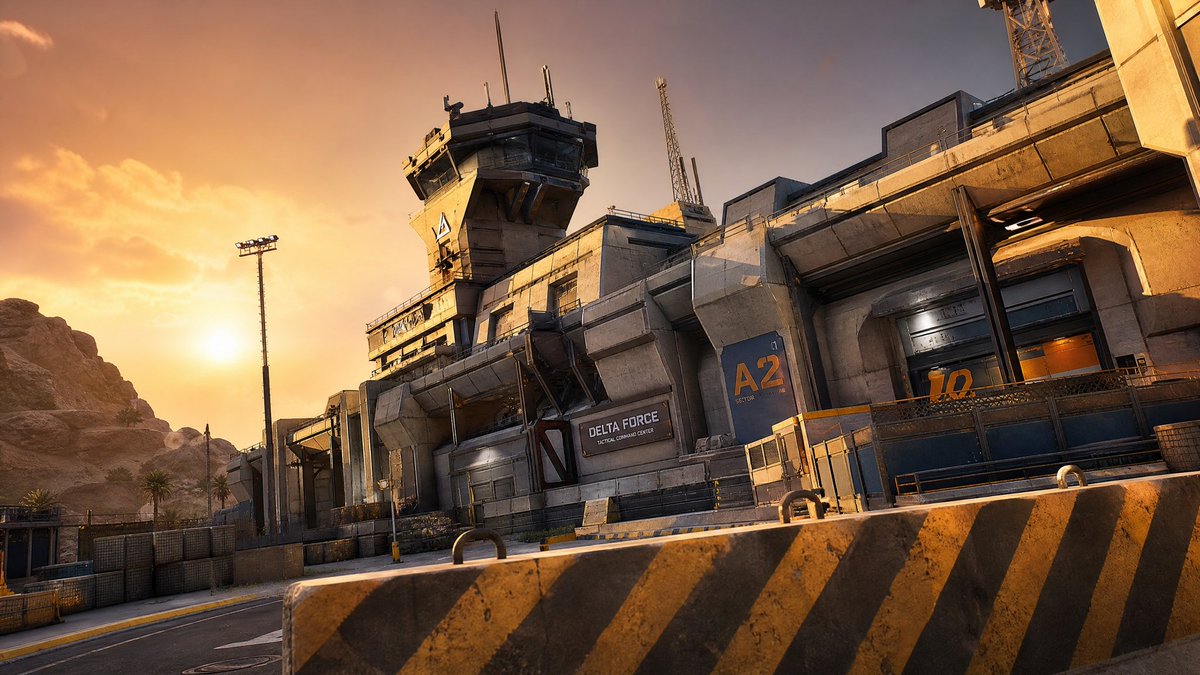
Taktisches Kommandozentrum in der Wüste
Eine filmische, fotorealistische Vorlage zur Erstellung einer futuristischen militärischen Kommandozentrale in der Wüste bei Sonnenuntergang.
Dies ist ein GPT Image 2 -Prompt für Innenarchitektur . Verwenden Sie den unten stehenden, kopierfertigen Prompt, um ähnliche Grafiken zu erstellen, und überprüfen Sie vor der Wiederverwendung Awesome GPT Image 2 Prompts -Quellenangaben sowie die kommerziellen Nutzungsrechte.
Benötigen Sie den vollständigen Prompt-Satz? Verwenden Sie den Innenarchitektur Weitere verwandte Beispiele finden Sie im Themen-Hub oder öffnen Sie die GPT Image 2 Prompt-Katalog für das vollständige Beispielverzeichnis, wiederverwendbare Strukturen und Quellenangaben.
Free 1K preview
Generate one preview image instantly, no sign-up required.
1601/4000
Eingabeaufforderung
Kopierfertige Eingabeaufforderung
Create a cinematic photorealistic wide shot of a futuristic military command compound in a desert canyon at golden hour. The scene shows a massive concrete-and-steel tactical base stretching diagonally from center-left to upper-right, with angular brutalist architecture, weathered tan concrete, dark metal trim, industrial vents, armored doors, railings, antenna masts, floodlights, and a tall control tower near the upper center. Add exactly 4 prominent text markings on the facility: a black sign reading {argument name="facility name" default="DELTA FORCE"} with smaller text "TACTICAL COMMAND CENTER" beneath it, a large blue wall panel labeled {argument name="sector label" default="A2"} with small "SECTOR" text below, a large orange door number {argument name="door number" default="12"}, and a small triangular warning-style emblem on the control tower. In the foreground, place one large concrete road barrier spanning the lower frame, painted with diagonal black-and-yellow hazard stripes and showing grime, chips, and two metal lifting loops. Behind it, include an empty paved road curving along the base, low security fencing, bollards, stacked crates, and industrial yard details. The background has rocky desert cliffs on the left, a few sparse palm trees, and a warm orange sunset sky with the sun low near the left horizon and soft clouds. Use a slightly tilted dynamic camera angle, 16:9 aspect ratio, low-to-mid viewpoint, high-detail game cinematic realism, dramatic warm rim light, long shadows, crisp textures, realistic dust and weathering, no people, no vehicles, no watermark.Eingabeaufforderungsvariablen
In der Eingabeaufforderung befinden sich bearbeitbare Argumentplatzhalter mit ihren Standardwerten.
Variable
facility name
Standard
DELTA FORCE
Variable
sector label
Standard
A2
Variable
door number
Standard
12
Best for
- - Innenarchitektur visual exploration
- - Image generation and reference-image edits
- - Reusable briefs that keep source attribution visible
Change these parts
- - Subject, product, character, or scene
- - Aspect ratio, camera, lighting, and background
- - Brand, text, color, and output constraints
Recommended model and settings
- - Model: gpt-image-2
- - Input mode: Text zu Bild
- - Aspect ratio: source
- - Commercial status: review original source
How to use this prompt
- 1. Copy the prompt and preserve its structure for the first test.
- 2. Replace the subject, context, and publishing channel.
- 3. Change one camera, lighting, or style variable per iteration.
- 4. Inspect the output, source, text, and rights before reuse.
Limitations, source, and reuse cautions
- - Generated output is an editable draft, not factual, legal, or rights evidence.
- - Review the linked source, people, brands, logos, text, and third-party media before commercial use.
Importiert von Awesome GPT Image 2 Prompts . Quellenangabe erforderlich. Status der kommerziellen Nutzung: allowed ; Rechte an der Quelle vor kostenpflichtiger Nutzung prüfen.
Weitere Fälle in dieser Kategorie
Priorisiert nach Kategorie, Kompatibilität der Eingabemodi, Qualität und geringerem Risiko.






Hinweise zur Wiederverwendung und Quellenangabe
Verwenden Sie diese Eingabeaufforderung sicher, nachdem Sie den Fall in der Vorschau angezeigt haben.
- 1.Kopieren Sie die Eingabeaufforderung oder öffnen Sie sie direkt in Dovoo mit der Schaltfläche „Generieren“.
- 2.Passen Sie Variablen, Seitenverhältnis und Referenzbilder an Ihren Anwendungsfall an.
- 3.Vor der Veröffentlichung oder kostenpflichtigen Nutzung sollten Sie die Rechte an der Quelle, die Anforderungen an die Namensnennung sowie die Risiken für die Marke oder das Abbild prüfen.