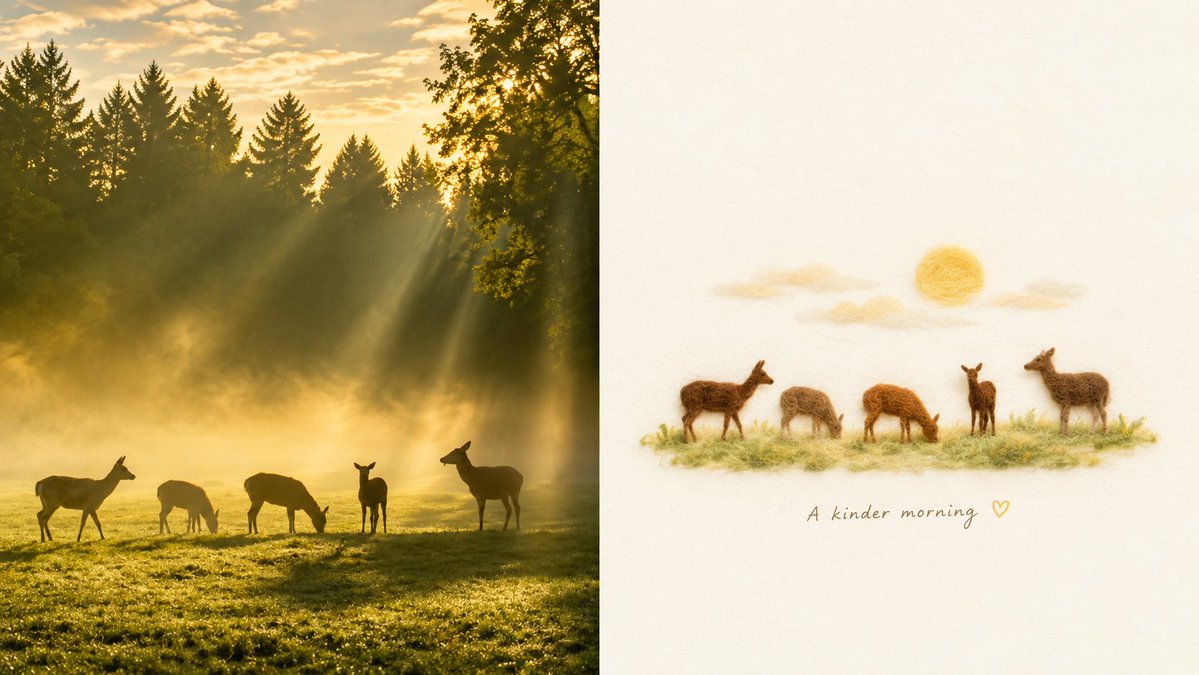
Golden Deer Morning Felt Transformation
Creates a split-screen scene comparing a misty golden forest deer photograph with a minimalist needle-felt wool illustration.
Dies ist ein GPT Image 2 -Prompt für Illustration & Kunst . Verwenden Sie den unten stehenden, kopierfertigen Prompt, um ähnliche Grafiken zu erstellen, und überprüfen Sie vor der Wiederverwendung Awesome GPT Image 2 Prompts -Quellenangaben sowie die kommerziellen Nutzungsrechte.
Free 1K preview
Generate one preview image instantly, no sign-up required.
Free text preview doesn’t preserve reference-image consistency.
Eingabeaufforderung
Kopierfertige Eingabeaufforderung
Goal: Create a two-panel horizontal comparison image showing a real-life nature photo transformed into a minimalist needle-felt illustration.

Canvas: Wide 16:9 canvas split vertically into two equal halves with a clean straight division down the center.

Left panel: A realistic golden-hour forest meadow photograph. Show exactly 5 deer in the foreground: 1 deer walking at far left, 1 deer grazing left-center, 1 deer grazing center, 1 small deer standing upright center-right, and 1 larger deer standing at far right. The meadow is covered in dewy green grass, with warm yellow sunlight and soft morning mist. In the background, dark evergreen trees form a dense forest silhouette, with additional leafy branches at the upper right. Strong sunbeams stream diagonally through the trees from the upper right, creating a serene cinematic atmosphere.

Right panel: A soft handmade needle-felt wool reinterpretation of the same scene on a warm off-white textured paper background with generous blank space. Center the felt scene horizontally in the upper-middle area. Show exactly 5 small felt deer matching the left panel arrangement: 1 standing deer at far left, 1 grazing deer left-center, 1 orange-brown grazing deer center, 1 small upright deer center-right, and 1 larger standing deer at far right. Place them on a thin strip of fuzzy pale green felt grass. Above them, include a simple round felt sun and 2 soft horizontal felt cloud wisps. Under the felt grass, add handwritten text reading {argument name="caption text" default="A kinder morning ♡"} in a delicate gray-brown script.

Visual style: Combine warm healing aesthetics, generous white space, cozy wool-felt texture, soft edges, muted earthy colors, and a calm poetic mood. The left side should look photographic and atmospheric; the right side should look like a handcrafted felt illustration with visible fibers and a minimal composition.

Constraints: Keep the split-screen layout, exactly 5 deer on each side, no extra animals, no border, no watermark, no additional text beyond the caption.
Eingabeaufforderungsvariablen
In der Eingabeaufforderung befinden sich bearbeitbare Argumentplatzhalter mit ihren Standardwerten.
Best for
- - Illustration & Kunst visual exploration
- - Image generation and reference-image edits
- - Reusable briefs that keep source attribution visible
Change these parts
- - Subject, product, character, or scene
- - Aspect ratio, camera, lighting, and background
- - Brand, text, color, and output constraints
Recommended model and settings
- - Model: gpt-image-2
- - Input mode: Bild zu Bild
- - Aspect ratio: source
- - Commercial status: review original source
How to use this prompt
- 1. Copy the prompt and preserve its structure for the first test.
- 2. Replace the subject, context, and publishing channel.
- 3. Change one camera, lighting, or style variable per iteration.
- 4. Inspect the output, source, text, and rights before reuse.
Limitations, source, and reuse cautions
- - Generated output is an editable draft, not factual, legal, or rights evidence.
- - Review the linked source, people, brands, logos, text, and third-party media before commercial use.
Weitere Fälle in dieser Kategorie
Priorisiert nach Kategorie, Kompatibilität der Eingabemodi, Qualität und geringerem Risiko.






Hinweise zur Wiederverwendung und Quellenangabe
Verwenden Sie diese Eingabeaufforderung sicher, nachdem Sie den Fall in der Vorschau angezeigt haben.
- 1.Kopieren Sie die Eingabeaufforderung oder öffnen Sie sie direkt in Dovoo mit der Schaltfläche „Generieren“.
- 2.Passen Sie Variablen, Seitenverhältnis und Referenzbilder an Ihren Anwendungsfall an.
- 3.Vor der Veröffentlichung oder kostenpflichtigen Nutzung sollten Sie die Rechte an der Quelle, die Anforderungen an die Namensnennung sowie die Risiken für die Marke oder das Abbild prüfen.