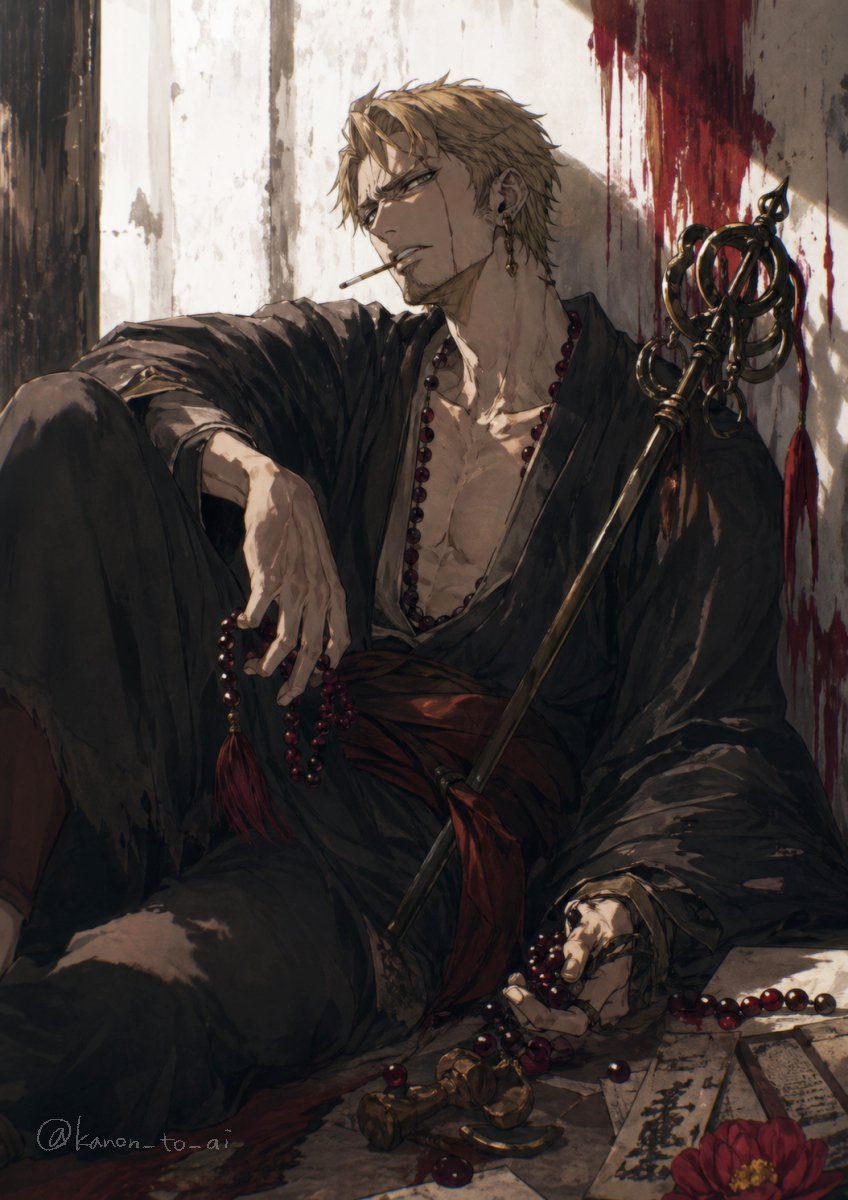
Porträt eines verwundeten Mönchs in düsterer Fantasy
Diese Vorgabe erzeugt eine ausdrucksstarke, vertikale Illustration im Anime-Stil, die einen verwundeten, in eine Robe gehüllten Mann mit Gebetsperlen und einem Zeremonialstab zeigt – ideal für Charakterzeichnungen im Dark-Fantasy-Genre oder als Key Visual.
Dies ist ein GPT Image 2 -Prompt für Anime & Spiel . Verwenden Sie den unten stehenden, kopierfertigen Prompt, um ähnliche Grafiken zu erstellen, und überprüfen Sie vor der Wiederverwendung Awesome GPT Image 2 Prompts -Quellenangaben sowie die kommerziellen Nutzungsrechte.
Free 1K preview
Generate one preview image instantly, no sign-up required.
Eingabeaufforderung
Kopierfertige Eingabeaufforderung
A moody dark fantasy anime illustration of a wounded young man with {argument name="hair color" default="ash blond"} short tousled hair, sitting slumped on the floor against a cracked white plaster wall. His face is mostly turned away and partially obscured in shadow, giving him a mysterious, exhausted presence. He wears a loose black kimono robe hanging open at the chest, exposing a lean muscular torso, with a deep red sash at the waist. A long strand of dark crimson prayer beads hangs around his neck, with more beads tangled in one hand and spilled across the floor. Beside him rests an ornate black ceremonial staff with circular rings and a spear-like finial, leaning diagonally against his shoulder. The wall behind him is streaked with dramatic dark red blood smears and drips near the upper right, suggesting a recent battle. On the floor in the foreground are scattered prayer beads, broken metallic ornaments, several paper talismans or ofuda slips with black calligraphy, and a single red flower. Warm late-afternoon light cuts across the scene from the left, creating strong highlights and deep shadows over the robe folds, hand, chest, and wall texture. Painterly brushwork, highly detailed fabric and skin rendering, melancholic atmosphere, elegant gothic composition, vertical portrait framing, cinematic anime key visual style.Eingabeaufforderungsvariablen
In der Eingabeaufforderung befinden sich bearbeitbare Argumentplatzhalter mit ihren Standardwerten.
Best for
- - Anime & Spiel visual exploration
- - Image generation and reference-image edits
- - Reusable briefs that keep source attribution visible
Change these parts
- - Subject, product, character, or scene
- - Aspect ratio, camera, lighting, and background
- - Brand, text, color, and output constraints
Recommended model and settings
- - Model: gpt-image-2
- - Input mode: Text zu Bild
- - Aspect ratio: source
- - Commercial status: review original source
How to use this prompt
- 1. Copy the prompt and preserve its structure for the first test.
- 2. Replace the subject, context, and publishing channel.
- 3. Change one camera, lighting, or style variable per iteration.
- 4. Inspect the output, source, text, and rights before reuse.
Limitations, source, and reuse cautions
- - Generated output is an editable draft, not factual, legal, or rights evidence.
- - Review the linked source, people, brands, logos, text, and third-party media before commercial use.
Weitere Fälle in dieser Kategorie
Priorisiert nach Kategorie, Kompatibilität der Eingabemodi, Qualität und geringerem Risiko.






Hinweise zur Wiederverwendung und Quellenangabe
Verwenden Sie diese Eingabeaufforderung sicher, nachdem Sie den Fall in der Vorschau angezeigt haben.
- 1.Kopieren Sie die Eingabeaufforderung oder öffnen Sie sie direkt in Dovoo mit der Schaltfläche „Generieren“.
- 2.Passen Sie Variablen, Seitenverhältnis und Referenzbilder an Ihren Anwendungsfall an.
- 3.Vor der Veröffentlichung oder kostenpflichtigen Nutzung sollten Sie die Rechte an der Quelle, die Anforderungen an die Namensnennung sowie die Risiken für die Marke oder das Abbild prüfen.