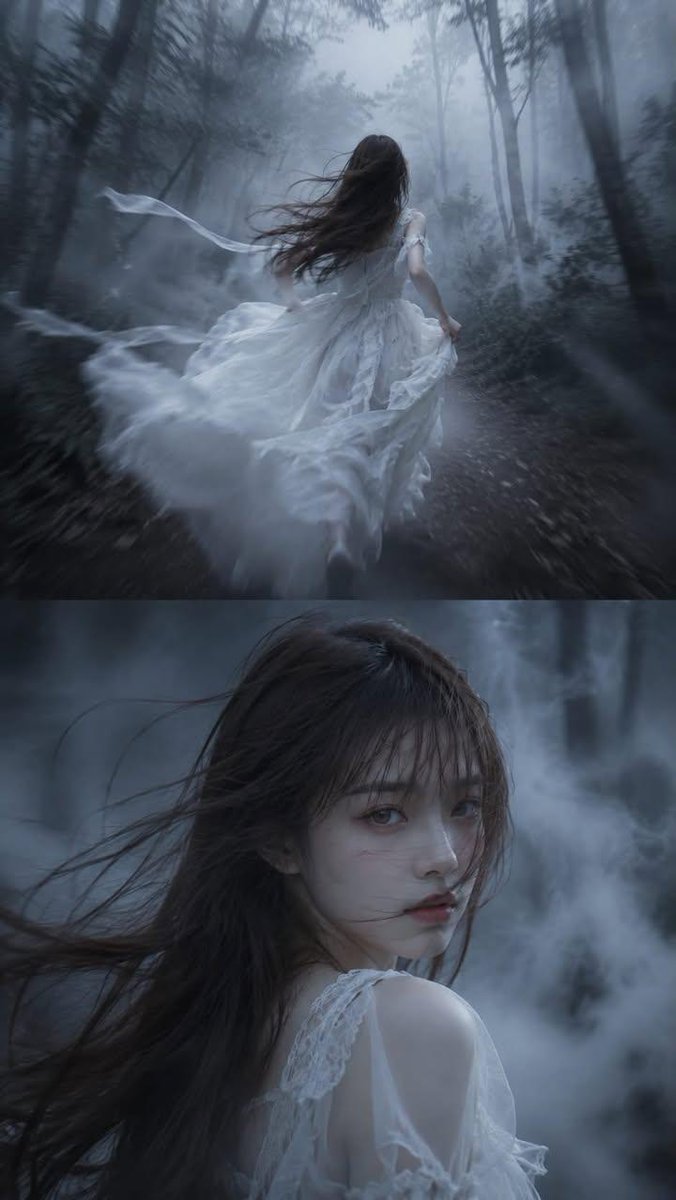
Dark Fairytale Cinematic Diptych
A multi-frame gothic composition showing a man running through a thick fog-shrouded forest with a mysterious close-up.
Dies ist ein GPT Image 2 -Prompt für Porträt & Charakter . Verwenden Sie den unten stehenden, kopierfertigen Prompt, um ähnliche Grafiken zu erstellen, und überprüfen Sie vor der Wiederverwendung Awesome GPT Image 2 Prompts -Quellenangaben sowie die kommerziellen Nutzungsrechte.
Benötigen Sie den vollständigen Prompt-Satz? Verwenden Sie den Porträt & Charakter Weitere verwandte Beispiele finden Sie im Themen-Hub oder öffnen Sie die GPT Image 2 Prompt-Katalog für das vollständige Beispielverzeichnis, wiederverwendbare Strukturen und Quellenangaben.
Free 1K preview
Generate one preview image instantly, no sign-up required.
1499/4000
Eingabeaufforderung
Kopierfertige Eingabeaufforderung
High-detail semi-realistic dark fairytale style, cinematic diptych composition, vertical 9:16 aspect ratio.

The image is divided into two frames.

Upper Frame:

{argument name="character" default="A man"} runs alone through a forest swallowed by thick fog. He wears a flowing {argument name="outfit style" default="black gothic suit"}, running quickly along a forest path.

The camera is positioned in a tracking shot from behind.

The image primarily focuses on the man's back.

A strong wind blows his hair, and his clothes flutter violently in the air. Extremely thick white fog shrouds the forest, and distant trees are completely obscured in the sea of fog, only blurry outlines remaining.

A strong sense of speed, motion blur, afterimages in motion, and a composition conveying a sense of pursuit.

Bottom Scene:

Close-up of a half-body figure.

The man maintains a running posture, but suddenly turns to look behind him.

Expressionless, aloof, calm, and restrained, his eyes are cold and mysterious, devoid of fear, sadness, or joy.

A strong wind tousles his hair, and thick fog swirls and flows against the forest background.

Face details are clearly defined.

The gaze is direct at the camera.

A close-up of a figure with a strong cinematic feel.

Cool {argument name="color tones" default="blue-gray"} tones, a dark fairytale atmosphere, Gothic aesthetics, a mysterious forest, volumetric fog, a dreamlike quality, cinematic lighting, beautiful yet eerie, and extremely high detail.
Eingabeaufforderungsvariablen
In der Eingabeaufforderung befinden sich bearbeitbare Argumentplatzhalter mit ihren Standardwerten.
Variable
character
Standard
A man
Variable
outfit style
Standard
black gothic suit
Variable
color tones
Standard
blue-gray
Best for
- - Porträt & Charakter visual exploration
- - Image generation and reference-image edits
- - Reusable briefs that keep source attribution visible
Change these parts
- - Subject, product, character, or scene
- - Aspect ratio, camera, lighting, and background
- - Brand, text, color, and output constraints
Recommended model and settings
- - Model: gpt-image-2
- - Input mode: Text zu Bild
- - Aspect ratio: source
- - Commercial status: review original source
How to use this prompt
- 1. Copy the prompt and preserve its structure for the first test.
- 2. Replace the subject, context, and publishing channel.
- 3. Change one camera, lighting, or style variable per iteration.
- 4. Inspect the output, source, text, and rights before reuse.
Limitations, source, and reuse cautions
- - Generated output is an editable draft, not factual, legal, or rights evidence.
- - Review the linked source, people, brands, logos, text, and third-party media before commercial use.
Importiert von Awesome GPT Image 2 Prompts . Quellenangabe erforderlich. Status der kommerziellen Nutzung: allowed ; Rechte an der Quelle vor kostenpflichtiger Nutzung prüfen.
Weitere Fälle in dieser Kategorie
Priorisiert nach Kategorie, Kompatibilität der Eingabemodi, Qualität und geringerem Risiko.






Hinweise zur Wiederverwendung und Quellenangabe
Verwenden Sie diese Eingabeaufforderung sicher, nachdem Sie den Fall in der Vorschau angezeigt haben.
- 1.Kopieren Sie die Eingabeaufforderung oder öffnen Sie sie direkt in Dovoo mit der Schaltfläche „Generieren“.
- 2.Passen Sie Variablen, Seitenverhältnis und Referenzbilder an Ihren Anwendungsfall an.
- 3.Vor der Veröffentlichung oder kostenpflichtigen Nutzung sollten Sie die Rechte an der Quelle, die Anforderungen an die Namensnennung sowie die Risiken für die Marke oder das Abbild prüfen.