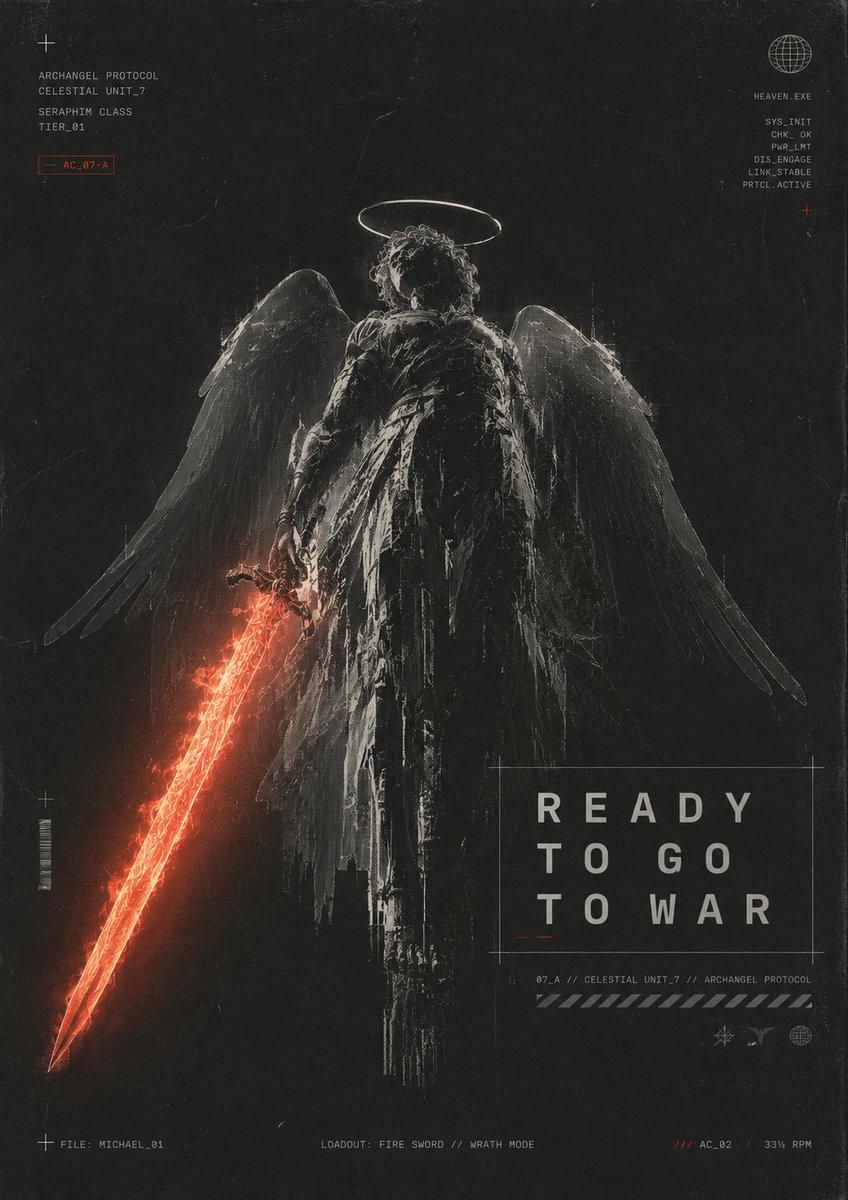
Dunkles Erzengel-Kriegsplakat
Ein düsteres Science-Fiction-Religionsposter mit einem geflügelten Erzengel mit einem feurigen Schwert und HUD-Typografie im Militärstil.
Dies ist ein GPT Image 2 -Prompt für Grafik & Poster . Verwenden Sie den unten stehenden, kopierfertigen Prompt, um ähnliche Grafiken zu erstellen, und überprüfen Sie vor der Wiederverwendung Awesome GPT Image 2 Prompts -Quellenangaben sowie die kommerziellen Nutzungsrechte.
Benötigen Sie den vollständigen Prompt-Satz? Verwenden Sie den Grafik & Poster Weitere verwandte Beispiele finden Sie im Themen-Hub oder öffnen Sie die GPT Image 2 Prompt-Katalog für das vollständige Beispielverzeichnis, wiederverwendbare Strukturen und Quellenangaben.
Free 1K preview
Generate one preview image instantly, no sign-up required.
2456/4000
Eingabeaufforderung
Kopierfertige Eingabeaufforderung
Create a dark futuristic religious sci-fi poster in a gritty black-and-charcoal palette with distressed film grain, scratches, dust, scanline artifacts, and worn paper texture. Center a full-body archangel warrior seen from behind, standing upright and imposing, with a glowing thin white halo above curly hair, large semi-transparent feathered wings spread downward and outward, and a tattered long black robe or armor cloak with ragged vertical strips. The angel holds a blazing red-orange energy fire sword in the left hand, angled diagonally down toward the bottom-left corner; the sword should be the main color accent, with molten cracks, sparks, and a triangular glowing blade tip. Use harsh monochrome rim lighting and etched, high-contrast sketch-like detailing, making the figure feel ancient, cybernetic, and battle-worn. Add minimal HUD typography and technical markings around the composition: top-left small cross icon and stacked text reading “ARCHANGEL PROTOCOL”, “CELESTIAL UNIT_7”, “SERAPHIM CLASS”, “TIER_01”, plus a small red outlined tag “AC_07-A”; top-right wireframe globe icon with “HEAVEN.EXE” and a vertical diagnostic list “SYS_INIT”, “CHK_OK”, “PNR_LMT”, “DIS_ENGAGE”, “LINK_STABLE”, “PRTCL_ACTIVE”, plus a tiny red cross. Place the main title in a thin outlined rectangle in the lower-right quadrant, large spaced uppercase text on three lines: “READY”, “TO GO”, “TO WAR”. Below it add small technical text “07_A // CELESTIAL UNIT_7 // ARCHANGEL PROTOCOL”, a diagonal hazard stripe bar, and three tiny interface icons. Along the bottom edge add three small captions: left “FILE: MICHAEL_01”, center “LOADOUT: FIRE SWORD // WRATH MODE”, right “/// AC_02 33% RPM”. Include exactly one central angel figure, one halo, two wings, one fiery sword, one large title box, two corner diagnostic text clusters, and three bottom status captions. Vertical poster aspect ratio, cinematic concept art, brutalist sci-fi graphic design, no extra characters, no watermark. The central title text may be customized as {argument name="headline text" default="READY TO GO TO WAR"}; the unit name may be customized as {argument name="unit name" default="CELESTIAL UNIT_7"}; the file name may be customized as {argument name="file name" default="MICHAEL_01"}; the weapon caption may be customized as {argument name="weapon caption" default="FIRE SWORD // WRATH MODE"}; the red tag may be customized as {argument name="red tag" default="AC_07-A"}.Eingabeaufforderungsvariablen
In der Eingabeaufforderung befinden sich bearbeitbare Argumentplatzhalter mit ihren Standardwerten.
Variable
headline text
Standard
READY TO GO TO WAR
Variable
unit name
Standard
CELESTIAL UNIT_7
Variable
file name
Standard
MICHAEL_01
Variable
weapon caption
Standard
FIRE SWORD // WRATH MODE
Variable
red tag
Standard
AC_07-A
Best for
- - Grafik & Poster visual exploration
- - Image generation and reference-image edits
- - Reusable briefs that keep source attribution visible
Change these parts
- - Subject, product, character, or scene
- - Aspect ratio, camera, lighting, and background
- - Brand, text, color, and output constraints
Recommended model and settings
- - Model: gpt-image-2
- - Input mode: Text zu Bild
- - Aspect ratio: source
- - Commercial status: review original source
How to use this prompt
- 1. Copy the prompt and preserve its structure for the first test.
- 2. Replace the subject, context, and publishing channel.
- 3. Change one camera, lighting, or style variable per iteration.
- 4. Inspect the output, source, text, and rights before reuse.
Limitations, source, and reuse cautions
- - Generated output is an editable draft, not factual, legal, or rights evidence.
- - Review the linked source, people, brands, logos, text, and third-party media before commercial use.
Importiert von Awesome GPT Image 2 Prompts . Quellenangabe erforderlich. Status der kommerziellen Nutzung: allowed ; Rechte an der Quelle vor kostenpflichtiger Nutzung prüfen.
Related prompt packs
Weitere Fälle in dieser Kategorie
Priorisiert nach Kategorie, Kompatibilität der Eingabemodi, Qualität und geringerem Risiko.






Hinweise zur Wiederverwendung und Quellenangabe
Verwenden Sie diese Eingabeaufforderung sicher, nachdem Sie den Fall in der Vorschau angezeigt haben.
- 1.Kopieren Sie die Eingabeaufforderung oder öffnen Sie sie direkt in Dovoo mit der Schaltfläche „Generieren“.
- 2.Passen Sie Variablen, Seitenverhältnis und Referenzbilder an Ihren Anwendungsfall an.
- 3.Vor der Veröffentlichung oder kostenpflichtigen Nutzung sollten Sie die Rechte an der Quelle, die Anforderungen an die Namensnennung sowie die Risiken für die Marke oder das Abbild prüfen.