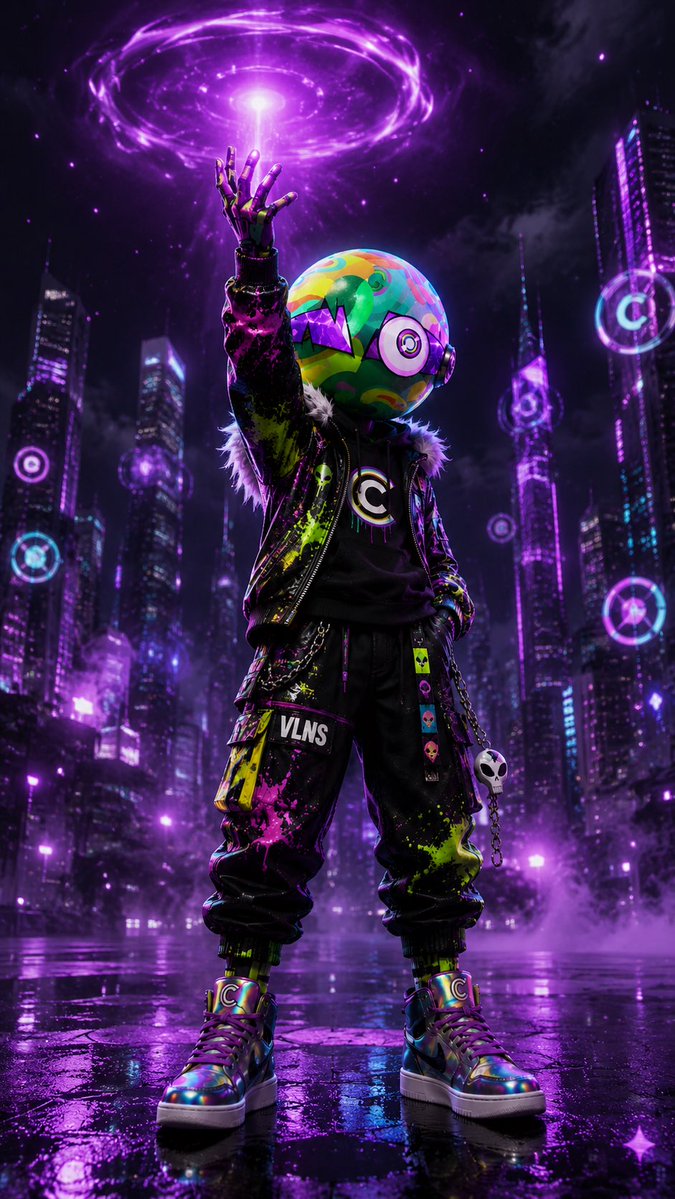
Cyberpunk Vinyl Character Summoning Portal
A vertical cinematic prompt for generating a neon cyberpunk designer-toy character in a rainy futuristic city with a glowing purple energy portal.
Dies ist ein GPT Image 2 -Prompt für Porträt & Charakter . Verwenden Sie den unten stehenden, kopierfertigen Prompt, um ähnliche Grafiken zu erstellen, und überprüfen Sie vor der Wiederverwendung Awesome GPT Image 2 Prompts -Quellenangaben sowie die kommerziellen Nutzungsrechte.
Benötigen Sie den vollständigen Prompt-Satz? Verwenden Sie den Porträt & Charakter Weitere verwandte Beispiele finden Sie im Themen-Hub oder öffnen Sie die GPT Image 2 Prompt-Katalog für das vollständige Beispielverzeichnis, wiederverwendbare Strukturen und Quellenangaben.
Free 1K preview
Generate one preview image instantly, no sign-up required.
1851/4000
Eingabeaufforderung
Kopierfertige Eingabeaufforderung
Create a vertical cinematic cyberpunk full-body character poster in a rainy futuristic city at night. Center a single humanoid streetwear figure, low-angle hero pose, standing on a glossy wet pavement with purple reflections; the character raises one robotic/gloved hand straight upward, summoning a glowing violet energy vortex overhead. The character has a large spherical helmet/head with colorful graffiti-like swirls in green, yellow, cyan, pink, and orange, one big circular target-like eye on the right side, and a jagged purple monster-mouth graphic wrapping the front. Outfit: a black leather-like jacket with neon paint splatters in {argument name="paint colors" default="acid green, hot pink, and purple"}, furry collar trim, black shirt with a bold circular C emblem, loose black cargo pants with a white “VLNS” patch, dangling neon skull charms, a small white skull keychain on a chain, and iridescent high-top sneakers with C logos. Show exactly one character, exactly one raised hand, exactly one large purple energy portal above the hand, exactly one spherical helmet, exactly one white skull keychain, and exactly five visible circular holographic target signs floating or mounted among the skyscrapers. Background: towering dark skyscrapers with magenta, violet, and cyan neon windows, fog near the ground, stormy clouds, rain-slick reflections, scattered purple light particles, and a moody sci-fi atmosphere. Lighting should be dramatic, high contrast, dominated by {argument name="primary neon color" default="electric purple"}, with rim light outlining the figure and bright glow from the portal. Style: ultra-detailed 3D render, fashion toy/designer vinyl character aesthetic, sharp focus on the character, cinematic depth of field, realistic wet surfaces, vibrant saturated colors, no extra characters, no watermark, no border.Eingabeaufforderungsvariablen
In der Eingabeaufforderung befinden sich bearbeitbare Argumentplatzhalter mit ihren Standardwerten.
Variable
paint colors
Standard
acid green, hot pink, and purple
Variable
primary neon color
Standard
electric purple
Best for
- - Porträt & Charakter visual exploration
- - Image generation and reference-image edits
- - Reusable briefs that keep source attribution visible
Change these parts
- - Subject, product, character, or scene
- - Aspect ratio, camera, lighting, and background
- - Brand, text, color, and output constraints
Recommended model and settings
- - Model: gpt-image-2
- - Input mode: Text zu Bild
- - Aspect ratio: source
- - Commercial status: review original source
How to use this prompt
- 1. Copy the prompt and preserve its structure for the first test.
- 2. Replace the subject, context, and publishing channel.
- 3. Change one camera, lighting, or style variable per iteration.
- 4. Inspect the output, source, text, and rights before reuse.
Limitations, source, and reuse cautions
- - Generated output is an editable draft, not factual, legal, or rights evidence.
- - Review the linked source, people, brands, logos, text, and third-party media before commercial use.
Importiert von Awesome GPT Image 2 Prompts . Quellenangabe erforderlich. Status der kommerziellen Nutzung: allowed ; Rechte an der Quelle vor kostenpflichtiger Nutzung prüfen.
Weitere Fälle in dieser Kategorie
Priorisiert nach Kategorie, Kompatibilität der Eingabemodi, Qualität und geringerem Risiko.






Hinweise zur Wiederverwendung und Quellenangabe
Verwenden Sie diese Eingabeaufforderung sicher, nachdem Sie den Fall in der Vorschau angezeigt haben.
- 1.Kopieren Sie die Eingabeaufforderung oder öffnen Sie sie direkt in Dovoo mit der Schaltfläche „Generieren“.
- 2.Passen Sie Variablen, Seitenverhältnis und Referenzbilder an Ihren Anwendungsfall an.
- 3.Vor der Veröffentlichung oder kostenpflichtigen Nutzung sollten Sie die Rechte an der Quelle, die Anforderungen an die Namensnennung sowie die Risiken für die Marke oder das Abbild prüfen.