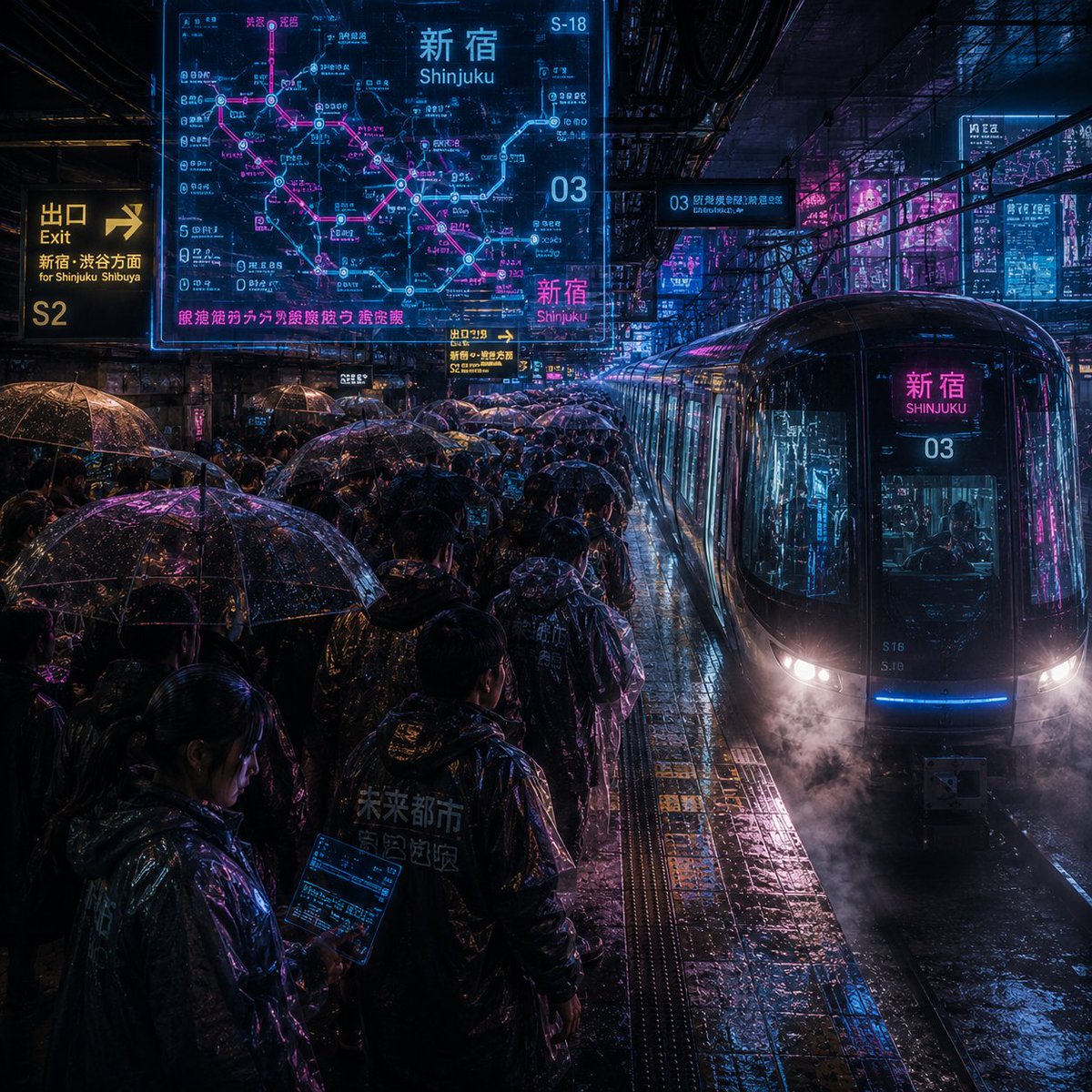
Noisy Cyberpunk Shinjuku Rain Platform
A dense cinematic prompt for generating an ultra-noisy cyberpunk rainy train platform scene with neon transit signage and crowded umbrellas.
Dies ist ein GPT Image 2 -Prompt für Landschaft & Natur . Verwenden Sie den unten stehenden, kopierfertigen Prompt, um ähnliche Grafiken zu erstellen, und überprüfen Sie vor der Wiederverwendung Awesome GPT Image 2 Prompts -Quellenangaben sowie die kommerziellen Nutzungsrechte.
Benötigen Sie den vollständigen Prompt-Satz? Verwenden Sie den Landschaft & Natur Weitere verwandte Beispiele finden Sie im Themen-Hub oder öffnen Sie die GPT Image 2 Prompt-Katalog für das vollständige Beispielverzeichnis, wiederverwendbare Strukturen und Quellenangaben.
Free 1K preview
Generate one preview image instantly, no sign-up required.
2079/4000
Eingabeaufforderung
Kopierfertige Eingabeaufforderung
Create an extremely noisy, highly detailed cyberpunk rainy night train platform located in {argument name="station name" default="Shinjuku"}, Tokyo. The camera is at platform height, looking down at the crowded platform at an angle, with a sleek black glass commuter train entering from the right, its rounded front flashing with white headlights, blue underlights, and magenta reflections, with steam or mist near the tracks, and the destination display in front of the train reading {argument name="station name" default="Shinjuku"} and {argument name="line number" default="03"}. The scene is filled with commuters wearing dark raincoats and holding 32 clearly visible transparent umbrellas with water droplets on the surface reflecting neon blue, cyan, purple, and bright pink light. The wet tiled floor, tactile yellow platform strips, puddles, track grooves, overhead beams, cables, and dense urban infrastructure should all have distinct textures and visual noise, with rain streaks everywhere. Add 6 prominent glowing information elements: 1 large semi-transparent cyan and magenta route map hologram in the upper left corner labeled {argument name="map headline" default="Shinjuku"} with Japanese station text and pink traffic lines; 1 yellow exit sign on the far left reading {argument name="exit text" default="Exit S2 for Shinjuku Shibuya"}; 1 small yellow platform direction sign near the center; 1 cyan elevated platform sign reading 03; 1 bright magenta station sign in front of the train; and 1 group of vertical neon advertisements in the city background on the right. Use dense Japanese and English traffic typography, including “Shinjuku” and “新宿” where appropriate, but maintain realism rather than perfect readability. Style: A combination of cinematic realism and futuristic UI overlays, extremely high ISO grain, high contrast, wet reflective surfaces, a *Blade Runner*-esque atmosphere, chaotic visual noise, sharp reflections, volumetric rain, deep shadows, electric cyan and magenta tones, 1:1 square composition, no clean negative space, no watermarks.Eingabeaufforderungsvariablen
In der Eingabeaufforderung befinden sich bearbeitbare Argumentplatzhalter mit ihren Standardwerten.
Variable
station name
Standard
Shinjuku
Variable
line number
Standard
03
Variable
map headline
Standard
Shinjuku
Variable
exit text
Standard
Exit S2 for Shinjuku Shibuya
Best for
- - Landschaft & Natur visual exploration
- - Image generation and reference-image edits
- - Reusable briefs that keep source attribution visible
Change these parts
- - Subject, product, character, or scene
- - Aspect ratio, camera, lighting, and background
- - Brand, text, color, and output constraints
Recommended model and settings
- - Model: gpt-image-2
- - Input mode: Text zu Bild
- - Aspect ratio: source
- - Commercial status: review original source
How to use this prompt
- 1. Copy the prompt and preserve its structure for the first test.
- 2. Replace the subject, context, and publishing channel.
- 3. Change one camera, lighting, or style variable per iteration.
- 4. Inspect the output, source, text, and rights before reuse.
Limitations, source, and reuse cautions
- - Generated output is an editable draft, not factual, legal, or rights evidence.
- - Review the linked source, people, brands, logos, text, and third-party media before commercial use.
Importiert von Awesome GPT Image 2 Prompts . Quellenangabe erforderlich. Status der kommerziellen Nutzung: allowed ; Rechte an der Quelle vor kostenpflichtiger Nutzung prüfen.
Weitere Fälle in dieser Kategorie
Priorisiert nach Kategorie, Kompatibilität der Eingabemodi, Qualität und geringerem Risiko.






Hinweise zur Wiederverwendung und Quellenangabe
Verwenden Sie diese Eingabeaufforderung sicher, nachdem Sie den Fall in der Vorschau angezeigt haben.
- 1.Kopieren Sie die Eingabeaufforderung oder öffnen Sie sie direkt in Dovoo mit der Schaltfläche „Generieren“.
- 2.Passen Sie Variablen, Seitenverhältnis und Referenzbilder an Ihren Anwendungsfall an.
- 3.Vor der Veröffentlichung oder kostenpflichtigen Nutzung sollten Sie die Rechte an der Quelle, die Anforderungen an die Namensnennung sowie die Risiken für die Marke oder das Abbild prüfen.