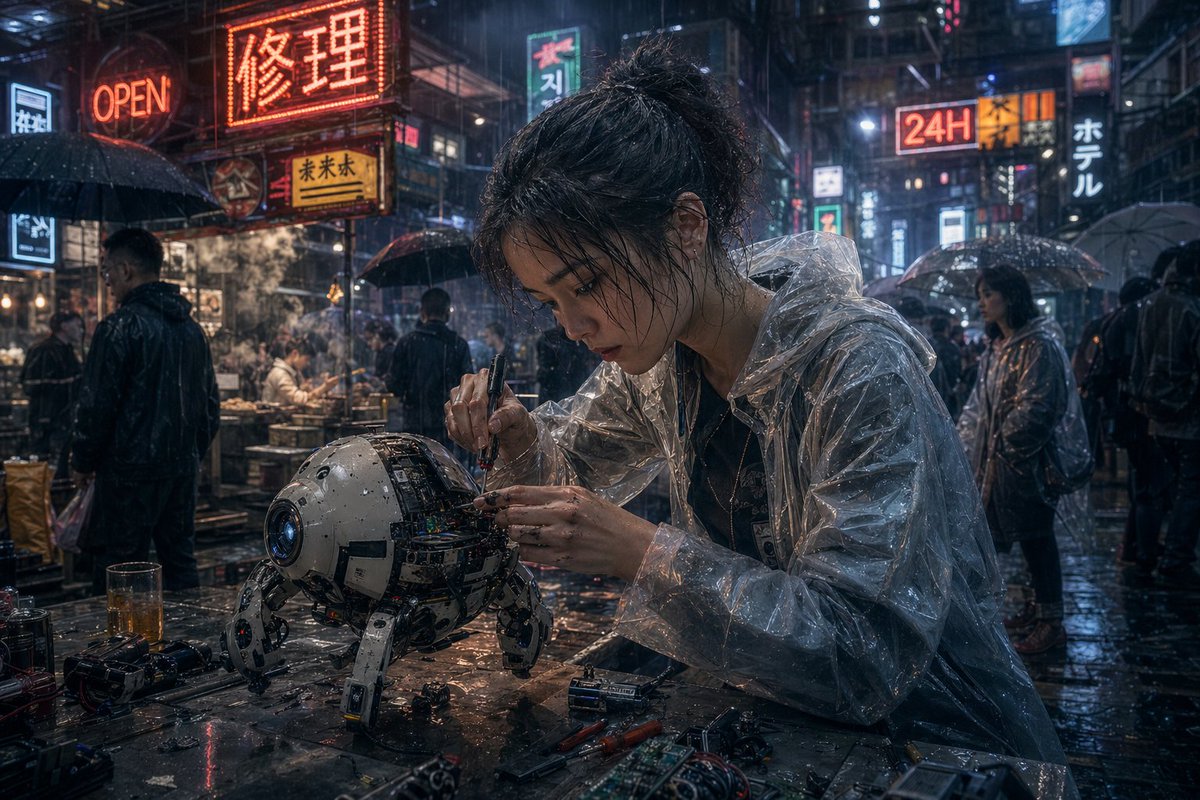
Cyberpunk-Roboterreparatur in der Regenstraße
Diese Vorgabe erzeugt eine filmische, fotorealistische Cyberpunk-Szene, in der ein vom Regen durchnässter Straßenmechaniker einen vierbeinigen Roboter repariert – ideal für Science-Fiction-Konzeptzeichnungen und stimmungsvolle Stadtvisualisierungen.
Dies ist ein GPT Image 2 -Prompt für Illustration & Kunst . Verwenden Sie den unten stehenden, kopierfertigen Prompt, um ähnliche Grafiken zu erstellen, und überprüfen Sie vor der Wiederverwendung Awesome GPT Image 2 Prompts -Quellenangaben sowie die kommerziellen Nutzungsrechte.
Free 1K preview
Generate one preview image instantly, no sign-up required.
Eingabeaufforderung
Kopierfertige Eingabeaufforderung
A cinematic cyberpunk street scene at night in heavy rain, ultra-detailed and photorealistic. In the foreground, a young East Asian woman mechanic with messy dark hair tied in a loose bun sits at a wet metal worktable, leaning forward with intense concentration as she repairs a small spherical quadruped robot. Show every face clearly with natural, detailed facial features. She wears a transparent plastic rain poncho over dark clothing, the glossy folds catching neon reflections. In one hand she holds a precision screwdriver and with the other she adjusts exposed wiring and circuitry inside the robot’s open shell. The robot is compact and worn, about the size of a small dog, with a white and gray rounded body, a blue camera-like lens for one eye, visible internal electronics, scratches, grime, and four articulated mechanical legs planted on the table. Scatter the tabletop with exact repair clutter: 2 screwdrivers, 2 batteries, 1 circuit board, 1 small camera or lens module, loose screws, wires, and a half-filled glass of amber liquid. Surround them with a dense neon-lit East Asian alley market full of rain-slick pavement, steam from food stalls, and pedestrians carrying umbrellas. Include at least 8 visible illuminated signs layered into the background, including a large red sign reading {argument name="main neon sign" default="Repair"}, an orange sign reading "OPEN", a bright sign reading "24H", a vertical sign reading "ホテル", and additional mixed Chinese, Japanese, and Korean-style shop signs. Show several background figures in dark rainwear and translucent ponchos, Show every face clearly with natural, detailed facial features. Use moody blue-and-orange lighting, glossy reflections, mist, volumetric rain, shallow depth of field, dramatic bokeh, anamorphic highlights, high texture detail, gritty realism, and the feeling of a lone street technician fixing advanced hardware in a bustling futuristic city.Eingabeaufforderungsvariablen
In der Eingabeaufforderung befinden sich bearbeitbare Argumentplatzhalter mit ihren Standardwerten.
Best for
- - Illustration & Kunst visual exploration
- - Image generation and reference-image edits
- - Reusable briefs that keep source attribution visible
Change these parts
- - Subject, product, character, or scene
- - Aspect ratio, camera, lighting, and background
- - Brand, text, color, and output constraints
Recommended model and settings
- - Model: gpt-image-2
- - Input mode: Text zu Bild
- - Aspect ratio: source
- - Commercial status: review original source
How to use this prompt
- 1. Copy the prompt and preserve its structure for the first test.
- 2. Replace the subject, context, and publishing channel.
- 3. Change one camera, lighting, or style variable per iteration.
- 4. Inspect the output, source, text, and rights before reuse.
Limitations, source, and reuse cautions
- - Generated output is an editable draft, not factual, legal, or rights evidence.
- - Review the linked source, people, brands, logos, text, and third-party media before commercial use.
Weitere Fälle in dieser Kategorie
Priorisiert nach Kategorie, Kompatibilität der Eingabemodi, Qualität und geringerem Risiko.






Hinweise zur Wiederverwendung und Quellenangabe
Verwenden Sie diese Eingabeaufforderung sicher, nachdem Sie den Fall in der Vorschau angezeigt haben.
- 1.Kopieren Sie die Eingabeaufforderung oder öffnen Sie sie direkt in Dovoo mit der Schaltfläche „Generieren“.
- 2.Passen Sie Variablen, Seitenverhältnis und Referenzbilder an Ihren Anwendungsfall an.
- 3.Vor der Veröffentlichung oder kostenpflichtigen Nutzung sollten Sie die Rechte an der Quelle, die Anforderungen an die Namensnennung sowie die Risiken für die Marke oder das Abbild prüfen.