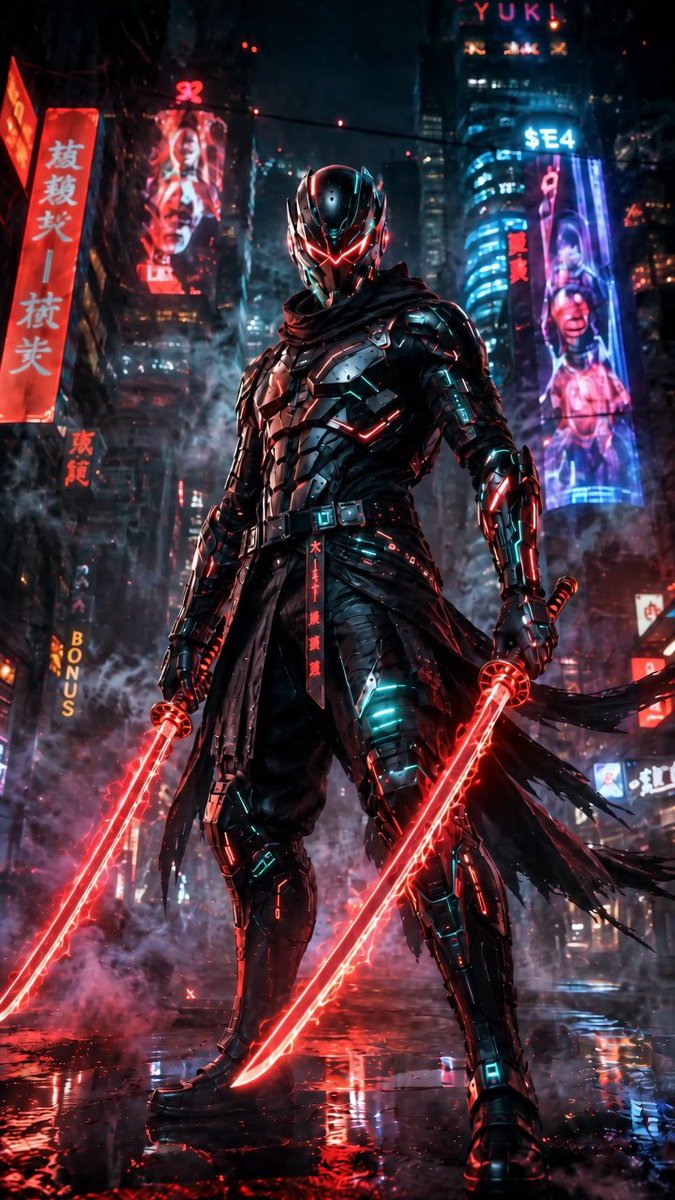
Cyberpunk Dual-Katana Ninja
A cinematic prompt for generating a neon-lit armored cyberpunk ninja with two glowing red katanas in a rainy futuristic city.
Dies ist ein GPT Image 2 -Prompt für Porträt & Charakter . Verwenden Sie den unten stehenden, kopierfertigen Prompt, um ähnliche Grafiken zu erstellen, und überprüfen Sie vor der Wiederverwendung Awesome GPT Image 2 Prompts -Quellenangaben sowie die kommerziellen Nutzungsrechte.
Benötigen Sie den vollständigen Prompt-Satz? Verwenden Sie den Porträt & Charakter Weitere verwandte Beispiele finden Sie im Themen-Hub oder öffnen Sie die GPT Image 2 Prompt-Katalog für das vollständige Beispielverzeichnis, wiederverwendbare Strukturen und Quellenangaben.
Free 1K preview
Generate one preview image instantly, no sign-up required.
1675/4000
Eingabeaufforderung
Kopierfertige Eingabeaufforderung
Create a vertical 9:16 cinematic cyberpunk character poster featuring {argument name="character name" default="a futuristic armored ninja assassin"} standing full-body in the center of a rain-soaked neon city street at night. The character wears glossy black segmented exosuit armor with teal cyan micro-lights, red glowing trim, a black tattered scarf and long torn waist cloth strips blowing to the right, armored boots, gauntlets, belt plates, and a sleek insect-like helmet with a black visor and sharp red V-shaped glowing eyes. Pose him in a powerful low-angle stance, legs apart, shoulders squared, looking directly forward. He holds exactly 2 red energy katanas, one in each hand, both blades glowing intensely with red plasma edges and reflecting on the wet pavement. The environment is dense and dramatic: towering skyscrapers, haze, steam, falling rain, puddles, red and blue neon reflections, sparks, smoke around the legs, and shallow depth of field. Include exactly 6 readable or semi-readable neon sign elements in the background: 1 tall red vertical sign with East Asian characters on the left, 1 red holographic portrait billboard on the upper left, 1 vertical yellow “BONUS” sign on the lower left, 1 top sign reading “YUK!”, 1 blue sign reading “$E4” on the upper right tower, and 1 tall purple-blue cybernetic woman billboard on the right. Use a dark palette of black, crimson red, cyan, electric blue, and violet, with intense rim lighting, ultra-detailed hard-surface armor, realistic rain, cinematic contrast, volumetric fog, and high-detail concept art realism. Avoid extra characters, daylight, cartoon styling, blurry anatomy, or additional weapons.Eingabeaufforderungsvariablen
In der Eingabeaufforderung befinden sich bearbeitbare Argumentplatzhalter mit ihren Standardwerten.
Variable
character name
Standard
a futuristic armored ninja assassin
Best for
- - Porträt & Charakter visual exploration
- - Image generation and reference-image edits
- - Reusable briefs that keep source attribution visible
Change these parts
- - Subject, product, character, or scene
- - Aspect ratio, camera, lighting, and background
- - Brand, text, color, and output constraints
Recommended model and settings
- - Model: gpt-image-2
- - Input mode: Text zu Bild
- - Aspect ratio: source
- - Commercial status: review original source
How to use this prompt
- 1. Copy the prompt and preserve its structure for the first test.
- 2. Replace the subject, context, and publishing channel.
- 3. Change one camera, lighting, or style variable per iteration.
- 4. Inspect the output, source, text, and rights before reuse.
Limitations, source, and reuse cautions
- - Generated output is an editable draft, not factual, legal, or rights evidence.
- - Review the linked source, people, brands, logos, text, and third-party media before commercial use.
Importiert von Awesome GPT Image 2 Prompts . Quellenangabe erforderlich. Status der kommerziellen Nutzung: allowed ; Rechte an der Quelle vor kostenpflichtiger Nutzung prüfen.
Weitere Fälle in dieser Kategorie
Priorisiert nach Kategorie, Kompatibilität der Eingabemodi, Qualität und geringerem Risiko.






Hinweise zur Wiederverwendung und Quellenangabe
Verwenden Sie diese Eingabeaufforderung sicher, nachdem Sie den Fall in der Vorschau angezeigt haben.
- 1.Kopieren Sie die Eingabeaufforderung oder öffnen Sie sie direkt in Dovoo mit der Schaltfläche „Generieren“.
- 2.Passen Sie Variablen, Seitenverhältnis und Referenzbilder an Ihren Anwendungsfall an.
- 3.Vor der Veröffentlichung oder kostenpflichtigen Nutzung sollten Sie die Rechte an der Quelle, die Anforderungen an die Namensnennung sowie die Risiken für die Marke oder das Abbild prüfen.