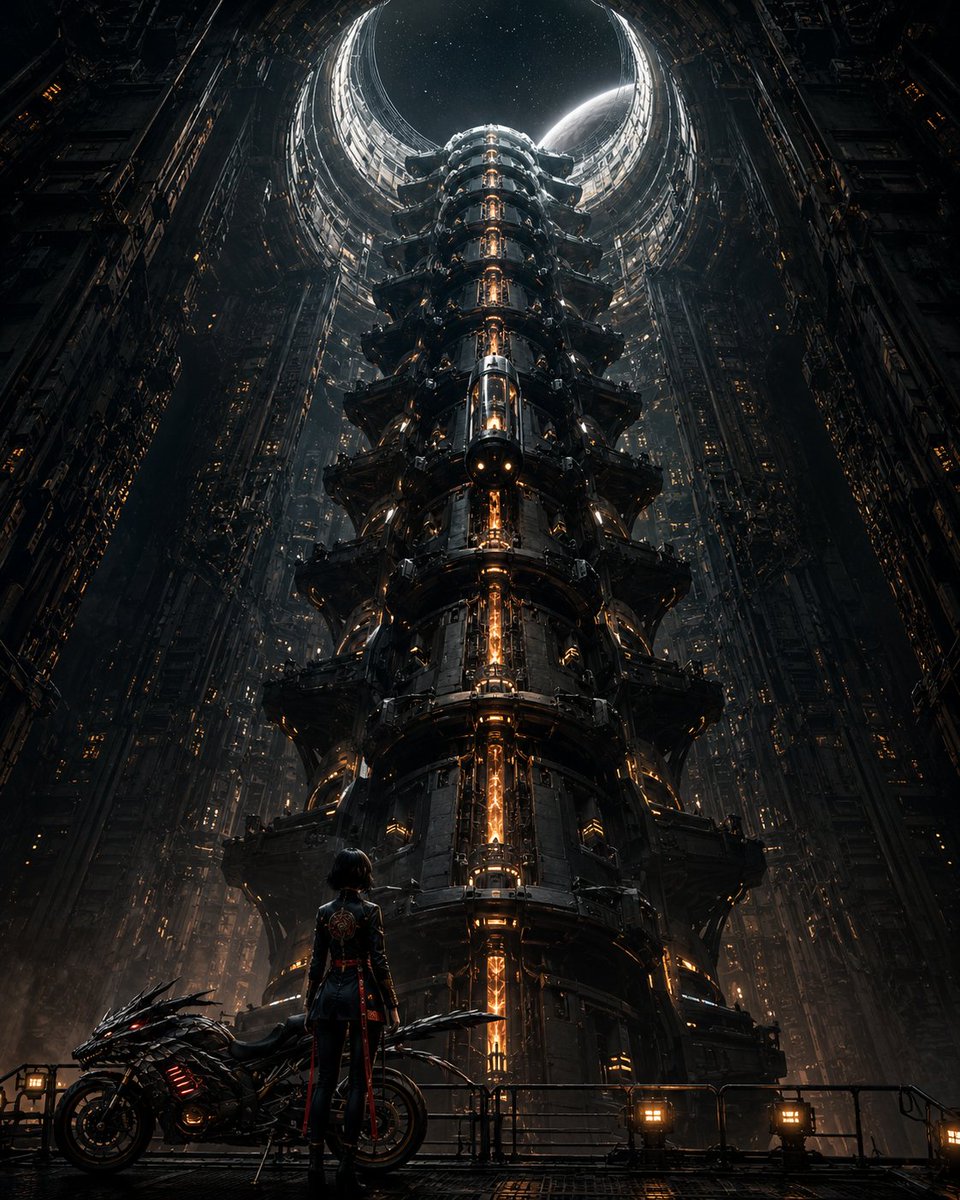
Cyberpunk Megastructure Rider
A cinematic prompt for generating an epic cyberpunk rider scene inside a towering futuristic industrial megastructure.
Dies ist ein GPT Image 2 -Prompt für Anime & Spiel . Verwenden Sie den unten stehenden, kopierfertigen Prompt, um ähnliche Grafiken zu erstellen, und überprüfen Sie vor der Wiederverwendung Awesome GPT Image 2 Prompts -Quellenangaben sowie die kommerziellen Nutzungsrechte.
Benötigen Sie den vollständigen Prompt-Satz? Verwenden Sie den Anime & Spiel Weitere verwandte Beispiele finden Sie im Themen-Hub oder öffnen Sie die GPT Image 2 Prompt-Katalog für das vollständige Beispielverzeichnis, wiederverwendbare Strukturen und Quellenangaben.
Free 1K preview
Generate one preview image instantly, no sign-up required.
2321/4000
Eingabeaufforderung
Kopierfertige Eingabeaufforderung
Create a dark cinematic science-fiction concept art scene in a vertical 4:5 frame. The viewpoint is low and centered, looking upward inside a colossal gothic-mechanical megastructure: 1 immense cylindrical central tower rises from the foreground into the distance, built from stacked industrial rings, armored platforms, pipes, ribs, vents, and black metal panels, with a bright vertical molten-orange energy core glowing through its center. Surround it with 2 towering side walls of dense futuristic city machinery, filled with tiny amber window lights and layered mechanical detail, forming a deep cathedral-like shaft. At the top, show 1 huge circular open aperture revealing a starry night sky and 1 pale crescent planet or moon partially visible behind the rim, creating a halo of cold white light. In the foreground on a grated metal platform, place exactly 2 main foreground subjects: 1 lone female cyberpunk rider, seen from behind, wearing a fitted black tactical outfit with red accents and a decorative emblem on the back, short dark hair, standing upright and gazing at the tower; and 1 aggressive futuristic black motorcycle parked to her left, low-slung with sharp aerodynamic armor, red glowing strips, and orange engine lights. Add 1 waist-high railing across the foreground with small industrial lamps, wet reflective metal flooring, subtle fog, drifting particles, sparks, and atmospheric haze. Use a dramatic scale contrast, symmetrical composition, ultra-detailed hard-surface design, dark gunmetal palette with warm amber-orange lighting and cold moon rim light, high contrast, volumetric lighting, realistic cinematic rendering, epic dystopian cyberpunk mood. Customize the main figure as {argument name="character description" default="a lone female cyberpunk rider with short dark hair"}, the vehicle as {argument name="vehicle type" default="an aggressive futuristic black motorcycle"}, the central structure as {argument name="tower type" default="a colossal cylindrical industrial tower with a glowing orange energy core"}, the setting mood as {argument name="atmosphere" default="dark, foggy, cinematic, dystopian"}, and the celestial object as {argument name="sky object" default="a pale crescent planet behind a circular aperture"}. No readable text, no logos, no daylight, no cartoon style.Eingabeaufforderungsvariablen
In der Eingabeaufforderung befinden sich bearbeitbare Argumentplatzhalter mit ihren Standardwerten.
Variable
character description
Standard
a lone female cyberpunk rider with short dark hair
Variable
vehicle type
Standard
an aggressive futuristic black motorcycle
Variable
tower type
Standard
a colossal cylindrical industrial tower with a glowing orange energy core
Variable
atmosphere
Standard
dark, foggy, cinematic, dystopian
Variable
sky object
Standard
a pale crescent planet behind a circular aperture
Best for
- - Anime & Spiel visual exploration
- - Image generation and reference-image edits
- - Reusable briefs that keep source attribution visible
Change these parts
- - Subject, product, character, or scene
- - Aspect ratio, camera, lighting, and background
- - Brand, text, color, and output constraints
Recommended model and settings
- - Model: gpt-image-2
- - Input mode: Text zu Bild
- - Aspect ratio: source
- - Commercial status: review original source
How to use this prompt
- 1. Copy the prompt and preserve its structure for the first test.
- 2. Replace the subject, context, and publishing channel.
- 3. Change one camera, lighting, or style variable per iteration.
- 4. Inspect the output, source, text, and rights before reuse.
Limitations, source, and reuse cautions
- - Generated output is an editable draft, not factual, legal, or rights evidence.
- - Review the linked source, people, brands, logos, text, and third-party media before commercial use.
Importiert von Awesome GPT Image 2 Prompts . Quellenangabe erforderlich. Status der kommerziellen Nutzung: allowed ; Rechte an der Quelle vor kostenpflichtiger Nutzung prüfen.
Weitere Fälle in dieser Kategorie
Priorisiert nach Kategorie, Kompatibilität der Eingabemodi, Qualität und geringerem Risiko.






Hinweise zur Wiederverwendung und Quellenangabe
Verwenden Sie diese Eingabeaufforderung sicher, nachdem Sie den Fall in der Vorschau angezeigt haben.
- 1.Kopieren Sie die Eingabeaufforderung oder öffnen Sie sie direkt in Dovoo mit der Schaltfläche „Generieren“.
- 2.Passen Sie Variablen, Seitenverhältnis und Referenzbilder an Ihren Anwendungsfall an.
- 3.Vor der Veröffentlichung oder kostenpflichtigen Nutzung sollten Sie die Rechte an der Quelle, die Anforderungen an die Namensnennung sowie die Risiken für die Marke oder das Abbild prüfen.