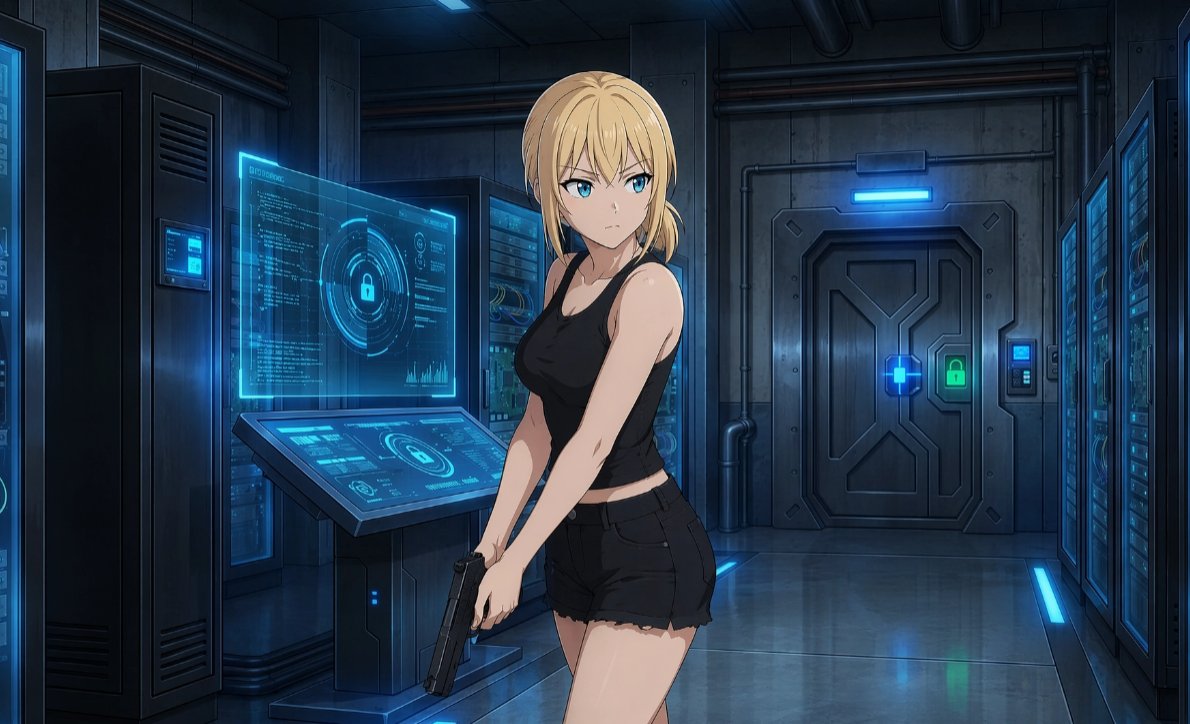
Gesichtsloser Cyberpunk-Infiltrator
Erzeugt eine filmreife Anime-Szene, in der eine bewaffnete, gesichtslose Frau in einen hochgesicherten futuristischen Serverraum eindringt.
Dies ist ein GPT Image 2 -Prompt für Anime & Spiel . Verwenden Sie den unten stehenden, kopierfertigen Prompt, um ähnliche Grafiken zu erstellen, und überprüfen Sie vor der Wiederverwendung Awesome GPT Image 2 Prompts -Quellenangaben sowie die kommerziellen Nutzungsrechte.
Benötigen Sie den vollständigen Prompt-Satz? Verwenden Sie den Anime & Spiel Weitere verwandte Beispiele finden Sie im Themen-Hub oder öffnen Sie die GPT Image 2 Prompt-Katalog für das vollständige Beispielverzeichnis, wiederverwendbare Strukturen und Quellenangaben.
Free 1K preview
Generate one preview image instantly, no sign-up required.
1714/4000
Eingabeaufforderung
Kopierfertige Eingabeaufforderung
Create a polished anime-style sci-fi thriller scene in a dark futuristic server room. Show one young adult woman with {argument name="hair color" default="blonde"} hair tied in a loose low side ponytail, standing in the foreground slightly right of center, body turned three-quarters toward the viewer, Show every face clearly with natural, detailed facial features, nose, or mouth. She wears {argument name="outfit" default="a black sleeveless tank top and black frayed short shorts"}, with bare arms and a tense, stealthy posture. She holds one {argument name="weapon" default="black semi-automatic pistol"} low in both hands near her thighs, angled downward as if infiltrating a secure facility. The background is {argument name="setting" default="a high-security cybernetic data center corridor"}: count 4 major equipment zones, including one tall dark server cabinet on the far left, one central server rack behind the console, one large secure metal door at the back, and one bank of server racks along the right wall. Include exactly 2 prominent cyan holographic interface displays on the left-center console: one upright transparent screen filled with code, circular lock graphics, charts, and tiny UI marks, and one slanted touchscreen console with matching lock icons and system diagrams. Add blue access lights, glowing cyan panels, a green lock indicator on the heavy door, exposed pipes, industrial wall panels, reflective metal flooring, and cool cinematic rim lighting. Use {argument name="lighting style" default="dark blue cyberpunk lighting with luminous cyan holograms"}, sharp clean line art, high-detail anime rendering, moody shadows, realistic perspective, and a widescreen 16:9 composition.Eingabeaufforderungsvariablen
In der Eingabeaufforderung befinden sich bearbeitbare Argumentplatzhalter mit ihren Standardwerten.
Variable
hair color
Standard
blonde
Variable
outfit
Standard
a black sleeveless tank top and black frayed short shorts
Variable
weapon
Standard
black semi-automatic pistol
Variable
setting
Standard
a high-security cybernetic data center corridor
Variable
lighting style
Standard
dark blue cyberpunk lighting with luminous cyan holograms
Best for
- - Anime & Spiel visual exploration
- - Image generation and reference-image edits
- - Reusable briefs that keep source attribution visible
Change these parts
- - Subject, product, character, or scene
- - Aspect ratio, camera, lighting, and background
- - Brand, text, color, and output constraints
Recommended model and settings
- - Model: gpt-image-2
- - Input mode: Text zu Bild
- - Aspect ratio: source
- - Commercial status: review original source
How to use this prompt
- 1. Copy the prompt and preserve its structure for the first test.
- 2. Replace the subject, context, and publishing channel.
- 3. Change one camera, lighting, or style variable per iteration.
- 4. Inspect the output, source, text, and rights before reuse.
Limitations, source, and reuse cautions
- - Generated output is an editable draft, not factual, legal, or rights evidence.
- - Review the linked source, people, brands, logos, text, and third-party media before commercial use.
Importiert von Awesome GPT Image 2 Prompts . Quellenangabe erforderlich. Status der kommerziellen Nutzung: allowed ; Rechte an der Quelle vor kostenpflichtiger Nutzung prüfen.
Weitere Fälle in dieser Kategorie
Priorisiert nach Kategorie, Kompatibilität der Eingabemodi, Qualität und geringerem Risiko.






Hinweise zur Wiederverwendung und Quellenangabe
Verwenden Sie diese Eingabeaufforderung sicher, nachdem Sie den Fall in der Vorschau angezeigt haben.
- 1.Kopieren Sie die Eingabeaufforderung oder öffnen Sie sie direkt in Dovoo mit der Schaltfläche „Generieren“.
- 2.Passen Sie Variablen, Seitenverhältnis und Referenzbilder an Ihren Anwendungsfall an.
- 3.Vor der Veröffentlichung oder kostenpflichtigen Nutzung sollten Sie die Rechte an der Quelle, die Anforderungen an die Namensnennung sowie die Risiken für die Marke oder das Abbild prüfen.