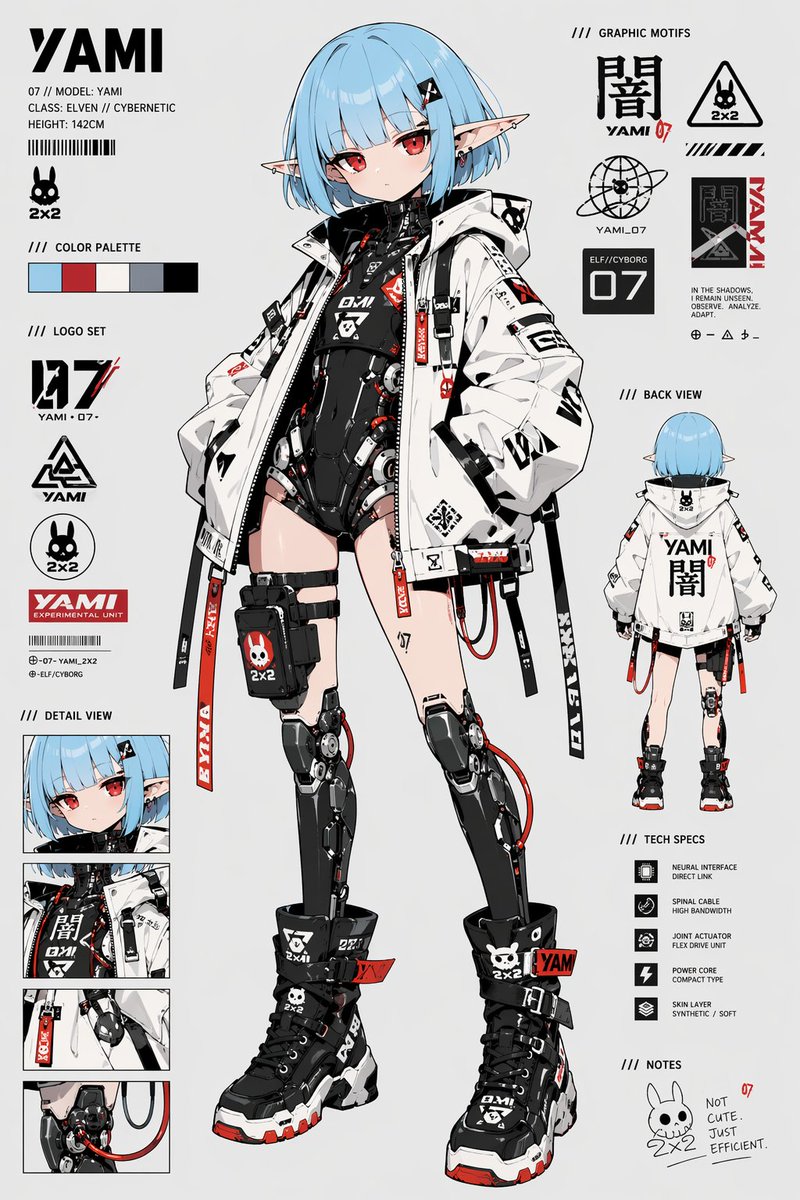
Cyberpunk Elf Android Referenzblatt
Ein aufwendig gestaltetes Charakterdesign-Blatt im Anime-Stil für ein zierliches Elfen-Cyborg-Mädchen mit Vorder- und Rückansicht, Logos, Detailansichten und technischen Spezifikationen, ideal für die Charaktererstellung und als Anregung für Konzeptzeichnungen.
Dies ist ein GPT Image 2 -Prompt für Anime & Spiel . Verwenden Sie den unten stehenden, kopierfertigen Prompt, um ähnliche Grafiken zu erstellen, und überprüfen Sie vor der Wiederverwendung Awesome GPT Image 2 Prompts -Quellenangaben sowie die kommerziellen Nutzungsrechte.
Diese Eingabeaufforderung ist für mehrere Referenzbilder vorgesehen. Wir öffnen Dovoo mit der Eingabeaufforderung und dem verfügbaren Vorschaubild; fügen Sie die restlichen Referenzen in Dovoo hinzu, bevor Sie den Generierungsvorgang starten.
Free 1K preview
Generate one preview image instantly, no sign-up required.
Free text preview doesn’t preserve reference-image consistency.
Eingabeaufforderung
Kopierfertige Eingabeaufforderung
{
  "type": "anime character reference sheet",
  "style": "clean futuristic concept art board, high-detail cel-shaded anime rendering, white studio background, black red and pale blue accent graphics, cyberpunk streetwear design, sharp linework, premium game character sheet presentation",
  "character": {
    "name": "{argument name=\"character name\" default=\"YAMI\"}",
    "species": "elven cyborg girl",
    "apparent_age": "teenage",
    "height": "142 cm",
    "build": "petite, slim",
    "skin": "fair",
    "hair": {
      "color": "{argument name=\"hair color\" default=\"ice blue\"}",
      "style": "short blunt bob with straight bangs, slightly tucked ends, small black hair clip on one side"
    },
    "eyes": {
      "color": "{argument name=\"eye color\" default=\"crimson red\"}",
      "expression": "cool, slightly pouty, detached"
    },
    "ears": "long pointed elf ears with multiple small piercings",
    "pose": "front-facing full-body hero pose, weight shifted slightly, hands tucked into oversized jacket pockets"
  },
  "outfit": {
    "outerwear": "oversized white techwear jacket with black straps, zipper tabs, printed symbols, red accents, large collar, hood, utility attachments",
    "bodysuit": "black cybernetic high-cut bodysuit with exposed mechanical structure, red cables, small warning labels, chest logos and segmented armor-like plating",
    "leg_gear": "asymmetrical thigh straps and a black utility pouch on one thigh with a bunny skull logo and 2x2 mark",
    "legs": "both legs are mostly mechanical prosthetics from upper thigh downward, glossy black metal with visible joints, pistons, discs and red cables",
    "footwear": "chunky black high-top combat sneakers with thick white midsoles, red outsole accents, buckles, straps, printed logos and skull icon"
  },
  "palette": {
    "count": 5,
    "colors": [
      "pale blue",
      "red",
      "off-white",
      "light gray",
      "black"
    ]
  },
  "layout": {
    "centerpiece": "one large full-body front view in the center",
    "sections": [
      {
        "title": "top-left identity block",
        "position": "top-left",
        "count": 6,
        "labels": [
          "YAMI",
          "07 // MODEL: YAMI",
          "CLASS: ELVEN // CYBERNETIC",
          "HEIGHT: 142CM",
          "barcode graphic",
          "2x2 bunny icon"
        ]
      },
      {
        "title": "color palette",
        "position": "upper-left",
        "count": 5,
        "labels": [
          "pale blue swatch",
          "red swatch",
          "off-white swatch",
          "light gray swatch",
          "black swatch"
        ]
      },
      {
        "title": "logo set",
        "position": "left-middle",
        "count": 4,
        "labels": [
          "27",
          "YAMI 07-",
          "triangular YAMI emblem",
          "2x2 bunny emblem",
          "YAMI EXPERIMENTAL UNIT"
        ]
      },
      {
        "title": "detail view",
        "position": "lower-left",
        "count": 4,
        "labels": [
          "face close-up",
          "torso and jacket close-up",
          "strap and hip close-up",
          "mechanical knee and cable close-up"
        ]
      },
      {
        "title": "graphic motifs",
        "position": "top-right",
        "count": 8,
        "labels": [
          "dark kanji symbol",
          "YAMI 07",
          "2x2 warning triangle bunny logo",
          "orbital globe symbol",
          "ELF/CYBORG 07 panel",
          "vertical YAMI block",
          "small slogan text block",
          "tiny geometric icon row"
        ]
      },
      {
        "title": "back view",
        "position": "right-middle",
        "count": 1,
        "labels": [
          "full-body rear view"
        ]
      },
      {
        "title": "tech specs",
        "position": "lower-right",
        "count": 5,
        "labels": [
          "NEURAL INTERFACE DIRECT LINK",
          "SPINAL CABLE HIGH BANDWIDTH",
          "JOINT ACTUATOR FLEX DRIVE UNIT",
          "POWER CORE COMPACT TYPE",
          "SKIN LAYER SYNTHETIC / SOFT"
        ]
      },
      {
        "title": "notes",
        "position": "bottom-right",
        "count": 2,
        "labels": [
          "2x2 bunny doodle",
          "NOT CUTE. JUST EFFICIENT."
        ]
      }
    ]
  },
  "text_elements": {
    "primary_name": "{argument name=\"display name\" default=\"YAMI\"}",
    "visible_markings": [
      "YAMI",
      "07",
      "2x2",
      "ELF/CYBORG",
      "YAMI EXPERIMENTAL UNIT",
      "NOT CUTE. JUST EFFICIENT."
    ]
  },
  "composition": {
    "aspect_ratio": "2:3 portrait",
    "background": "flat very light gray",
    "camera": "orthographic character sheet view",
    "rendering": "highly polished anime concept illustration with crisp typography and UI-like design elements"
  }
}
Eingabeaufforderungsvariablen
In der Eingabeaufforderung befinden sich bearbeitbare Argumentplatzhalter mit ihren Standardwerten.
Best for
- - Anime & Spiel visual exploration
- - Image generation and reference-image edits
- - Reusable briefs that keep source attribution visible
Change these parts
- - Subject, product, character, or scene
- - Aspect ratio, camera, lighting, and background
- - Brand, text, color, and output constraints
Recommended model and settings
- - Model: gpt-image-2
- - Input mode: Mehrere Bilder zu Bildern
- - Aspect ratio: source
- - Commercial status: review original source
How to use this prompt
- 1. Copy the prompt and preserve its structure for the first test.
- 2. Replace the subject, context, and publishing channel.
- 3. Change one camera, lighting, or style variable per iteration.
- 4. Inspect the output, source, text, and rights before reuse.
Limitations, source, and reuse cautions
- - Generated output is an editable draft, not factual, legal, or rights evidence.
- - Review the linked source, people, brands, logos, text, and third-party media before commercial use.
Weitere Fälle in dieser Kategorie
Priorisiert nach Kategorie, Kompatibilität der Eingabemodi, Qualität und geringerem Risiko.






Hinweise zur Wiederverwendung und Quellenangabe
Verwenden Sie diese Eingabeaufforderung sicher, nachdem Sie den Fall in der Vorschau angezeigt haben.
- 1.Kopieren Sie die Eingabeaufforderung oder öffnen Sie sie direkt in Dovoo mit der Schaltfläche „Generieren“.
- 2.Passen Sie Variablen, Seitenverhältnis und Referenzbilder an Ihren Anwendungsfall an.
- 3.Vor der Veröffentlichung oder kostenpflichtigen Nutzung sollten Sie die Rechte an der Quelle, die Anforderungen an die Namensnennung sowie die Risiken für die Marke oder das Abbild prüfen.