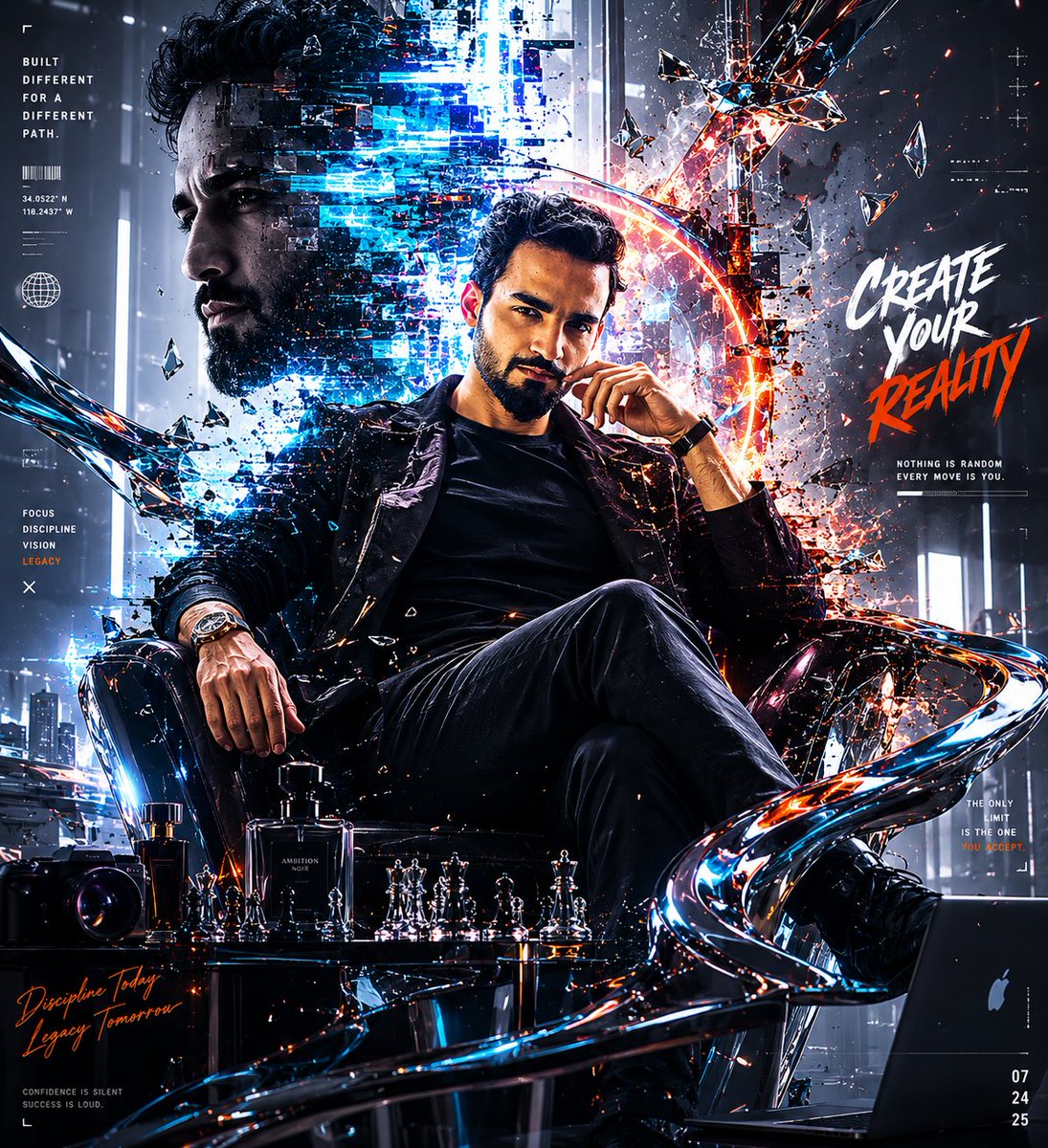
Futuristic Cyberpunk Creative Leader Poster
A prompt for creating a high-end cinematic cyberpunk poster featuring a creative leader in a luxury office with holographic elements.
Dies ist ein GPT Image 2 -Prompt für Grafik & Poster . Verwenden Sie den unten stehenden, kopierfertigen Prompt, um ähnliche Grafiken zu erstellen, und überprüfen Sie vor der Wiederverwendung Awesome GPT Image 2 Prompts -Quellenangaben sowie die kommerziellen Nutzungsrechte.
Free 1K preview
Generate one preview image instantly, no sign-up required.
Free text preview doesn’t preserve reference-image consistency.
Eingabeaufforderung
Kopierfertige Eingabeaufforderung
Use the provided reference image of me for facial resemblance only. Do not copy the original pose, clothing, hairstyle, background, or lighting. Transform me into a powerful futuristic creative leader / cyberpunk visionary. Create a high-end cinematic cyberpunk poster featuring a confident {argument name="ethnicity" default="South Asian"} male sitting in a black leather executive chair, wearing an all-black luxury outfit: black tailored blazer, black shirt, black trousers, premium watch, and polished dark styling. Change the hairstyle into a fuller messy cinematic hairstyle with volume, slightly longer textured hair, and keep a sharp well-groomed beard. Expression should be intense, calm, confident, and dominant. Composition: The main subject is seated in the center-right, leaning slightly forward with one hand near the face and the other resting on the chair arm. Behind him, show a massive semi-transparent side-profile portrait of his face on the left, made from blue digital glitch fragments, pixel displacement, scanlines, broken data blocks, and holographic distortion. Environment: Futuristic dark office / creative command room with glass, reflections, neon blue and orange lighting, smoke, floating glass shards, abstract metallic ribbons, digital interface panels, chess pieces on a glossy table, camera lens, perfume bottle, laptop, and cinematic city-light atmosphere. Visual style: ultra-detailed, dramatic lighting, blue and orange contrast, sharp shadows, glossy reflections, broken glass particles, digital corruption, cybernetic overlays, holographic UI, fragmented neon data, premium editorial composition, powerful atmosphere, cinematic realism, high fashion advertising, dark luxury aesthetic. Typography: Add bold poster text on the right side: “CREATE YOUR REALITY”. Add smaller text elements: “BUILT DIFFERENT FOR A DIFFERENT PATH”, “FOCUS. DISCIPLINE. VISION. LEGACY.”, “NOTHING IS RANDOM. EVERY MOVE IS YOU.”, “DISCIPLINE TODAY. LEGACY TOMORROW.” Use clean futuristic typography mixed with brush-style impact text. Keep text minimal, stylish, and integrated into the design. Mood: powerful, mysterious, premium, visionary, cinematic, rebellious, futuristic, confident, high-status, artistic, dramatic. Format: vertical poster, 4:5 ratio, ultra-realistic, high-resolution, sharp facial details, natural skin texture.Eingabeaufforderungsvariablen
In der Eingabeaufforderung befinden sich bearbeitbare Argumentplatzhalter mit ihren Standardwerten.
Best for
- - Grafik & Poster visual exploration
- - Image generation and reference-image edits
- - Reusable briefs that keep source attribution visible
Change these parts
- - Subject, product, character, or scene
- - Aspect ratio, camera, lighting, and background
- - Brand, text, color, and output constraints
Recommended model and settings
- - Model: gpt-image-2
- - Input mode: Bild zu Bild
- - Aspect ratio: source
- - Commercial status: review original source
How to use this prompt
- 1. Copy the prompt and preserve its structure for the first test.
- 2. Replace the subject, context, and publishing channel.
- 3. Change one camera, lighting, or style variable per iteration.
- 4. Inspect the output, source, text, and rights before reuse.
Limitations, source, and reuse cautions
- - Generated output is an editable draft, not factual, legal, or rights evidence.
- - Review the linked source, people, brands, logos, text, and third-party media before commercial use.
Weitere Fälle in dieser Kategorie
Priorisiert nach Kategorie, Kompatibilität der Eingabemodi, Qualität und geringerem Risiko.






Hinweise zur Wiederverwendung und Quellenangabe
Verwenden Sie diese Eingabeaufforderung sicher, nachdem Sie den Fall in der Vorschau angezeigt haben.
- 1.Kopieren Sie die Eingabeaufforderung oder öffnen Sie sie direkt in Dovoo mit der Schaltfläche „Generieren“.
- 2.Passen Sie Variablen, Seitenverhältnis und Referenzbilder an Ihren Anwendungsfall an.
- 3.Vor der Veröffentlichung oder kostenpflichtigen Nutzung sollten Sie die Rechte an der Quelle, die Anforderungen an die Namensnennung sowie die Risiken für die Marke oder das Abbild prüfen.