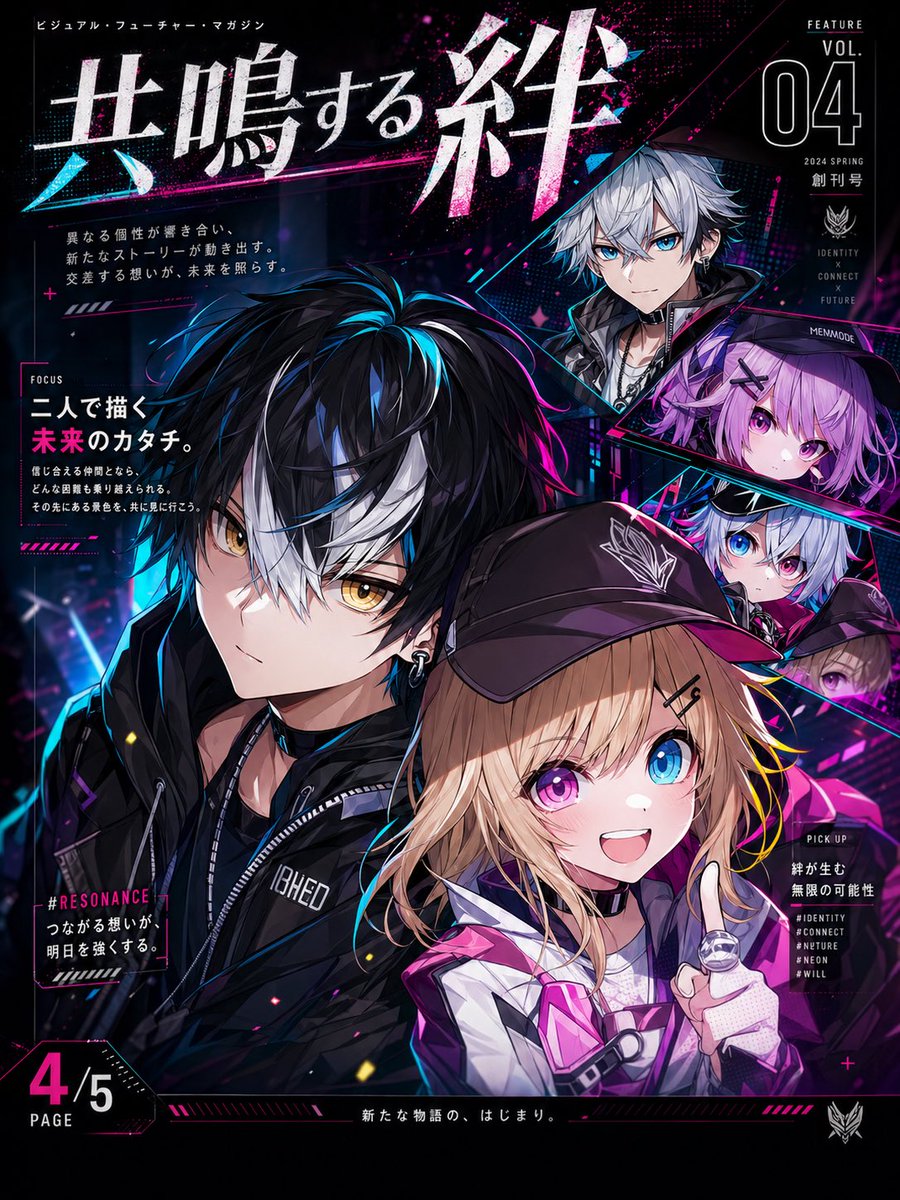
Cyberpunk-Anime-Magazin-Cover
Ein glänzendes, futuristisches Anime-Magazin-Cover im japanischen Stil mit einem zentralen Duo, vier eingefügten Charakterporträts und dichten Neon-Grafiken, ideal für Werbegrafiken oder fiktive Magazin-Cover.
Dies ist ein GPT Image 2 -Prompt für Anime & Spiel . Verwenden Sie den unten stehenden, kopierfertigen Prompt, um ähnliche Grafiken zu erstellen, und überprüfen Sie vor der Wiederverwendung Awesome GPT Image 2 Prompts -Quellenangaben sowie die kommerziellen Nutzungsrechte.
Free 1K preview
Generate one preview image instantly, no sign-up required.
Eingabeaufforderung
Kopierfertige Eingabeaufforderung
A visually striking futuristic cyberpunk-style anime magazine cover, using a vertical full-page composition with dense Japanese typography and neon graphic design. The focal point is a close-up portrait of a duo in the foreground: on the left is a handsome anime boy with messy black short hair, bright blue highlights, a striking white fringe, sharp golden eyes, fair skin, and a confident slight smile, wearing silver hoop earrings and a black street-style hooded jacket with zipper details, layered innerwear, and a black neckband. Slightly lower and partially overlapping on the right is a fashionable anime girl with wavy long curls, wearing a black baseball cap and oversized dark sunglasses, dressed in a purple and white futuristic jacket, with a gloved finger lightly touching her lips in a cool pose. Surrounding them, arranged diagonally along the upper right corner, are 4 embedded character portraits: 1 silver-haired anime boy wearing dark clothing, 1 purple-haired anime girl with violet eyes, 1 small silver-haired anime character with blue-pink highlights in their eyes, and 1 smaller brown-haired character on the lower right edge. The background is deep black and dark navy blue, adorned with electric pink, hot pink, and cyan beams, glowing fragments, splash textures, halftone patterns, angular borders, and diagonal UI-style decorations. The overall layout presents the texture of a high-end Japanese special magazine cover, with a large distressed metallic white kanji title {argument name="headline text" default="共鳴する絆"} at the top, surrounded by smaller Japanese subheadings and editorial annotations. The upper right corner features a “FEATURE VOL. 04 2024 SPRING First Issue” special section, with a focus section on the left, and a “4/5 PAGE” page number in the lower left corner, adorned with various brand logos and decorative symbols. Strong contrast, glossy printing texture, deep layering, dramatic edge lighting, vivid neon reflections, and a fashionable urban sci-fi atmosphere, with the quality of a refined trading card game or light novel promotional image.Eingabeaufforderungsvariablen
In der Eingabeaufforderung befinden sich bearbeitbare Argumentplatzhalter mit ihren Standardwerten.
Best for
- - Anime & Spiel visual exploration
- - Image generation and reference-image edits
- - Reusable briefs that keep source attribution visible
Change these parts
- - Subject, product, character, or scene
- - Aspect ratio, camera, lighting, and background
- - Brand, text, color, and output constraints
Recommended model and settings
- - Model: gpt-image-2
- - Input mode: Text zu Bild
- - Aspect ratio: source
- - Commercial status: review original source
How to use this prompt
- 1. Copy the prompt and preserve its structure for the first test.
- 2. Replace the subject, context, and publishing channel.
- 3. Change one camera, lighting, or style variable per iteration.
- 4. Inspect the output, source, text, and rights before reuse.
Limitations, source, and reuse cautions
- - Generated output is an editable draft, not factual, legal, or rights evidence.
- - Review the linked source, people, brands, logos, text, and third-party media before commercial use.
Weitere Fälle in dieser Kategorie
Priorisiert nach Kategorie, Kompatibilität der Eingabemodi, Qualität und geringerem Risiko.






Hinweise zur Wiederverwendung und Quellenangabe
Verwenden Sie diese Eingabeaufforderung sicher, nachdem Sie den Fall in der Vorschau angezeigt haben.
- 1.Kopieren Sie die Eingabeaufforderung oder öffnen Sie sie direkt in Dovoo mit der Schaltfläche „Generieren“.
- 2.Passen Sie Variablen, Seitenverhältnis und Referenzbilder an Ihren Anwendungsfall an.
- 3.Vor der Veröffentlichung oder kostenpflichtigen Nutzung sollten Sie die Rechte an der Quelle, die Anforderungen an die Namensnennung sowie die Risiken für die Marke oder das Abbild prüfen.