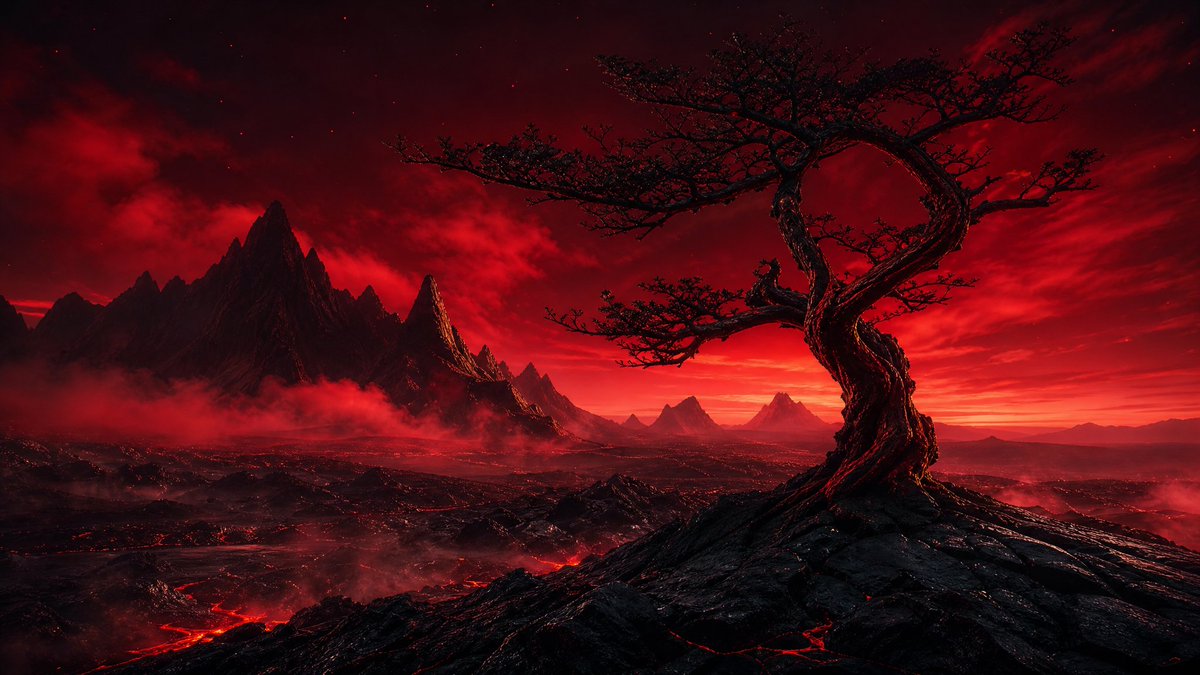
Purpurroter Vulkanherzbaum
Eine filmreife, düstere Fantasy-Landschaft mit einem verdrehten, herzförmigen Baum in einer roten Vulkanwüste, ideal für epische Konzeptzeichnungen oder stimmungsvolle Hintergründe.
Dies ist ein GPT Image 2 -Prompt für Landschaft & Natur . Verwenden Sie den unten stehenden, kopierfertigen Prompt, um ähnliche Grafiken zu erstellen, und überprüfen Sie vor der Wiederverwendung Awesome GPT Image 2 Prompts -Quellenangaben sowie die kommerziellen Nutzungsrechte.
Free 1K preview
Generate one preview image instantly, no sign-up required.
Eingabeaufforderung
Kopierfertige Eingabeaufforderung
Create a cinematic dark fantasy landscape in a wide 16:9 aspect ratio. The scene shows a solitary ancient twisted tree on the right foreground, its gnarled black trunk spiraling upward into a dramatic loop like a heart or ring, with sparse thorny branches silhouetted against a blood-red sky. Place the tree on a jagged volcanic ridge of black rock with glowing red lava cracks. In the midground and background, show a vast hostile wasteland with exactly 7 visible mountain peaks or peak clusters: one dominant sharp black mountain mass on the left, one narrow glowing spire just right of it, three smaller triangular peaks near the center horizon, and two faint distant peaks on the far right. Add low red fog and smoke drifting through the valleys, with glowing lava rivers snaking across the lower left and center ground. The sky should be intense crimson and black, filled with layered storm clouds, faint stars, and a blazing red-orange horizon glow. Use a limited palette of {argument name="main color palette" default="deep red, black, crimson, and ember orange"}, high contrast, dramatic rim lighting, ultra-detailed textures, epic scale, realistic fantasy concept art, no characters, no buildings, no text, no watermark. Emphasize the mood as {argument name="mood" default="ominous, apocalyptic, and romantic"} and make the focal subject a {argument name="foreground tree shape" default="twisted heart-shaped dead tree"} in a {argument name="environment" default="volcanic wasteland at red dusk"}.Eingabeaufforderungsvariablen
In der Eingabeaufforderung befinden sich bearbeitbare Argumentplatzhalter mit ihren Standardwerten.
Best for
- - Landschaft & Natur visual exploration
- - Image generation and reference-image edits
- - Reusable briefs that keep source attribution visible
Change these parts
- - Subject, product, character, or scene
- - Aspect ratio, camera, lighting, and background
- - Brand, text, color, and output constraints
Recommended model and settings
- - Model: gpt-image-2
- - Input mode: Text zu Bild
- - Aspect ratio: source
- - Commercial status: review original source
How to use this prompt
- 1. Copy the prompt and preserve its structure for the first test.
- 2. Replace the subject, context, and publishing channel.
- 3. Change one camera, lighting, or style variable per iteration.
- 4. Inspect the output, source, text, and rights before reuse.
Limitations, source, and reuse cautions
- - Generated output is an editable draft, not factual, legal, or rights evidence.
- - Review the linked source, people, brands, logos, text, and third-party media before commercial use.
Weitere Fälle in dieser Kategorie
Priorisiert nach Kategorie, Kompatibilität der Eingabemodi, Qualität und geringerem Risiko.






Hinweise zur Wiederverwendung und Quellenangabe
Verwenden Sie diese Eingabeaufforderung sicher, nachdem Sie den Fall in der Vorschau angezeigt haben.
- 1.Kopieren Sie die Eingabeaufforderung oder öffnen Sie sie direkt in Dovoo mit der Schaltfläche „Generieren“.
- 2.Passen Sie Variablen, Seitenverhältnis und Referenzbilder an Ihren Anwendungsfall an.
- 3.Vor der Veröffentlichung oder kostenpflichtigen Nutzung sollten Sie die Rechte an der Quelle, die Anforderungen an die Namensnennung sowie die Risiken für die Marke oder das Abbild prüfen.