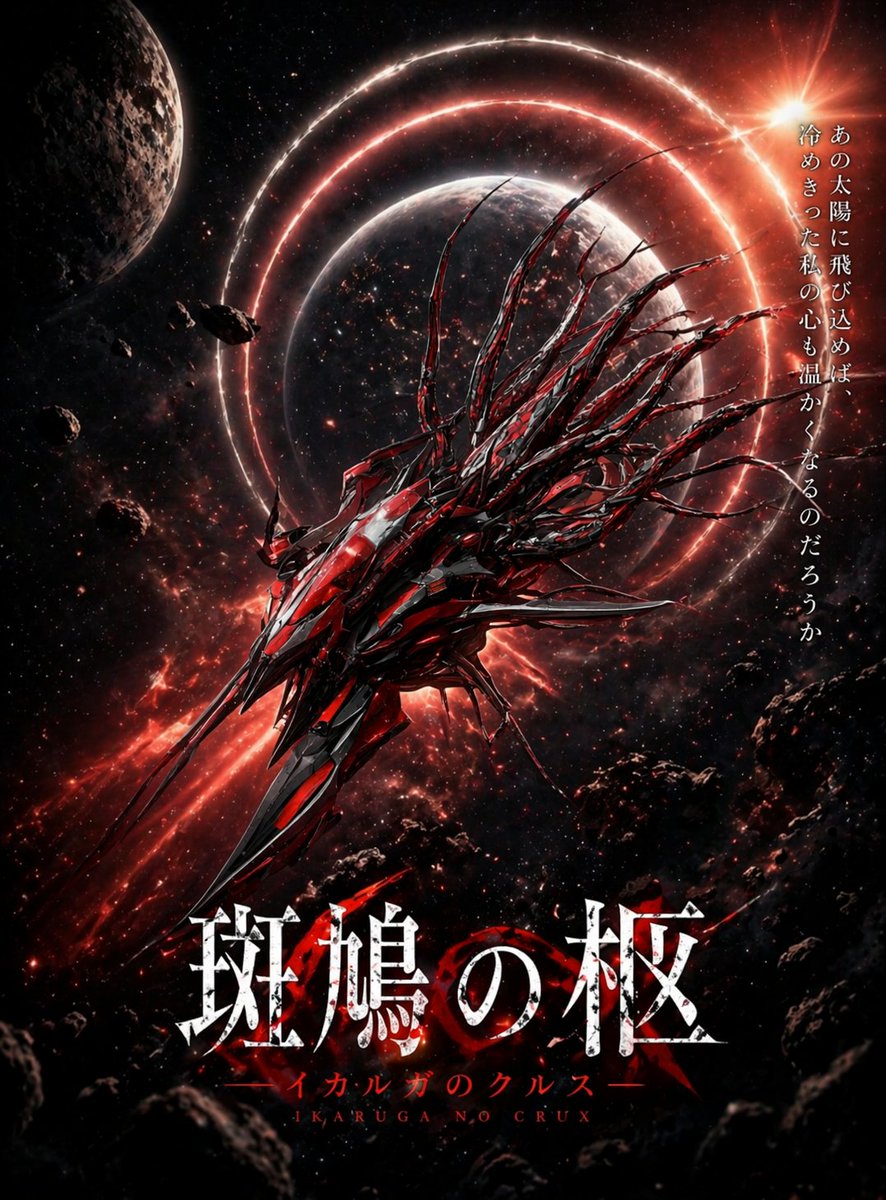
Crimson Space Opera Key Visual
Ein düsteres, filmisches Sci-Fi-Spielposter, das ein rot-schwarzes biomechanisches Raumschiff vor Planeten, leuchtenden Orbitalringen und japanischer Titeltypografie zeigt, ideal für die Erstellung von Key Visuals oder Cover-Artworks.
Dies ist ein GPT Image 2 -Prompt für Anime & Spiel . Verwenden Sie den unten stehenden, kopierfertigen Prompt, um ähnliche Grafiken zu erstellen, und überprüfen Sie vor der Wiederverwendung Awesome GPT Image 2 Prompts -Quellenangaben sowie die kommerziellen Nutzungsrechte.
Benötigen Sie den vollständigen Prompt-Satz? Verwenden Sie den Anime & Spiel Weitere verwandte Beispiele finden Sie im Themen-Hub oder öffnen Sie die GPT Image 2 Prompt-Katalog für das vollständige Beispielverzeichnis, wiederverwendbare Strukturen und Quellenangaben.
Free 1K preview
Generate one preview image instantly, no sign-up required.
1844/4000
Eingabeaufforderung
Kopierfertige Eingabeaufforderung
A dramatic vertical sci-fi key visual poster for a dark space opera game, featuring a single colossal alien-mechanical spacecraft centered slightly low in the frame, angled diagonally from lower left toward upper right as if surging forward through space. The ship is razor-sharp, asymmetrical, and aggressively organic, built from layered black metal and glowing crimson-red armor plates, with a long spear-like prow, many jagged fins, and about 12 to 16 whip-like tendrils or spines streaming backward from its upper rear like biomechanical hair. Behind it floats a large shadowed planet at center, encircled by 3 luminous red orbital rings that create a halo effect. At upper left, include 1 cratered moon or planet partially cropped by the frame. Scatter multiple dark asteroids and rocky debris across the foreground and edges, especially lower right and lower left, to create depth. The background is a dense starfield with red nebula clouds and streaks of fiery cosmic dust. In the upper right, place a blazing orange-white sun flare breaking into the scene, casting hot rim light across the ship and rings. Use a high-contrast palette of black, deep crimson, ember red, and white highlights, with glossy metallic reflections and a grim, apocalyptic mood. Add vertical Japanese tagline text on the right side in white Mincho-style serif characters: 「あの太陽に飛び込めば 冷めきった私の心も温かくなるのだろうか」. At the bottom center, add the main title in very large distressed white Japanese serif characters with cracked texture and subtle red glow: 「斑鳩の柩」. Beneath it, add 1 line of smaller red katakana subtitle text: 「イカルガのクルスー」, and beneath that 1 line of small Roman letters in red: "IKARUGA NO CRUX". Make it look like premium anime game key art, cinematic poster composition, ultra-detailed, sharp focus, dynamic lighting, epic scale, ominous and beautiful.
Best for
- - Anime & Spiel visual exploration
- - Image generation and reference-image edits
- - Reusable briefs that keep source attribution visible
Change these parts
- - Subject, product, character, or scene
- - Aspect ratio, camera, lighting, and background
- - Brand, text, color, and output constraints
Recommended model and settings
- - Model: gpt-image-2
- - Input mode: Text zu Bild
- - Aspect ratio: source
- - Commercial status: review original source
How to use this prompt
- 1. Copy the prompt and preserve its structure for the first test.
- 2. Replace the subject, context, and publishing channel.
- 3. Change one camera, lighting, or style variable per iteration.
- 4. Inspect the output, source, text, and rights before reuse.
Limitations, source, and reuse cautions
- - Generated output is an editable draft, not factual, legal, or rights evidence.
- - Review the linked source, people, brands, logos, text, and third-party media before commercial use.
Importiert von Awesome GPT Image 2 Prompts . Quellenangabe erforderlich. Status der kommerziellen Nutzung: allowed ; Rechte an der Quelle vor kostenpflichtiger Nutzung prüfen.
Weitere Fälle in dieser Kategorie
Priorisiert nach Kategorie, Kompatibilität der Eingabemodi, Qualität und geringerem Risiko.






Hinweise zur Wiederverwendung und Quellenangabe
Verwenden Sie diese Eingabeaufforderung sicher, nachdem Sie den Fall in der Vorschau angezeigt haben.
- 1.Kopieren Sie die Eingabeaufforderung oder öffnen Sie sie direkt in Dovoo mit der Schaltfläche „Generieren“.
- 2.Passen Sie Variablen, Seitenverhältnis und Referenzbilder an Ihren Anwendungsfall an.
- 3.Vor der Veröffentlichung oder kostenpflichtigen Nutzung sollten Sie die Rechte an der Quelle, die Anforderungen an die Namensnennung sowie die Risiken für die Marke oder das Abbild prüfen.