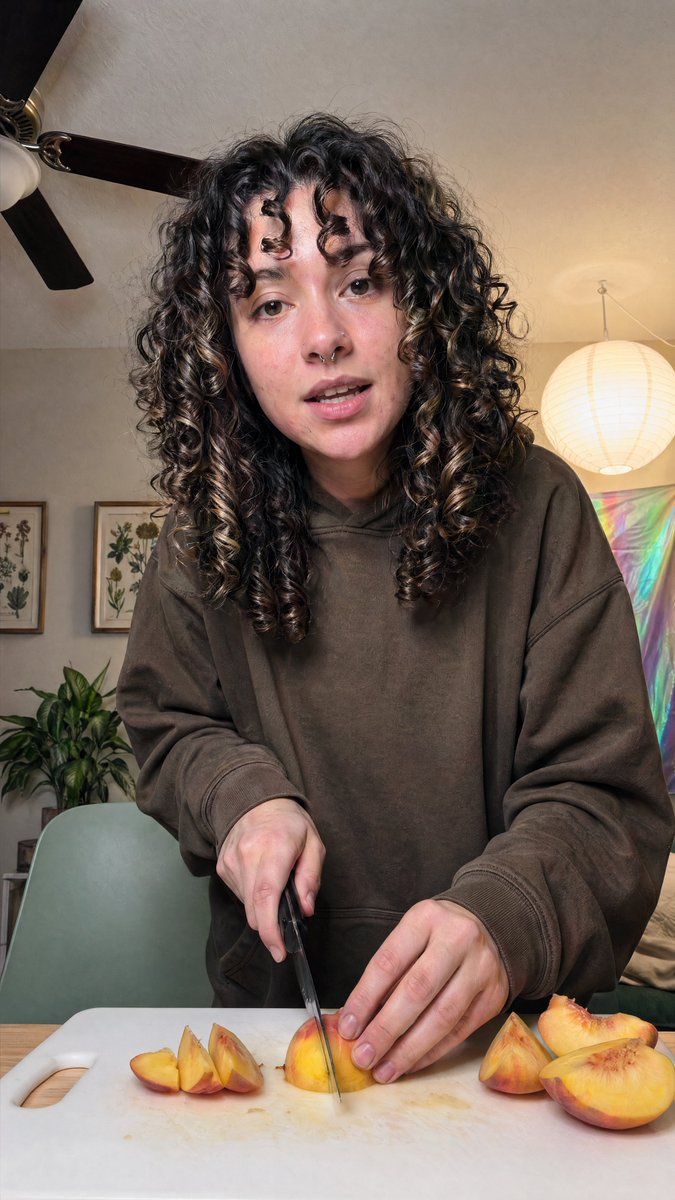
Gemütliches Porträt beim Pfirsichschneiden in Innenräumen
Diese Funktion erzeugt ein realistisches, authentisches Hochformatfoto einer Person, die zu Hause Pfirsiche schneidet – ideal für Food-, Wohn- oder authentische Social-Media-Bilder.
Dies ist ein GPT Image 2 -Prompt für Porträt & Charakter . Verwenden Sie den unten stehenden, kopierfertigen Prompt, um ähnliche Grafiken zu erstellen, und überprüfen Sie vor der Wiederverwendung Awesome GPT Image 2 Prompts -Quellenangaben sowie die kommerziellen Nutzungsrechte.
Free 1K preview
Generate one preview image instantly, no sign-up required.
Eingabeaufforderung
Kopierfertige Eingabeaufforderung
A realistic vertical smartphone photo of a {argument name="person" default="young woman"} standing at a kitchen or dining table, slicing ripe peaches on a white plastic cutting board. The subject is centered and framed from about mid-thigh or waist up, leaning slightly toward the camera in a casual candid pose. She has very thick, long, dark brown to black naturally curly hair with defined ringlets and a few lighter brown highlights, falling around her shoulders and partially covering the sides of her face. She wears an oversized {argument name="hoodie color" default="dark brown"} hoodie with loose sleeves, giving the image a relaxed at-home lifestyle feel. One hand holds a kitchen knife vertically as it cuts into a peach wedge in the center of the board, while the other hand steadies the fruit. Show exactly 7 peach pieces visible on the cutting board: 3 smaller wedges grouped on the left, 1 central wedge being cut, and 3 larger pieces on the right including a half peach. The table surface is light wood. The room is warmly lit and cozy, with a beige wall and ceiling, a dark ceiling fan with 3 visible blades in the upper left, 2 framed botanical prints on the left wall, 1 leafy green houseplant in the lower left background, 1 pale sage-green chair behind the table, 1 glowing round white paper lantern hanging on the right, and 1 iridescent pastel wall hanging or reflective fabric panel in the right background. Use soft indoor lighting, natural skin tones, subtle shadows, realistic fruit texture and knife detail, documentary-style composition, shallow to medium depth of field, and an authentic everyday home aesthetic.Eingabeaufforderungsvariablen
In der Eingabeaufforderung befinden sich bearbeitbare Argumentplatzhalter mit ihren Standardwerten.
Best for
- - Porträt & Charakter visual exploration
- - Image generation and reference-image edits
- - Reusable briefs that keep source attribution visible
Change these parts
- - Subject, product, character, or scene
- - Aspect ratio, camera, lighting, and background
- - Brand, text, color, and output constraints
Recommended model and settings
- - Model: gpt-image-2
- - Input mode: Text zu Bild
- - Aspect ratio: source
- - Commercial status: review original source
How to use this prompt
- 1. Copy the prompt and preserve its structure for the first test.
- 2. Replace the subject, context, and publishing channel.
- 3. Change one camera, lighting, or style variable per iteration.
- 4. Inspect the output, source, text, and rights before reuse.
Limitations, source, and reuse cautions
- - Generated output is an editable draft, not factual, legal, or rights evidence.
- - Review the linked source, people, brands, logos, text, and third-party media before commercial use.
Weitere Fälle in dieser Kategorie
Priorisiert nach Kategorie, Kompatibilität der Eingabemodi, Qualität und geringerem Risiko.






Hinweise zur Wiederverwendung und Quellenangabe
Verwenden Sie diese Eingabeaufforderung sicher, nachdem Sie den Fall in der Vorschau angezeigt haben.
- 1.Kopieren Sie die Eingabeaufforderung oder öffnen Sie sie direkt in Dovoo mit der Schaltfläche „Generieren“.
- 2.Passen Sie Variablen, Seitenverhältnis und Referenzbilder an Ihren Anwendungsfall an.
- 3.Vor der Veröffentlichung oder kostenpflichtigen Nutzung sollten Sie die Rechte an der Quelle, die Anforderungen an die Namensnennung sowie die Risiken für die Marke oder das Abbild prüfen.