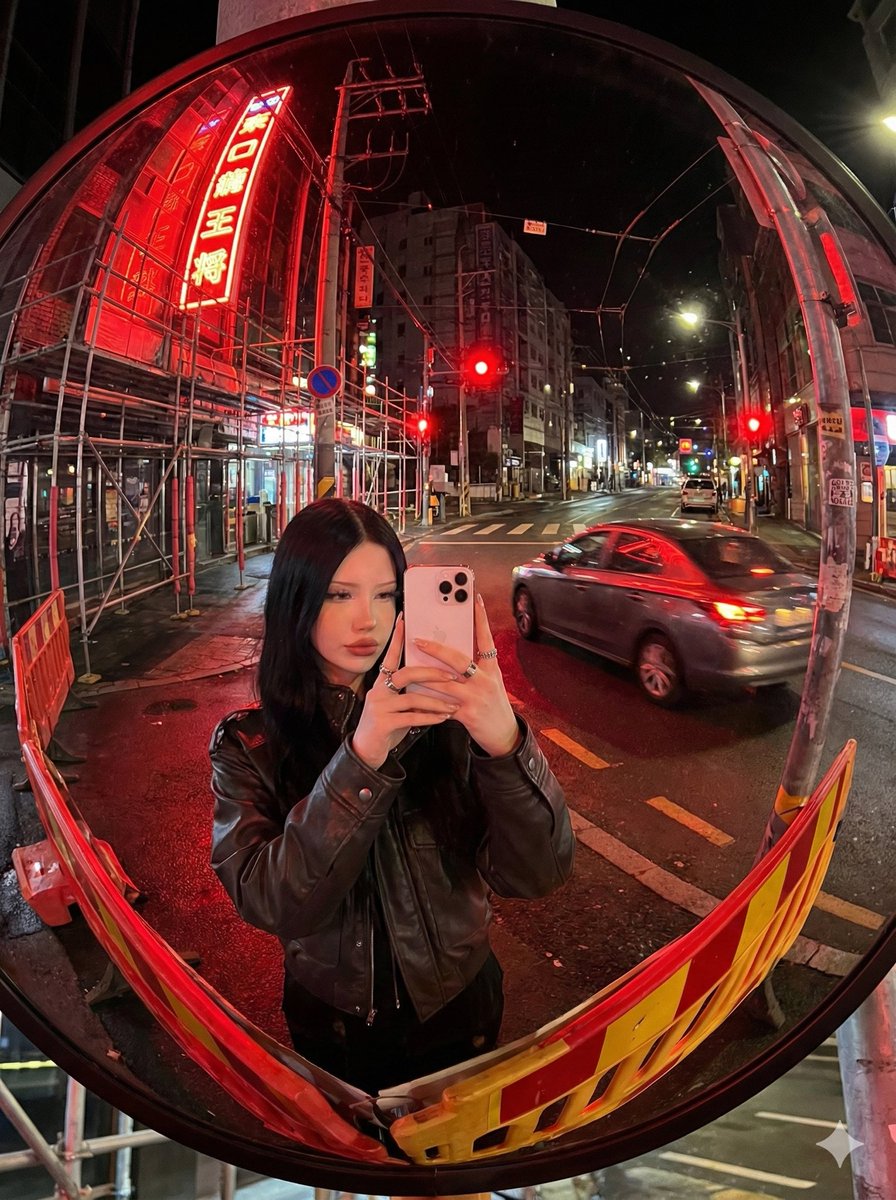
Konvexer Spiegel Neon Street Selfie
Diese Funktion erzeugt ein realistisches nächtliches Straßen-Selfie im Fisheye-Stil, das sich in einem konvexen Spiegel am Straßenrand spiegelt – ideal für filmische Stadtfotografie und stimmungsvolle Neon-Stadtbilder.
Dies ist ein GPT Image 2 -Prompt für Porträt & Charakter . Verwenden Sie den unten stehenden, kopierfertigen Prompt, um ähnliche Grafiken zu erstellen, und überprüfen Sie vor der Wiederverwendung Awesome GPT Image 2 Prompts -Quellenangaben sowie die kommerziellen Nutzungsrechte.
Free 1K preview
Generate one preview image instantly, no sign-up required.
Eingabeaufforderung
Kopierfertige Eingabeaufforderung
A hyper-realistic nighttime street photo seen entirely through a large circular roadside convex traffic mirror, shot in a vertical 3:4 composition with a strong fisheye lens look and pronounced dome-mirror distortion. The black rim of the mirror is fully visible and the whole circular reflection is filled with the surrounding city street, with roads, buildings, utility poles, wires, scaffolding, and signs bending dramatically toward the edges. At the lower center of the mirror reflection, a young woman is taking a mirror selfie from about the waist up, standing directly in front of the mirror and holding a {argument name="phone model" default="white iPhone 15 Pro Max"} in front of her face so the phone hides most facial features. She has straight dark hair around shoulder length, wears a {argument name="jacket style" default="black leather jacket"}, and has {argument name="accessory detail" default="silver rings"} on her fingers. The city scene is a quiet intersection at night with wet asphalt reflecting vivid red light. There are exactly 3 clearly visible red traffic lights in the reflection, and exactly 1 moving gray sedan crossing from right to left with slight motion blur and red neon reflections along its body. On the left side of the mirror reflection, dense metal construction scaffolding wraps the building facade, lit by a tall vertical red neon sign with white Japanese characters. Along the bottom edge and lower left, there are exactly 2 red-and-yellow striped road barriers curving with the mirror distortion. Street lamps and storefront lights recede into the background on the right side, while overhead cables and poles arc across the upper half of the image. Lighting is dominated by {argument name="lighting color" default="intense red neon and traffic lights"}, creating cinematic red highlights on the street, the car, the barriers, and the subject's jacket. Realistic urban Tokyo-like night atmosphere, candid yet stylish, crisp detail with slight grime and reflections on the mirror surface, high contrast, immersive convex mirror perspective.Eingabeaufforderungsvariablen
In der Eingabeaufforderung befinden sich bearbeitbare Argumentplatzhalter mit ihren Standardwerten.
Best for
- - Porträt & Charakter visual exploration
- - Image generation and reference-image edits
- - Reusable briefs that keep source attribution visible
Change these parts
- - Subject, product, character, or scene
- - Aspect ratio, camera, lighting, and background
- - Brand, text, color, and output constraints
Recommended model and settings
- - Model: gpt-image-2
- - Input mode: Text zu Bild
- - Aspect ratio: source
- - Commercial status: review original source
How to use this prompt
- 1. Copy the prompt and preserve its structure for the first test.
- 2. Replace the subject, context, and publishing channel.
- 3. Change one camera, lighting, or style variable per iteration.
- 4. Inspect the output, source, text, and rights before reuse.
Limitations, source, and reuse cautions
- - Generated output is an editable draft, not factual, legal, or rights evidence.
- - Review the linked source, people, brands, logos, text, and third-party media before commercial use.
Weitere Fälle in dieser Kategorie
Priorisiert nach Kategorie, Kompatibilität der Eingabemodi, Qualität und geringerem Risiko.






Hinweise zur Wiederverwendung und Quellenangabe
Verwenden Sie diese Eingabeaufforderung sicher, nachdem Sie den Fall in der Vorschau angezeigt haben.
- 1.Kopieren Sie die Eingabeaufforderung oder öffnen Sie sie direkt in Dovoo mit der Schaltfläche „Generieren“.
- 2.Passen Sie Variablen, Seitenverhältnis und Referenzbilder an Ihren Anwendungsfall an.
- 3.Vor der Veröffentlichung oder kostenpflichtigen Nutzung sollten Sie die Rechte an der Quelle, die Anforderungen an die Namensnennung sowie die Risiken für die Marke oder das Abbild prüfen.